Checking whether Google has indexed your website’s pages is an important part of technical SEO. A page may load correctly in a browser, appear in an XML sitemap, and have valid metadata, yet still not appear in Google’s search index.
The most reliable programmatic way to check Google indexing status with Python is to use the Google Search Console URL Inspection API. This official API retrieves indexing information for URLs belonging to Search Console properties that the authenticated user or service account is authorized to access.
Python can automate individual inspections, process multiple URLs, record Google’s indexing verdicts, identify canonical differences, and export results for further analysis.
However, the URL Inspection API has important restrictions. It cannot inspect arbitrary websites without authorization, does not perform live URL testing, and operates within Google’s published API quotas.
This guide explains how to configure Google Cloud, authenticate Python, inspect URLs, interpret the results, and create a repeatable indexing audit.
What Does It Mean When Google Indexes a URL?
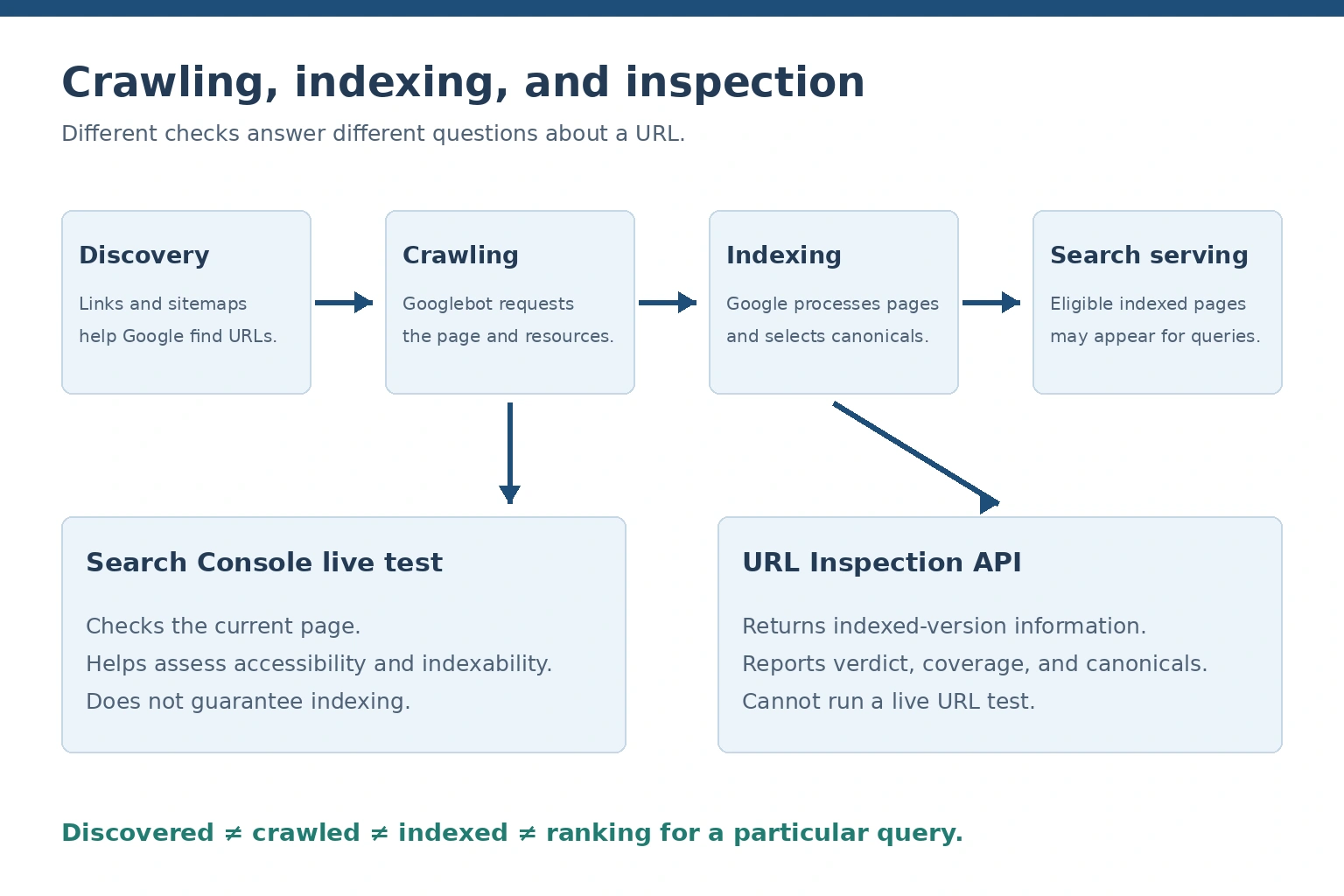
The URL Inspection API retrieves information about indexed versions. Search Console live testing checks the current page accessibility and indexability.
Google indexing is the process by which Google analyzes web content and decides whether to store it in its search index.
Indexing is different from discovering or crawling a page.
Google Search generally involves four connected stages.
1. URL discovery
Google identifies URLs through internal links, external links, XML sitemaps, previously discovered pages, and other discovery mechanisms.
A URL may be discovered without being crawled.
2. Crawling
Googlebot requests the page from its server. During crawling, Google may retrieve HTML, inspect links, and fetch supporting resources.
Crawling depends on server availability, robots.txt rules, crawl scheduling, and other technical conditions.
3. Indexing
Google processes the retrieved content, evaluates indexing directives, and determines whether the page should be included in its index.
It may also identify similar pages and select a canonical URL.
4. Search serving
Indexed content may be eligible to appear in search results when Google determines that it is relevant to a user’s query.
Indexing does not guarantee ranking, impressions, or clicks.
Understanding these stages prevents incorrect conclusions during indexing audits. The AOFIRS article Google Search vs. AI Search: How Each One Actually Reaches the Web explains how conventional search engines discover, crawl, and index information, and how these processes differ from AI-assisted retrieval.
A page can therefore be technically accessible but remain absent from Google’s index. Similarly, an indexed page may not appear for a particular search.
For official technical guidance, consult Google’s crawling and indexing documentation.
Can Python Check Whether a URL Is Indexed by Google?
Yes. Python can send authenticated requests to Google’s URL Inspection API and analyze the returned index status information.
This is more reliable for authorized indexing audits than inferring indexing from standard Google Search results.
Different tools provide different kinds of evidence.
| Method | What it provides | Can Python automate it? | Main limitation |
|---|---|---|---|
| URL Inspection API | Official indexed-version information | Yes | Requires authorized property access |
| Search Console URL Inspection tool | Indexed-version details and live testing | Not through the URL Inspection API’s live-test functionality | Mostly manual |
| Page Indexing report | Site-wide indexing categories | Not a complete per-URL API export | Does not expose every page as a complete inventory |
| Search Analytics API | Search impressions, clicks, and performance | Yes | No impressions does not prove non-indexing |
Google site: operator |
Search results restricted to a domain or path | Possible to investigate, but not recommended for bulk indexing verification | Results are incomplete |
| Third-party indexing tools | Varies by provider | Sometimes | Reliability depends on the underlying data |
| Python website crawler | HTTP responses and page-level technical signals | Yes | Cannot directly prove Google indexing |
| XML sitemap | A list of discoverable URLs | Yes | Sitemap inclusion does not guarantee indexing |
Why the site: operator is not a definitive indexing checker
A query such as:
site:example.com
can help researchers find pages that Google displays from a particular website.
However, Google does not guarantee that this operator returns a complete list of indexed URLs.
The AOFIRS Google Search Operators: The Complete, Tested Reference explains which search operators remain documented and useful in 2026, including limitations affecting older techniques.
For an authorized technical SEO audit, use Search Console inspection data as the primary evidence.
URL Inspection API vs. Google Indexing API
These two APIs are frequently confused.
The URL Inspection API retrieves Google’s available indexing information for URLs in authorized Search Console properties.
The Google Indexing API is designed for notifying Google about additions, updates, and removals of eligible pages containing JobPosting or BroadcastEvent embedded in VideoObject.
The Indexing API is not a general-purpose indexing checker, nor is it an unrestricted way to request indexing for ordinary articles, services, or product pages.
What You Need Before Checking Google Indexing with Python
Before running a Python indexing script, prepare the following:
- Python 3 installed on your computer or server.
- A Google account with access to the relevant Search Console property.
- A Google Cloud project.
- The Google Search Console API must be enabled in that project.
- OAuth 2.0 credentials or an appropriately authorized service account.
- A list of URLs belonging to the authorized property.
For this tutorial, Python uses Google’s authentication library and the Requests library.
Install Python dependencies
Create a virtual environment:
python -m venv .venvActivate it on Windows:
.venv\Scripts\activateOn macOS or Linux:
source .venv/bin/activateInstall the libraries:
python -m pip install --upgrade google-auth requestsPython’s built-in libraries will handle CSV files, logging, delays, and URL validation.
How to Enable the Google Search Console URL Inspection API
The setup requires both API access through Google Cloud and permission to inspect the relevant Search Console property.
Step 1: Create a Google Cloud project
Open Google Cloud Console.
Create a new project or select an existing one your organization manages.
Step 2: Enable the Search Console API
Open the API Library, locate the Google Search Console API, and enable it.
The documented URL inspection endpoint is:
POST https://searchconsole.googleapis.com/v1/urlInspection/index:inspectThe request body contains the URL being inspected and the Search Console property identifier.
Step 3: Configure authentication
The API supports these OAuth authorization scopes:
https://www.googleapis.com/auth/webmastersand:
https://www.googleapis.com/auth/webmasters.readonlyThe read-only scope is appropriate for a script that only retrieves inspection information.
For interactive applications, OAuth 2.0 allows users to authorize the application with their Google account.
When a service account has been explicitly granted access to the Search Console property, it may be suitable for scheduled automation.
Step 4: Authorize the service account
Create a service account in Google Cloud.
If your environment requires a JSON key, store it securely and never publish it in source code or public repositories.
Then add the service account email to the relevant Search Console property with appropriate permissions.
A Google Cloud service account doesn’t automatically gain access to websites just because it belongs to a project with the API enabled.
Step 5: Identify the correct Search Console property
Google supports URL prefix and domain properties.
A URL-prefix property might be:
https://www.example.com/A domain property uses:
sc-domain:example.comUse the exact identifier shown in Search Console.
For a URL-prefix property, the protocol, hostname, and path scope matter. The property identifier must include the trailing slash.
A domain property can cover supported subdomains and protocols under the verified domain.
The inspected URL must belong to the specified property.
Step 6: Configure credentials
On macOS or Linux:
export GOOGLE_APPLICATION_CREDENTIALS="/secure/service-account.json"
export GSC_SITE_URL="sc-domain:example.com"
On Windows PowerShell:
$env:GOOGLE_APPLICATION_CREDENTIALS="C:\secure\service-account.json"
$env:GSC_SITE_URL="sc-domain:example.com"
Use environment variables instead of embedding credentials directly in Python.
Google’s URL Inspection API method documentation explains the request format and property requirements.
How to Check a Single URL’s Indexing Status Using Python
The following script authenticates using Application Default Credentials and retrieves the available indexing information for one URL.
Replace the example URL with a page belonging to your authorized property.
import os
import google.auth

from google.auth.transport.requests import AuthorizedSession
from requests.exceptions import RequestException

SCOPES = [
    "https://www.googleapis.com/auth/webmasters.readonly"
]

API_URL = (
    "https://searchconsole.googleapis.com/"
    "v1/urlInspection/index:inspect"
)

SITE_URL = os.environ["GSC_SITE_URL"]

PAGE_URL = "https://www.example.com/blog/article/"

def inspect_url(page_url):
    credentials, _ = google.auth.default(scopes=SCOPES)

    session = AuthorizedSession(credentials)

    payload = {
        "inspectionUrl": page_url,
        "siteUrl": SITE_URL,
        "languageCode": "en-US"
    }

    response = session.post(
        API_URL,
        json=payload,
        timeout=30
    )

    response.raise_for_status()

    result = response.json().get("inspectionResult", {})

    return result.get("indexStatusResult", {})


try:
    status = inspect_url(PAGE_URL)

    print("URL:", PAGE_URL)
    print("Verdict:", status.get("verdict", "UNKNOWN"))
    print("Coverage:", status.get("coverageState", "UNKNOWN"))
    print("Indexing:", status.get("indexingState", "UNKNOWN"))
    print("Last Crawl:", status.get("lastCrawlTime", "N/A"))
    print("Google Canonical:", status.get("googleCanonical", "N/A"))

except (RequestException, ValueError) as error:
    print("Inspection request failed:", error)

except google.auth.exceptions.GoogleAuthError as error:
    print("Authentication failed:", error)
How the script works
The script begins by obtaining credentials with the read-only Search Console authorization scope.
An authorized HTTP session then submits a POST request containing languageCode.
Google returns an inspectionResult object when the request succeeds. The script extracts its indexStatusResult and prints selected fields.
A successful API request does not necessarily mean the page is indexed. It only means Google processed the inspection request successfully.
The returned indexing information represents Google’s available indexed-version data. It is not a live test of the page’s current HTML.
How to Check Multiple URLs with Python
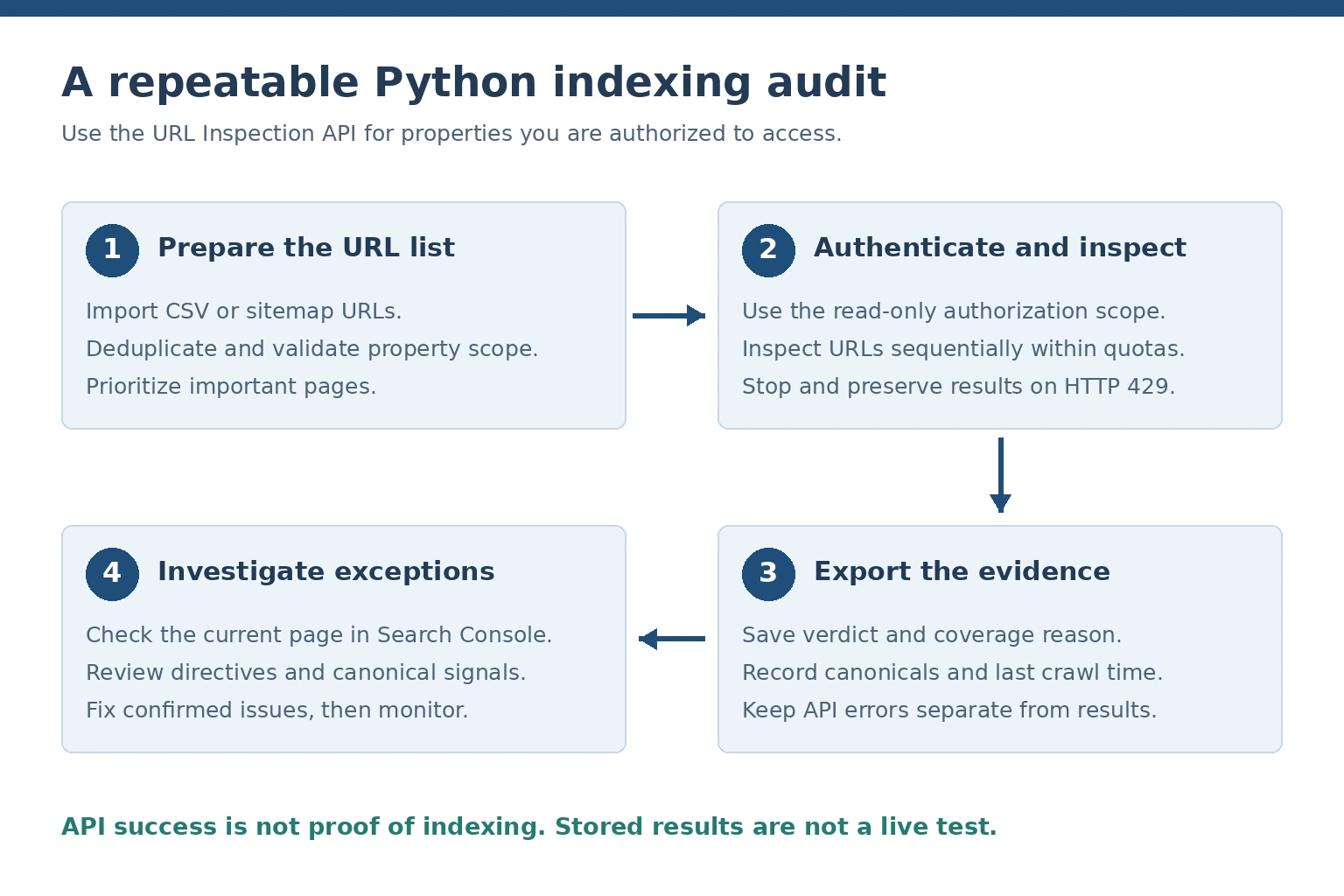
An authorized audit collects stored index data and exports it for investigation. API success alone does not establish indexing.
A bulk indexing checker is useful when a website contains many articles, product pages, service URLs, or recently migrated pages.
Rather than running one request manually for each URL, Python can process a CSV file and save the inspection results.
Step 1: Create a CSV file
Create urls.csv:
url
https://www.example.com/
https://www.example.com/team-profile/
https://www.example.com/services/
https://www.example.com/blog/article/
Step 2: Use a bulk inspection script
The following example demonstrates a sequential CSV audit with URL validation, deduplication, delay controls, limited retries, and CSV output.
import csv
import logging
import os
import random
import time
from urllib.parse import urlparse

import google.auth
from google.auth.transport.requests import AuthorizedSession
from requests.exceptions import RequestException

SCOPES = [
    "https://www.googleapis.com/auth/webmasters.readonly"
]

API_URL = (
    "https://searchconsole.googleapis.com/"
    "v1/urlInspection/index:inspect"
)

SITE_URL = os.environ["GSC_SITE_URL"]
INPUT_FILE = "urls.csv"
OUTPUT_FILE = "indexing_results.csv"

DELAY_SECONDS = 1.0
MAX_RETRIES = 3

logging.basicConfig(
    filename="indexing_audit.log",
    level=logging.INFO,
    format="%(asctime)s %(levelname)s %(message)s"
)

def belongs_to_property(url, property_url):
    parsed = urlparse(url)

    if parsed.scheme not in ("http", "https"):
        return False

    if not parsed.hostname or parsed.username or parsed.password:
        return False

    if property_url.startswith("sc-domain:"):
        domain = property_url.split(":", 1)[1].lower().rstrip(".")
        host = parsed.hostname.lower().rstrip(".")

        return host == domain or host.endswith("." + domain)

    prefix = urlparse(property_url)

    return (
        parsed.scheme == prefix.scheme
        and parsed.netloc.lower() == prefix.netloc.lower()
        and parsed.path.startswith(prefix.path or "/")
    )

def read_urls(filename):
    seen = set()
    urls = []

    with open(filename, newline="", encoding="utf-8-sig") as file:
        reader = csv.DictReader(file)

        if "url" not in (reader.fieldnames or []):
            raise ValueError("Input CSV must contain a url column")

        for row in reader:
            url = (row.get("url") or "").strip()

            if not url or url in seen:
                continue

            seen.add(url)
            urls.append(url)

    return urls

def inspect(session, url):
    payload = {
        "inspectionUrl": url,
        "siteUrl": SITE_URL,
        "languageCode": "en-US"
    }

    for attempt in range(MAX_RETRIES + 1):
        try:
            response = session.post(
                API_URL,
                json=payload,
                timeout=30
            )

            if response.status_code == 429:
                raise RuntimeError(
                    "Quota or rate limit reached. Audit stopped."
                )

            if response.status_code in (500, 502, 503, 504):
                if attempt < MAX_RETRIES:
                    delay = (2 ** attempt) + random.uniform(0, 1)
                    time.sleep(delay)
                    continue

            response.raise_for_status()

            result = response.json().get("inspectionResult", {})
            return result.get("indexStatusResult", {}), ""

        except RequestException as error:
            if attempt == MAX_RETRIES:
                return {}, str(error)

            time.sleep((2 ** attempt) + random.uniform(0, 1))

    return {}, "Inspection retries exhausted"

def get_assessment(status):
    verdict = status.get("verdict", "")

    if verdict == "PASS":
        return "Indexed"

    if verdict == "NEUTRAL":
        return "Excluded"

    if verdict == "FAIL":
        return "Error or invalid"

    return "Unknown"

def main():
    credentials, _ = google.auth.default(scopes=SCOPES)
    session = AuthorizedSession(credentials)

    urls = read_urls(INPUT_FILE)

    fields = [
        "url",
        "assessment",
        "verdict",
        "coverage_state",
        "indexing_state",
        "robots_txt_state",
        "page_fetch_state",
        "last_crawl",
        "google_canonical",
        "user_canonical",
        "error"
    ]

    with open(
        OUTPUT_FILE,
        "w",
        newline="",
        encoding="utf-8"
    ) as output:

        writer = csv.DictWriter(output, fieldnames=fields)
        writer.writeheader()

        for url in urls:
            if not belongs_to_property(url, SITE_URL):
                writer.writerow({
                    "url": url,
                    "assessment": "Invalid property URL",
                    "error": "URL outside authorized property"
                })
                output.flush()
                continue

            try:
                status, error = inspect(session, url)

            except RuntimeError as limit_error:
                logging.error("%s", limit_error)
                print(limit_error)
                break

            writer.writerow({
                "url": url,
                "assessment": (
                    get_assessment(status)
                    if status else "API error"
                ),
                "verdict": status.get("verdict", ""),
                "coverage_state": status.get("coverageState", ""),
                "indexing_state": status.get("indexingState", ""),
                "robots_txt_state": status.get("robotsTxtState", ""),
                "page_fetch_state": status.get("pageFetchState", ""),
                "last_crawl": status.get("lastCrawlTime", ""),
                "google_canonical": status.get("googleCanonical", ""),
                "user_canonical": status.get("userCanonical", ""),
                "error": error
            })

            output.flush()

            if error:
                logging.warning("%s: %s", url, error)

            time.sleep(DELAY_SECONDS)

    print("Audit output:", OUTPUT_FILE)

if __name__ == "__main__":
    main()
The property check in this example is a local validation convenience, not Google’s authorization mechanism. Actual access is still enforced by Google.
For production use, you may want additional controls, including persistent daily quota accounting, more detailed HTTP error categorization, and robust handling of interrupted jobs.
The example has not been validated with live Google credentials. Before relying on the results, review and test the example in an authorized environment.
Step 3: Run the script
Save the Python code as bulk_indexing_check.py, place it alongside urls.csv, and run:
python bulk_indexing_check.pyThe script creates:
indexing_results.csvIt also writes diagnostic messages to:
indexing_audit.logStep 4: Review the report
A sample report might contain:
| URL | Assessment | Coverage state | Recommended investigation |
|---|---|---|---|
/ |
Indexed | Submitted and indexed | Monitor performance |
/team-profile/ |
Indexed | Indexed | No immediate action |
/services/ |
Excluded | Crawled, currently not indexed | Review content and canonical |
/blog/article/ |
Excluded | Discovered, currently not indexed | Check discovery and crawl accessibility |
The table uses illustrative data, not results from a live website inspection.
An indexing report should preserve Google’s original response values. Additional recommendations can be generated through a separate analysis process.
Understanding Google URL Inspection API Results
The URL Inspection API provides several fields that explain Google’s known indexing state.
Reading these fields together is more useful than relying on a single status label.
Important response fields
| API field | Explanation |
|---|---|
verdict |
High-level indexing verdict |
coverageState |
Human-readable indexing coverage reason |
indexingState |
Whether Google detected a page-level indexing restriction |
robotsTxtState |
Whether robots.txt allowed or restricted crawling |
lastCrawlTime |
Last recorded Google crawl time, when available |
pageFetchState |
Whether Google’s page retrieval succeeded |
googleCanonical |
Canonical URL selected by Google |
userCanonical |
Canonical URL declared by the site |
crawledAs |
Reported primary crawler type |
sitemap |
Sitemaps associated with the URL in Google’s data |
Some fields may be absent when Google lacks the relevant information.
Interpreting verdict values
Google’s documented verdict values include:
| Verdict | Interpretation |
|---|---|
PASS |
Valid or indexed outcome |
NEUTRAL |
Excluded outcome |
FAIL |
Error or invalid outcome |
VERDICT_UNSPECIFIED |
Unknown |
PARTIAL |
Reserved and no longer in use |
A PASS verdict is a positive indexing signal.
A NEUTRAL verdict indicates an excluded outcome, but it does not necessarily mean something is broken. Google may have selected another canonical URL, for example.
A FAIL verdict warrants further investigation. Its meaning should be interpreted alongside the coverage and page-fetch information.
Understanding indexingState
The indexingState field reports indexing directives rather than a complete binary indexed/not-indexed outcome.
Current documented values include:
INDEXING_ALLOWEDBLOCKED_BY_META_TAGBLOCKED_BY_HTTP_HEADERINDEXING_STATE_UNSPECIFIED
A value of INDEXING_ALLOWED indicates that Google’s reported indexing-directive check permits indexing. It does not by itself prove that the URL is indexed.
Understanding pageFetchState
This field describes Google’s recorded attempt to retrieve the page.
It may report:
SUCCESSFULSOFT_404BLOCKED_ROBOTS_TXTNOT_FOUNDACCESS_DENIEDSERVER_ERRORREDIRECT_ERRORACCESS_FORBIDDENBLOCKED_4XXINTERNAL_CRAWL_ERRORINVALID_URL
These values provide useful diagnostic evidence. For example, SERVER_ERROR suggests a recorded server-side retrieval failure, whereas BLOCKED_ROBOTS_TXT points toward a crawler access restriction.
Why canonical information matters
Consider the following inspected URL:
https://example.com/blog/article/?source=emailGoogle may report:
googleCanonical:
https://example.com/blog/article/
This means Google’s preferred canonical differs from the inspected URL.
It may be a correct outcome if the parameterized URL contains the same content as the clean URL.
However, unexpected canonical selection can reveal conflicting signals, duplicate content, or website configuration problems.
Why indexing results can become outdated
The API retrieves information about the version known to Google’s index.
If you recently modified the page, Google’s stored information may still reflect an earlier crawl.
Removing a noindex tag or repairing a broken server response does not guarantee that the next API request immediately reflects the change.
For current-page testing, use the live testing functionality available in the Search Console URL Inspection interface.
Consult Google’s official URL Inspection response schema for field definitions and supported values.
How to Export Google Indexing Results to CSV or Excel
CSV is a practical format for indexing audits because spreadsheet applications can open it and Python can analyze it.
A useful report includes the inspected URL, verdict, coverage reason, canonical URLs, last crawl date, page-fetch state, and any API errors.
For more advanced reporting, add the inspection date, website section, sitemap membership, and technical priority.
Do not automatically classify every excluded URL as an SEO problem.
A redirect, duplicate URL, or intentionally noindexed page may have a valid reason to remain outside Google’s index.
An indexing report identifies unexpected outcomes and prioritizes investigation.
How to Compare Sitemap URLs Against Google’s Indexing Data
An XML sitemap provides a structured inventory of URLs the website wants search engines to discover.
However, it is not a record of Google’s actual index.
Extract URLs from an XML sitemap
For a sitemap saved as sitemap.xml, Python can extract URLs using the standard XML library.
import xml.etree.ElementTree as ET

namespace = {
    "sm": "http://www.sitemaps.org/schemas/sitemap/0.9"
}

tree = ET.parse("sitemap.xml")
root = tree.getroot()

urls = []

for item in root.findall("sm:url", namespace):
    location = item.find("sm:loc", namespace)

    if location is not None and location.text:
        urls.append(location.text.strip())

print("URLs found:", len(urls))
This example reads a standard URL sitemap. Sitemap indexes, compressed sitemaps, and large sitemap collections require additional handling.
Only process files from trusted sources or use suitable hardened XML parsing controls.
Compare the sitemap and indexing results
After extracting the URLs, inspect the important ones through the authorized API.
Group the results into indexed pages, excluded pages, unexpected canonical differences, and inspection failures.
This comparison helps identify discrepancies between the site’s intended URL inventory and Google’s known indexing information.
The AOFIRS article How to Find Hidden PDFs with Google Search Operators explains how public documents and webpages may be discovered through XML sitemaps, site search, and other methods even when ordinary search queries fail to reveal them. These discovery techniques can supplement a technical audit, but they do not independently confirm Google’s indexing status.
The distinction is particularly useful when auditing websites that publish extensive document libraries, research reports, or dynamically generated content.
Common Reasons Google Does Not Index a URL
A page can remain outside Google’s index for several reasons, and the URL Inspection API doesn’t always identify a single definitive cause.
Discovered, currently not indexed
Google knows about the URL but has not yet crawled it for indexing.
Review the page’s internal links, sitemap inclusion, accessibility, and relationship to other important pages.
This status does not automatically indicate a content-quality problem.
Crawled, currently not indexed
Google has visited the URL but has not included it in the index.
Potential considerations include content duplication, canonical selection, page usefulness, and Google’s indexing decisions.
Further investigation is needed before assigning a cause.
Duplicate content and unexpected canonical selection
Google may group pages containing substantially similar content and select one as canonical.
Check whether the preferred URL is consistent across internal links, canonical tags, redirects, and XML sitemaps.
Noindex directives
A page may contain:
<meta name="robots" content="noindex">Or an HTTP response header:
X-Robots-Tag: noindexThese directives can prevent indexing when Google can discover and process them.
Robots.txt restrictions
A robots.txt rule may prevent Googlebot from fetching page content.
Robots.txt restrictions should not be confused with noindex directives. A blocked URL can sometimes remain known through links or other signals.
HTTP errors and redirects
Pages that return 404, 403, 5xx, or problematic redirects can create indexing difficulties.
Review server responses and redirect chains using independent technical checks.
A successful HTTP 200 response does not prove indexing.
Weak internal linking
Pages with few or no crawlable internal links may be difficult for Google to discover.
Improve website navigation and provide appropriate contextual links from relevant pages.
Rendering problems
If important content depends on JavaScript, investigate whether Google can retrieve and render the necessary resources.
A page that appears complete in a user’s browser may not provide the same content to a crawler.
Pages outside the publicly searchable web
Some content exists behind login systems, search forms, private databases, or access restrictions.
Such resources should not automatically be classified as failed indexing attempts.
The AOFIRS research report Information Retrieval in the Age of AI discusses how contemporary information systems discover, process, and validate digital resources. Its broader retrieval perspective helps distinguish search-engine visibility from information availability through other systems.
Manual actions and spam policy violations
Google may apply manual actions when website content or behavior violates its spam policies.
Google investigates manual actions through the corresponding Search Console report, not solely from an indexing verdict.
Where manual actions are present, site owners should address the underlying policy violations before submitting a reconsideration request.
How to Troubleshoot Google Indexing Problems
Indexing troubleshooting should be evidence-based.
Start by reviewing the API’s coverage state, indexing directives, canonical information, and crawl results. Then investigate the current page through independent technical checks.
A useful diagnostic process includes:
- Check the page’s current HTTP response and redirect chain.
- Confirm that robots.txt allows the intended crawling behavior.
- Inspect HTML robots directives and X-Robots-Tag headers.
- Review canonical tags and Google’s selected canonical.
- Verify that the page contains the intended content.
- Confirm that important pages are internally linked.
- Check XML sitemap entries for appropriate canonical URLs.
- Investigate rendering or server problems.
- Review the Search Console Page Indexing and Manual Actions reports.
- Request recrawling through supported Search Console mechanisms when appropriate.
Do not assume that one issue explains every excluded URL.
A duplicate page and a page affected by repeated server errors may both be absent from the index, but they require different actions.
After making changes, allow time for Google’s systems to revisit and process the content.
No tool can guarantee immediate indexing.
Google Search Console API Limits and Python Automation Best Practices
The URL Inspection API enforces per-site and per-project quotas.
Google’s published limits are:
| Quota type | Limit |
|---|---|
| Per-site daily quota | 2,000 requests |
| Per-site minute quota | 600 requests |
| Per-project daily quota | 10,000,000 requests |
| Per-project minute quota | 15,000 requests |
The per-project quota does not override the per-site limit.
For example, an organization cannot inspect 10,000 URLs from a single property in one day merely because its project has sufficient remaining daily capacity.
Handling HTTP 429 errors
An HTTP 429 response can indicate a rate or quota limit.
For temporary rate limiting, carefully controlled retries may be appropriate.
If a daily quota has been reached, repeatedly retrying will not help. Preserve completed results, review quota usage, and resume later.
Use conservative request scheduling
A sequential request delay can help prevent unnecessary bursts of traffic.
However, request delays alone do not protect against the daily quota. Production systems should record requests across executions and avoid repeated inspections when previous results remain adequate.
Prioritize valuable URLs
Focus first on:
- Newly published or updated pages.
- Pages affected by migrations.
- Important service and product pages.
- Unexpected canonical changes.
- Pages with previous indexing problems.
- High-value editorial resources.
Automated inspection is most useful when it supports clear decisions rather than generating unnecessary requests.
For current limits, consult Google’s Search Console API usage limits.
Can AI Help Analyze Google Indexing Reports?
AI-assisted analysis can help technical SEO teams process large indexing reports, identify repeated patterns, and generate preliminary troubleshooting recommendations.
For example, an AI tool may group excluded URLs by coverage reason, identify sections of a website experiencing similar problems, or summarize changes between two audit dates.
However, an AI model cannot reliably determine Google’s actual indexing state without suitable source data.
The underlying evidence should come from official inspection results or other appropriate technical sources.
A responsible AI-assisted workflow
First, retrieve indexing information using the authorized URL Inspection API.
Second, clean and organize the results with Python or a spreadsheet.
Third, use AI to identify patterns and formulate hypotheses.
Finally, verify important diagnoses manually before making technical changes.
This distinction between retrieved evidence and generated conclusions is essential.
The AOFIRS learning publication The Search Query Matrix: Mastering Cross-Engine Syntax illustrates how search syntax and retrieval behavior differ between search systems. Although query syntax differs from URL inspection, it reinforces a useful research principle: different retrieval methods produce different evidence and should not be treated as interchangeable.
Similarly, the AOFIRS article Google Search in 2026: Advanced Search Operators, AI Mode & Research Techniques emphasizes choosing appropriate search tools and verifying results against original sources.
For indexing analysis, this means that a generated explanation should never override the actual API response or independently verified technical findings.
Google Indexing Checks: Python vs. Manual Search Console Inspection
Both methods are useful, but they serve different purposes.
| Factor | Python URL Inspection API | Manual Search Console inspection |
|---|---|---|
| Official indexing data | Yes | Yes |
| Programmatic bulk audits | Yes, within quotas | Limited |
| Live URL testing | Not supported through this API | Available |
| Authentication | OAuth or authorized service account | Google account |
| Technical requirements | Python and API configuration | Search Console access |
| Reporting | Custom CSV and analysis workflows | Interface reports and available exports |
| Best use | Repeatable inspection of important URL groups | Investigation of individual URLs |
| Main limitation | Quotas and indexed-version-only data | Manual effort |
For most professional workflows, the best approach combines both.
Use Python to collect consistent data across authorized URLs. Then manually investigate key exceptions in Search Console and through appropriate technical checks.
Frequently Asked Questions
1. How can I check if a URL is indexed by Google using Python?
Use the official Search Console URL Inspection API. Authenticate with an account or service account authorized for the website, submit the URL and property identifier, and inspect the returned indexStatusResult, particularly its verdict and coverage details.
2. Is the Google URL Inspection API free?
Google does not document a separate per-inspection charge for standard URL Inspection API requests. Usage is subject to quotas, and supporting infrastructure or administrative work may involve costs.
3. Can Python check thousands of URLs?
Yes. Python can inspect thousands of URLs over multiple runs or days, as long as requests stay within Google’s per-site and per-project quotas.
4. Can I check indexing without Google Search Console access?
Public search tools can offer clues, but the official URL Inspection API requires access to an authorized Search Console property. Search operators and third-party tools are not equivalent substitutes.
5. Why does Google crawl a URL but not index it?
Google may crawl a page without indexing it because of duplication, canonical selection, indexing directives, or other indexing decisions. The reported coverage reason should guide further investigation.
6. Is the Google Indexing API the same as the URL Inspection API?
No. The URL Inspection API retrieves indexing information. Google’s separate Indexing API is restricted to documented eligible job postings and livestream use cases.
7. Can Python automatically request indexing for every page?
No unrestricted official indexing-request API exists for ordinary website pages. Python can help maintain sitemaps and check indexing status, but it cannot guarantee Google will index submitted URLs.
8. How often should I check my website’s indexing status?
Inspection frequency should reflect publication volume, technical changes, and page importance. Recently migrated or critical pages may require closer monitoring, while stable pages generally need less frequent checks.
Conclusion
Python offers a practical way to automate Google indexing audits, especially for websites with large collections of important URLs. The most appropriate official method is the Google Search Console URL Inspection API, which provides indexed-version information for properties that the requesting identity is authorized to access. A reliable workflow begins with secure authentication and accurate property configuration. It then collects Google’s inspection results, preserves the original response values, identifies unexpected outcomes, and exports structured reports for further investigation. However, indexing should never be reduced to a simple assumption based on whether a page loads, appears in a sitemap, or can be found through a search operator.
Google’s crawling, indexing, canonicalization, and search-serving systems perform different functions. Understanding those differences is essential for interpreting indexing data correctly. For technical SEO professionals, the strongest approach combines Python automation, official Search Console data, sitemap analysis, manual diagnostics, and evidence-based recommendations. The objective is not merely to count indexed pages. It is to understand which important URLs Google has indexed, why other URLs may be excluded, and what corrective actions are justified by the available evidence.