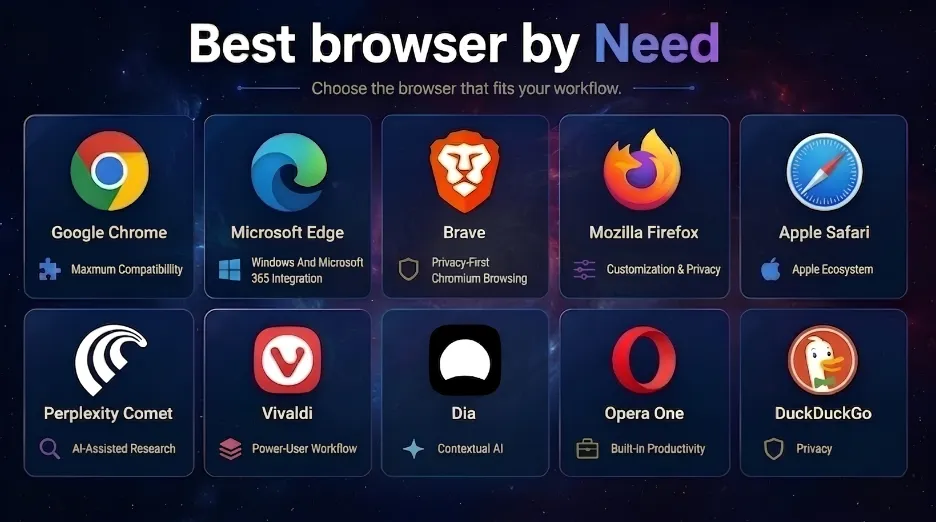
THE SHORT ANSWER
Also: Vivaldi for heavy tab work, Dia for contextual AI on Apple Silicon, DuckDuckGo for effortless privacy, Opera One for built-in tools, Opera Neon for agentic experiments, Opera GX for gaming controls.
Find your browser in three questions
Skip the 6,000 words. Answer three questions and we’ll name the browser that fits your work — and the one to keep as a second.
All twelve compared
Scores are out of 5 and reflect practical usefulness for each browser’s intended audience — not a pure speed ranking. Filter by what you need, or sort any column.
Filter
Sort by
| Browser | Best for | Rating | Privacy | Extensions | Research | Engine | AI / agentic |
|---|---|---|---|---|---|---|---|
| Google Chrome | Best overall compatibility | 4.8/5 | Moderate | Excellent | Excellent | Blink | Gemini, rolling out |
| Microsoft Edge | Windows and Microsoft 365 | 4.7/5 | Moderate | Excellent | Excellent | Blink | Copilot, stable; agentic in preview |
| Brave | Privacy with Chromium compatibility | 4.5/5 | Strong | Excellent | Strong | Blink | Leo, opt-in; agentic in early testing |
| Mozilla Firefox | Non-Chromium browsing | 4.5/5 | Strong | Very good | Excellent | Gecko | Optional, centrally controllable |
| Apple Safari | Apple ecosystem | 4.5/5 | Strong | Moderate | Strong | WebKit | Apple Intelligence on supported hardware |
| Perplexity Comet | AI research and knowledge work | 4.5/5 | Moderate | Very good | Excellent | Blink | Native, agentic |
| Vivaldi | Tabs and power users | 4.2/5 | Above average | Excellent | Excellent | Blink | Deliberately none |
| Dia | AI-assisted knowledge work | 4.1/5 | Above average | Chromium-compatible | Strong | Blink | Native, tightly permissioned |
| Opera One | Built-in tools and multitasking | 4.0/5 | Above average | Excellent on desktop | Strong | Blink | Opera AI, stable |
| DuckDuckGo Browser | Simple private browsing | 4.0/5 | Strong | Limited | Good | Platform-dependent | Optional Duck.ai |
| Opera Neon | Dedicated agentic browsing | 3.9/5 | Moderate | Secondary | Strong | Blink | Agent-first, extensive |
| Opera GX | Gaming | 3.8/5 | Moderate | Excellent | Good | Blink | Opera AI, permission-gated |
No browser in this list matches that filter.
AI features vary by country, account, subscription, device and administrator policy — “yes” rarely means universal availability. Status labels: stable (broadly available), rolling out (gradual by region or account), preview (experimental or early access).
How we evaluated these browsers
This is a research-based editorial comparison, not a controlled laboratory benchmark. We assessed publicly documented capabilities and current product availability across six dimensions.
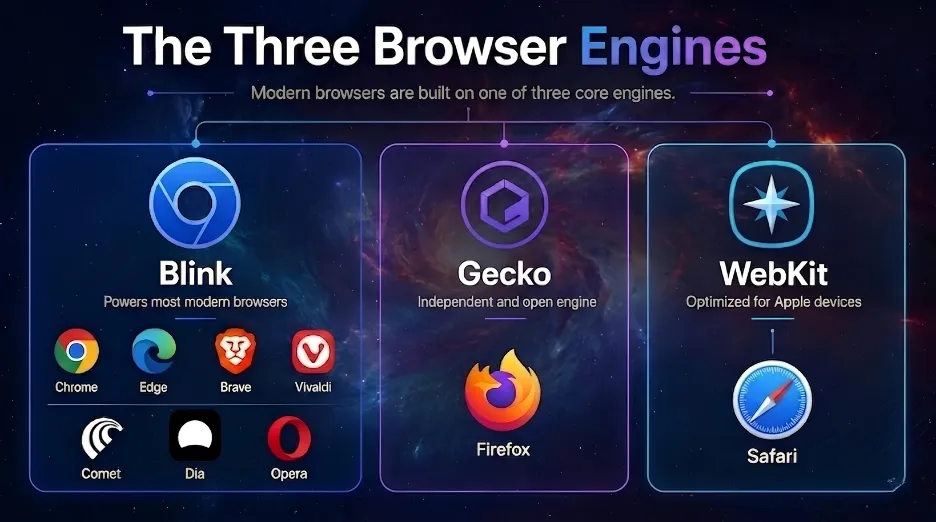
Understanding browser engines
Chromium-based browsers offer the broadest site and extension compatibility because developers test for Chromium first. The trade-off is engine diversity: switching between two Chromium browsers changes privacy, interface and services — not the engine underneath.
The twelve browsers reviewed
Ranked by overall practical usefulness. Each entry lists what it does well, where it falls short, and the specific reader it is — and is not — for.
1
Google Chrome
Best overall compatibility
5.0
Chrome remains the lowest-friction recommendation for anyone who needs reliable website support, the largest extension ecosystem, mature developer tools and close integration with Google services.
Gemini works with page and tab context, and Auto Browse can perform selected multistep tasks — subject to eligibility, subscription, language, region and rollout limits, with user review required for sensitive actions. Gemini in Chrome requirements ↗
Key features
- Gemini integration and contextual tab assistance
- Chrome Web Store and broad extension compatibility
- Tab groups, vertical tabs and split view
- Google account and Workspace sync
- Memory Saver and Energy Saver
Main limitations
- Weaker default privacy than dedicated privacy browsers
- Close connection to Google’s advertising ecosystem
- AI access varies by account, region and subscription
2
Microsoft Edge
Windows and Microsoft 365
5.0
Edge pairs Chromium compatibility with Windows integration, vertical tabs, sleeping tabs, Collections, Workspaces and the strongest enterprise management in this list.
Copilot supports page and multi-tab reasoning. In Edge for Business, agentic browsing is a limited preview — organisations can restrict approved sites and retain Purview protections, and sensitive steps pause for user action. Edge for Business AI release details ↗
Key features
- Copilot with multi-tab reasoning
- Vertical tabs, Sleeping Tabs, split screen
- Workspaces and Collections
- Microsoft 365 and Windows integration
- Chrome extension compatibility
- Enterprise policy and data controls
Main limitations
- Interface can feel crowded
- Microsoft services promoted throughout
- Some AI functions need specific licences or admin settings
3
Brave
Privacy with Chromium compatibility
5.0
Brave is the strongest choice for users who want Chrome extension compatibility alongside aggressive tracker and ad blocking enabled by default.
Leo summarises pages, answers contextual questions and analyses documents. Brave says requests are proxied, conversations are not used for training, and the feature requires explicit opt-in; agentic mode is early testing only. Brave Leo privacy documentation ↗
Key features
- Brave Shields tracker and ad blocking
- Fingerprinting and third-party cookie protections
- Brave Leo AI, opt-in
- Chrome extension support
- Optional VPN and private browsing tools
Main limitations
- Agentic browsing remains early-stage
- Some sites need Shields adjustments
- Cryptocurrency features will not appeal to everyone
4
Mozilla Firefox
Non-Chromium browsing
5.0
Firefox is the leading general-purpose alternative to Chromium, with strong privacy controls, Multi-Account Containers, capable developer tools and an established add-on ecosystem.
Generative-AI features are optional. From Firefox 148, a dedicated panel lets users manage or block current and future AI enhancements including chatbot, translation, PDF alt-text, tab-group and link-preview features. Firefox AI settings guide ↗
Key features
- Independent Gecko engine
- Enhanced Tracking Protection with granular settings
- Central controls for optional AI
- Multi-Account Containers
- Strong add-on and developer tooling
Main limitations
- Some Chromium-focused sites work better elsewhere
- Smaller extension catalogue than Chrome
- Limited native agentic functionality
5
Apple Safari
Apple ecosystem
5.0
Safari is the strongest native fit for Mac, iPhone and iPad — Apple passwords and passkeys, energy efficiency, and privacy protections built around the Apple ecosystem.
Apple Intelligence can summarise webpages on supported devices, but availability varies by model, language and region, and Apple warns users to verify important AI-generated information. Safari intelligence requirements ↗
Key features
- Apple Intelligence on supported hardware
- Intelligent Tracking Prevention and fingerprinting defences
- iCloud sync, passkeys and password integration
- Reader Mode, profiles and Tab Groups
- Efficient battery performance on Apple silicon
Main limitations
- Limited usefulness outside Apple devices
- Smaller extension ecosystem
- Advanced AI needs compatible hardware
6
Perplexity Comet
AI research and knowledge work
5.0
Comet is a Chromium browser designed around Perplexity search, page context and browser commands. Its advantage is reducing friction between searching, reading, comparing and synthesising.
The corresponding risk is that AI synthesis can hide weak sources or compress away important qualifications, so researchers should always open and verify the underlying evidence. Comet feature and installation guide ↗
Key features
- Cross-tab reasoning and page-aware AI
- Research assistance and source comparison
- Natural-language browser commands
- Task-oriented browsing and automation
- Chrome extension compatibility
Main limitations
- Heavy dependence on cloud AI
- Contextual workflows may need broad permissions
- Less suitable if you want local AI processing
7
Vivaldi
Tabs and power users
5.0
Vivaldi prioritises manual control: tab stacks, workspaces, tiling, notes, mail, calendar and deep interface customisation — useful for researchers who need primary sources visible and organised.
Vivaldi deliberately avoids making generative AI central, stating it will not add native LLM summarisation or form-filling until it considers those systems rigorous enough. Vivaldi’s stated product position ↗
Key features
- Tab Stacks, Tab Tiling and vertical tabs
- Workspaces and Web Panels
- Notes and Reading List
- Built-in mail and calendar
- Extensive interface customisation
Main limitations
- No native generative-AI assistant
- Dense interface, substantial learning curve
- Limited appeal if you want agentic automation
8
Dia
AI-assisted knowledge work
5.0
Dia is an AI-native Chromium browser built around contextual work across tabs and connected services. It currently requires macOS 14 or later on Apple silicon.
Dia documents several agent safeguards — no write access without approval, restricted navigation, filtered URLs, confirmation before inserting data — but relevant page content may go to third-party AI providers. Dia security and data-flow documentation ↗
Key features
- Contextual, page-aware AI
- Tab, document and connected-service context
- Split views and organised workspaces
- Permissioned agentic actions
- Sensitive-action confirmations
Main limitations
- Centred on Apple silicon Macs
- Many AI functions need cloud processing
- Smaller ecosystem and platform reach
9
Opera One
Built-in tools and multitasking
5.0
Opera One combines Chromium compatibility with built-in messaging, ad blocking, workspaces, tab organisation, a browser proxy and Opera AI — a good fit if you prefer integrated tools to installing extensions.
That convenience creates a busier interface and does not automatically make Opera more private than a dedicated privacy browser. Opera’s current AI rollout announcement ↗
Key features
- Built-in Opera AI
- Tab Islands, vertical tabs and workspaces
- Split Screen
- Built-in ad blocker and browser proxy
- Messaging sidebar and media controls
Main limitations
- Interface can feel busy
- The built-in proxy is not full anonymity
- Advanced agentic functions live in Opera Neon
10
DuckDuckGo Browser
Simple private browsing
5.0
DuckDuckGo Browser delivers low-configuration privacy: tracker blocking, cookie protection, link-tracking protection, Global Privacy Control and a one-click Fire Button.
Duck.ai is optional; DuckDuckGo says chats are anonymised, are not used for training, and are generally covered by zero-retention agreements with model providers. Duck.ai data policy ↗
Key features
- Third-party tracker and cookie blocking
- Private search integration
- Fingerprinting and link-tracking protections
- Fire Button and Email Protection
- Optional Duck.ai with a no-AI option
Main limitations
- Smaller extension ecosystem
- Fewer productivity and workspace tools
- Limited agentic functionality and customisation
11
Opera Neon
Dedicated agentic browsing
5.0
Opera Neon is designed around browser agents rather than bolting an assistant onto a conventional browser. It executes multistep workflows and connects to third-party AI agents.
That makes Neon relevant if you specifically want automation, but it raises the stakes on permissions, confirmations and data boundaries. Opera’s March 2026 update adds third-party agents via an MCP connector. Official Neon announcement ↗
Key features
- Agentic browsing and multistep task execution
- Autonomous research and site interaction
- Cross-tab reasoning
- Chat, Do, Make and research workflows
- Third-party agent connectivity
Main limitations
- More experimental than mainstream browsers
- Agent permissions create additional security risk
- Paid access may be required
12
Opera GX
Gaming
5.0
Opera GX differentiates through CPU, memory and network limiters, gaming integrations, themes and heavy interface customisation.
Opera AI is built in and can use page or tab context when permission is enabled; users can disable page access or turn the AI off entirely. Opera GX AI controls ↗
Key features
- CPU, RAM and network limiters
- GX Control and gaming integrations
- Extensive themes and customisation
- Built-in ad blocker and browser proxy
- Sidebar applications
Main limitations
- Gaming design may not suit professional environments
- Less compelling for non-gamers
- AI is less advanced than AI-native browsers
From the Association of Internet Research Specialists
The browser is the easy part. The method is the hard part.
Agentic browsers will happily summarise a weak source. AOFIRS members get the CIRS certification track, tool briefings like this one before publication, and a library of verification and search methodology.
Speed, memory and battery
No browser is universally fastest. Results shift with operating system, processor, version, extensions, open sites, thermal conditions and power settings. Speedometer 3 — built jointly by the Blink, Gecko and WebKit communities — is the fairest comparison, but a small benchmark lead should never outweigh compatibility, privacy or workflow.
Test it yourself in five steps
- 1Use the same computer, network, browser profile and extension set.
- 2Update every browser immediately before testing.
- 3Run the benchmark several times and compare the median, not the best run.
- 4Repeat a real workload with the same 10–20 tabs open.
- 5Record memory use, battery drain, fan activity and tab-reload behaviour.
Read the Speedometer 3 benchmark design overview ↗ before quoting any score.
Privacy: what the scores actually mean
Privacy is not a single switch. Our privacy score weighs four separate layers — and a browser can be strong on one while weak on another.
Private or Incognito mode mainly reduces what is stored locally after a session. It does not make you anonymous, hide your IP address from websites, or stop an employer, provider, logged-in service or search engine from observing activity.
Check before enabling browser AI
- Is page or tab access automatic, or permission-based?
- Can history, files, email or calendar enter the AI context?
- Which company actually processes the request?
- Are prompts or page content retained, or used for training?
- Can memory and personalisation be switched off?
- Can administrators enforce data-loss-prevention policies?
Security and the risks of agentic browsers
Agentic browsers add a second security layer: the AI interprets untrusted webpages and then acts with your permissions. OWASP’s 2026 agentic-AI guidance ↗ identifies prompt injection as the primary delivery mechanism.
Practical rule: run browser agents on the minimum necessary permissions, and keep human approval for communications, purchases, account changes, uploads, financial activity, healthcare data and anything irreversible.
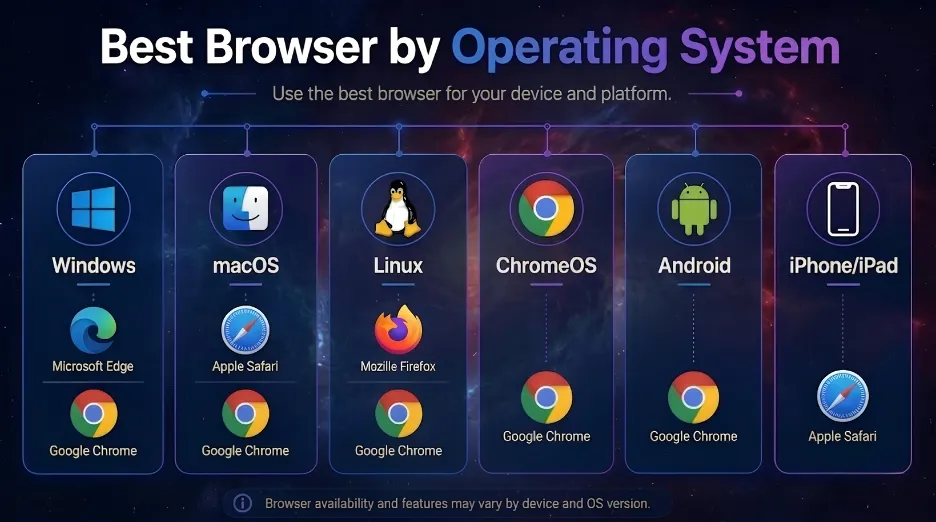
Best browser by operating system
Best browsers for research and knowledge work
Research is where these browsers diverge most. Pair your choice with the right tooling — our AI research tools directory and specialist search engine lists matter more than the browser itself.
How to choose — in order
Most people do not need one browser for everything. A practical setup: a mainstream browser for compatibility, a privacy browser for sensitive work, and an AI browser only for research that benefits from contextual assistance.
- 1Which operating systems and devices must it support?Eliminate anything that cannot cover your required platforms.
- 2Which ecosystem do you already use?Google, Microsoft or Apple integration can outweigh small feature differences.
- 3How much default privacy do you want?Choose Brave, Firefox or DuckDuckGo if you do not want to assemble protections yourself.
- 4Are specific extensions essential?Confirm availability before switching, not after.
- 5Do you want AI assistance, agentic automation, or neither?These are not the same requirement — do not treat them as one.
- 6What will the AI be allowed to see?Review page, history, file, email, calendar and memory permissions.
- 7Can you migrate cleanly?Test bookmark, password, extension, profile and sync imports before committing.
Frequently asked questions
Chrome is the strongest general-purpose compatibility choice. Edge is better for Microsoft workflows, Brave for private Chromium browsing, Firefox for an independent engine, Safari for Apple devices, and Comet for AI-assisted research.
Comet is the clearest research-first option. Chrome and Edge deliver increasingly capable AI inside mature mainstream browsers, while Dia emphasises contextual work and Opera Neon emphasises agentic automation.
There is no universal winner. Brave offers strong tracker blocking with Chromium compatibility, Firefox combines privacy controls with engine independence, and DuckDuckGo emphasises simple defaults. Privacy also depends on your search, account, sync, extension and AI settings.
It depends on hardware, operating system, version, workload and extensions. Compare browsers on the same device under controlled conditions rather than relying on a universal ranking.
They can be safe for many low-risk tasks, but agents introduce prompt-injection, permission, data-exposure and incorrect-action risks. Use minimal permissions and keep human approval for sensitive or irreversible steps.
Firefox uses Gecko and Safari uses WebKit. DuckDuckGo relies on platform-dependent browser technologies rather than maintaining one independent engine everywhere.
No. It primarily limits local history, cookies and form data kept after the session. It does not hide network activity or your identity from websites and services.
Comet is strongest for AI-assisted synthesis, Vivaldi for manual source organisation, Firefox for independent-engine research, and Chrome or Edge when specialist extensions and conventional web applications are essential.
The verdict
Choose by workflow, not by brand or a single benchmark. Chrome and Edge minimise compatibility friction; Brave, Firefox and DuckDuckGo offer stronger privacy positions; Safari is the natural Apple option; Vivaldi excels at manual organisation; Comet, Dia and Opera Neon each take a different route to AI-native browsing.
Whichever you pick: keep it updated, review extension permissions, audit what the AI can see, and verify important research against primary sources. The most capable browser is not automatically the safest — or the best fit for the work you actually do.