Research cut-off: 5 October 2026 | Association of Internet Research Specialists (AOFIRS)
Converting images into editable text is a common task for researchers, students, journalists, investigators, and businesses. Optical Character Recognition (OCR) lets you extract text from scanned documents, screenshots, and photographs without manually retyping the information. However, the convenience of an online image-to-text converter should not be confused with proven accuracy or document security.
JPGtoText.io is presented as an online image-to-text conversion service. Its intended purpose is straightforward: help users obtain editable text from images. Yet several important questions remain unanswered. How accurately does it recognize text? Does it preserve document structure? What happens to uploaded images? Can researchers trust it with confidential material?
This JPGtoText.io review finds that its OCR accuracy, complete feature set, and document-handling practices cannot currently be independently verified. The official website could not be reliably retrieved during this assessment, and no controlled OCR benchmark was completed. Consequently, this article does not assign an accuracy score or claim that the service is secure.
Instead, it reviews the available evidence, explains how to assess OCR accuracy, and compares documented alternatives. The aim is to help readers choose appropriate image-to-text tools without relying on unsupported marketing claims.
Quick Verdict: Is JPGtoText.io Worth Using in 2026?
JPGtoText.io may be considered for exploratory, non-sensitive image-to-text conversion, but its suitability for professional research remains unproven.
Successfully converting an ordinary image would not show how well the service handles handwritten material, multilingual documents, financial tables, or damaged scans. Nor would it show that the service deletes uploaded files or protects them from unauthorized access.
| Evaluation Area | Finding |
|---|---|
| Intended purpose | Online image-to-text conversion |
| OCR accuracy | No independent benchmark established |
| Supported file formats | Full format coverage not verified |
| Multilingual recognition | Not verified |
| Handwriting support | Not verified |
| Batch processing | Not verified |
| Document layout preservation | Not verified |
| Privacy and file retention | Not verified |
| Suitability for confidential documents | Insufficient evidence |
| Overall assessment | Further testing and policy verification required |
The lack of verification should not be interpreted as proof that the service performs poorly. It means there is insufficient evidence for a definitive recommendation.
For researchers, the decision should depend on the document’s sensitivity, the required level of accuracy, and whether the provider offers transparent technical and privacy documentation.
What Is JPGtoText.io?
JPGtoText.io is a web-based image-to-text conversion service that extracts written content from image files.
An image-to-text converter typically uses OCR technology to identify letters, numbers, and punctuation inside a photograph or scanned page. It then produces digital text you can copy, edit, or search.
This matters because an image containing words isn’t automatically a searchable text document. A photograph of a printed article may be readable to a person but inaccessible to ordinary text-selection and search functions.
OCR bridges this gap by estimating which characters appear in the image.
What can JPGtoText.io be used for?
Potential applications of an image-to-text converter include copying text from screenshots, transcribing printed notes, extracting quotations from scanned publications, and preparing searchable research material.
The suitability of JPGtoText.io for each application remains dependent on features that require confirmation.
For example, converting a single image to plain text differs from processing an entire PDF, reconstructing a table, or preserving the page structure of an archival record.
Researchers should not assume that an OCR service provides all these capabilities simply because it advertises image-to-text conversion.
Is JPGtoText.io an AI-powered OCR tool?
Its underlying recognition technology cannot be independently verified.
OCR systems may employ traditional image-processing techniques, machine-learning models, or combinations of several technologies. Some modern systems incorporate neural networks capable of recognising complex character patterns.
However, calling an OCR service AI-powered requires supporting technical details. Automated text extraction alone does not indicate which technologies the provider uses.
How Does Image-to-Text Conversion Work?
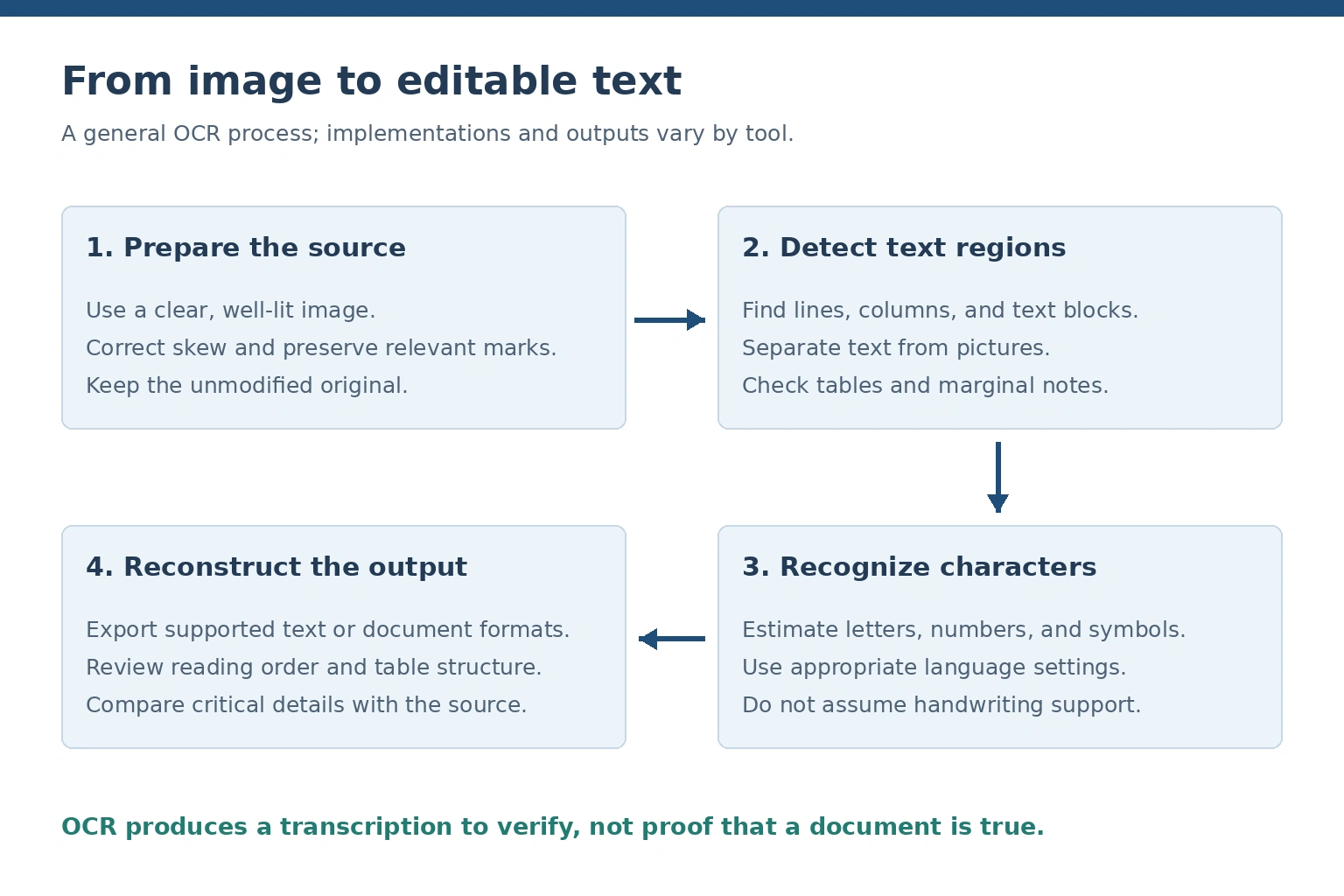
A general OCR workflow. Product-specific capabilities require independent verification.
OCR converts the visual representation of written characters into machine-readable text.
Although implementations differ, a typical OCR process involves image preparation, text detection, character recognition, and output generation.
1. Preparing the image
First, the system receives a source image, such as a photograph, screenshot, or scanned page.
Depending on its capabilities, it may adjust contrast, reduce background noise, correct rotation, or improve the visibility of text.
Image preparation matters because poor lighting, blur, and compression can distort individual character shapes.
For instance, a damaged scan may make the number 8 resemble a 3, while the letter O can be confused with the number 0.
2. Detecting text regions
The software identifies areas likely to contain text.
In simple documents, this might involve detecting lines and paragraphs. More complicated pages may contain multiple columns, captions, footnotes, tables, and handwritten annotations.
Text detection is especially important when the page contains both pictures and writing.
3. Recognizing characters
After detecting text regions, the OCR engine estimates the letters, digits, and symbols represented by the image.
Some systems employ language information to improve recognition, while others rely primarily on visual features or learned patterns.
These techniques can improve readability, but they can also introduce mistakes when characters are unclear.
4. Reconstructing the output
The final stage produces recognized text in one or more supported formats.
Some OCR applications return plain text. Others create searchable PDFs, editable documents, or structured outputs containing text positions.
This distinction is significant for research. A paragraph of extracted words cannot necessarily preserve the relationship between a figure and the table cell from which it came.
AOFIRS’ article on how archive scans lose meaning when their layout is stripped examines why source geometry matters. A stamp, signature, column heading, or annotation may be evidence rather than merely decorative. Removing those relationships can undermine the document’s interpretation.
For that reason, researchers should preserve the original image alongside the extracted text.
JPGtoText.io Features: What Can Be Confirmed?
An OCR service’s feature set determines whether it suits quick transcription or more demanding document-processing tasks.
JPGtoText.io’s precise capabilities were not independently established during this assessment. Therefore, treat the following areas as verification requirements rather than confirmed product features.
Supported image and document formats
An image-to-text service may accept formats such as JPG, JPEG, or PNG. Some applications also support PDF, TIFF or other file types.
The full list of formats JPGtoText.io accepts could not be confirmed.
This matters because a researcher handling a collection of scanned PDF documents may require a different workflow from someone converting an individual photograph.
Multilingual OCR
Multilingual recognition allows software to identify characters from different languages or writing systems.
This review does not specify how many languages JPGtoText.io supports.
Before using any OCR application for multilingual research, users should confirm whether it supports the relevant language, script, and document characteristics.
Recognizing printed English text does not demonstrate equivalent performance on Arabic, Urdu, Chinese, or historical European documents.
Handwriting recognition
Handwritten documents present additional challenges because letter shapes, spacing, and writing styles vary considerably.
Specialized handwriting recognition systems may handle certain handwriting styles, but support should never be assumed.
Whether JPGtoText.io recognizes handwritten text and how accurately remains unverified.
Batch processing and output formats
Batch processing can save time when multiple documents require transcription. However, it may also create large quantities of unreviewed output.
The availability of batch conversion, downloadable document formats, and specific file-size limits could not be established for JPGtoText.io.
These limitations should be investigated before using the service in a substantial research project.
How Accurate Is JPGtoText.io?
OCR accuracy is one of the most important criteria when evaluating an image-to-text converter.
No independently measured accuracy percentage is available from this assessment of JPGtoText.io.
Assigning a numerical score without processing a controlled collection of documents would misrepresent the evidence.
An accurate evaluation requires source images, verified reference transcriptions, and a consistent testing method.
Character Error Rate (CER)
Character error rate measures the number of recognition errors relative to the number of characters in the reference text.
CER = (substitutions + deletions + insertions) / reference characters.
Where:
- S = character substitutions
- D = deleted characters
- I = inserted characters
- N = total characters in the reference transcription
A lower CER generally indicates fewer recognition errors.
For example, confusing one digit in a document identifier counts as a substitution. Omitting a punctuation mark may count as a deletion, depending on the evaluation rules.
Word Error Rate (WER)
Word Error Rate evaluates recognition differences at the word level.
WER = (substitutions + deletions + insertions) / reference words.
Here, N represents the number of reference words rather than characters.
WER can help assess whether extracted passages remain readable and complete, but it does not measure every aspect of document usability.
A system might recognize the correct words while rearranging them into an incorrect reading order.
Why numerical accuracy is not enough
A high character recognition rate does not automatically mean that the extracted document is reliable for research.
Consider a scanned financial statement. Most of its text may be recognized correctly, while one amount appears beside the wrong category. The transcription could achieve a strong numerical score yet still produce a misleading financial interpretation.
Similarly, an OCR system might omit a handwritten qualification beside a printed statement, changing how that statement should be understood.
These failures illustrate why accuracy testing must examine context, layout, and meaning, not only individual characters.
AOFIRS’ research report on verification debt in online research discusses the risks of allowing unverified automated information to accumulate across research workflows. Although its primary focus is AI-assisted research, the same concern applies when uncorrected OCR text becomes input for summaries, databases, or further automated analysis.
How Should JPGtoText.io OCR Accuracy Be Tested?
A credible comparison should evaluate the same source material across several OCR applications.
The testing dataset should contain different kinds of documents rather than relying exclusively on clean, printed English text.
| Test Material | Main Evaluation Goal |
|---|---|
| High-quality printed pages | Basic character recognition |
| Low-resolution screenshots | Recognition under limited detail |
| Blurred photographs | Handling visual distortion |
| Handwritten notes | Handwriting recognition |
| Multilingual documents | Language and script accuracy |
| Tables and invoices | Structure and numerical precision |
| Multi-column publications | Correct reading order |
| Historical scans | Recognition of damaged or unusual print |
| Receipts | Accuracy of small text and numbers |
Testing should use legally obtained, non-sensitive documents for which accurate reference transcriptions are available.
Each application should receive equivalent inputs, and the evaluation should document any preprocessing, settings, or manual corrections.
Researchers should record not only CER and WER but also processing failures, missing content, distorted tables, and cases where the system changes the intended meaning.
What a reproducible test report should include
A useful report identifies the test documents, their characteristics, the software settings used, and the method applied to calculate error rates.
It should explain whether results were obtained from a browser interface, desktop application, or API, since different implementations may behave differently.
The report should also distinguish measured results from subjective observations.
Until such a study is conducted, comparisons involving JPGtoText.io should avoid claims that it is more accurate or faster than competing tools.
JPGtoText.io Privacy and Security Review
Privacy deserves particular attention when an OCR service processes uploaded files.
Images may contain much more information than the user intends to extract. A photograph can reveal names, signatures, personal identifiers, confidential correspondence, or contextual details unrelated to the immediate task.
The critical question is whether the service provides sufficient information about how this material is processed, stored, protected, and deleted.
For JPGtoText.io, those practices could not be independently verified.
Does JPGtoText.io store uploaded images?
Its file-retention arrangements remain unconfirmed.
Some OCR systems process files locally, while others send material to remote infrastructure. The actual handling depends on the provider’s technical architecture.
Without clear documentation, users should not assume that an uploaded image is deleted immediately after conversion.
Are files automatically deleted?
No independently verified automatic deletion schedule was established.
Even where a provider states that files are removed after processing, researchers should understand the scope of that commitment.
Deletion from an active processing system does not necessarily mean that all copies have immediately disappeared from backups, logs or related services.
Does JPGtoText.io use uploaded documents for AI training?
The answer could not be established.
Users should look for explicit policy statements addressing the use of uploaded files and extracted text for model training, product improvement, or other secondary purposes.
A general privacy statement may not answer every question about the treatment of document contents.
Is JPGtoText.io safe for confidential material?
There is insufficient verified evidence to support such a conclusion.
This does not mean that the service is necessarily insecure. It means the relevant safeguards have not been independently demonstrated.
AOFIRS’ article on digital security for researchers recommends establishing clear rules for storing, accessing, uploading, and sharing research documents. This is particularly relevant when external OCR systems are introduced into workflows containing confidential sources or unpublished information.
For sensitive material, researchers should consider locally controlled processing and review the security of the entire environment, including file storage and access permissions.
Privacy assessment summary
| Privacy Question | Finding |
|---|---|
| Are uploaded images stored? | Not verified |
| Is there an automatic deletion policy? | Not verified |
| Is extracted text retained? | Not verified |
| Is encryption at rest documented? | Not verified |
| Are third-party processors identified? | Not verified |
| Is content used for AI training? | Not verified |
| Can users request deletion? | Not verified |
| Is the service suitable for confidential records? | Cannot be established |
These findings identify gaps in the available evidence, not proven security failures.
JPGtoText.io vs Other OCR Tools
A meaningful OCR comparison should examine documented capabilities, privacy considerations, and appropriate use cases.
Different tools are designed for different workflows. A service intended for quickly copying text from a photograph may not offer the same functions as software developed for searchable PDFs or automated document processing.
Comparison of OCR alternatives
| Tool | Documented Functionality | Main Use Case | Limitation or Consideration |
|---|---|---|---|
| JPGtoText.io | Complete capabilities unverified | Potential basic image-to-text conversion | Requires direct testing and policy verification |
| Google Lens | Text recognition and copying from images | Quick extraction from photographs | Review relevant Google privacy controls |
| Adobe Acrobat | OCR for scanned PDF documents | Searchable PDF workflows | Features vary by product and plan |
| Tesseract OCR | Open-source text recognition engine | Configurable and local OCR processing | Requires setup and technical knowledge |
This table is a comparison of documented functionality, not a ranking based on measured accuracy.
Google Lens
Google’s Lens guidance describes text recognition functions that allow users to select and copy text from images.
It is a practical option for everyday tasks involving printed notes, signs, and screenshots. However, researchers should distinguish quick extraction convenience from a controlled process for validating complex documents.
Google Lens is not a substitute for confirming that important figures, names, and quotations were recognized correctly.
Adobe Acrobat
Adobe Acrobat supports OCR processing for scanned PDF documents. It also provides tools for reviewing and correcting recognized text.
Adobe’s OCR correction guidance describes how users can inspect uncertain words against the underlying scanned image. This illustrates an important advantage of workflows that keep recognized text connected to the original document.
Acrobat is particularly relevant where the goal is to create searchable PDF records rather than simply extract a paragraph of text.
Tesseract OCR
Tesseract is an open-source OCR engine that can be configured for different document-processing tasks.
It supports multiple languages and provides options for controlling recognition and page segmentation.
Because Tesseract can run locally, it may be suitable for organizations that need greater control over document processing. However, users must configure and secure the surrounding workflow appropriately.
Its official image-quality guidance also explains how scaling, noise, rotation, and page segmentation can influence recognition results.
Which OCR Tool Is Best for Researchers?
There is no universally best image-to-text converter.
The appropriate choice depends on the document type, processing requirements, available technical expertise, and sensitivity of the information.
For quick extraction of ordinary text from photographs, Google Lens may provide a convenient workflow.
For scanned PDF collections requiring searchable text and manual correction, Adobe Acrobat offers documented capabilities.
For users who require configurable, locally executed OCR, Tesseract provides an established open-source option.
JPGtoText.io should not be preferred over these alternatives on the basis of assumed accuracy or security. Its capabilities must first be established through testing.
Researchers should also consider whether the software will be used independently or incorporated into a larger analytical workflow.
The AOFIRS learning publication Optimizing the Modern Research Workflow: Integrating Traditional Information Retrieval with Generative AI provides broader context for combining digital information tools with verification and human judgment. OCR belongs within that larger process when extracted text becomes material for searching, analysis, or AI-assisted synthesis.
How to Improve OCR Accuracy
The quality of a source image often affects recognition performance.
Improving the input can sometimes yield better results than repeatedly processing the same poor-quality image.
Use a clear source image
Where possible, use the original digital document or a high-quality scan.
Avoid repeatedly compressing or enlarging an already degraded screenshot. Increasing pixel dimensions does not automatically restore missing detail.
Correct image rotation
Scanned pages should be straight and text lines properly aligned.
Photographs taken at an angle may introduce perspective distortion, making it harder to identify individual characters and their reading order.
Improve lighting and contrast
Ensure that text is distinguishable from the background.
Shadows, reflections, and uneven lighting can obscure writing. Moderate adjustments may improve visibility, but excessive sharpening can damage thin strokes.
Remove irrelevant backgrounds
Cropping unnecessary borders or surrounding objects can help an OCR application focus on the text.
Care must be taken not to remove annotations, page numbers, seals, or other content relevant to the original document.
Verify language settings
If the OCR application provides language selection, choose the appropriate language or script.
Multilingual documents may require additional testing because recognition quality can vary between scripts and language combinations.
Review critical information manually
OCR errors involving numbers, quotations, and names deserve particular attention.
A single incorrect character may alter a date, change a financial amount, or produce an invalid document reference.
How Researchers Should Verify OCR-Extracted Text
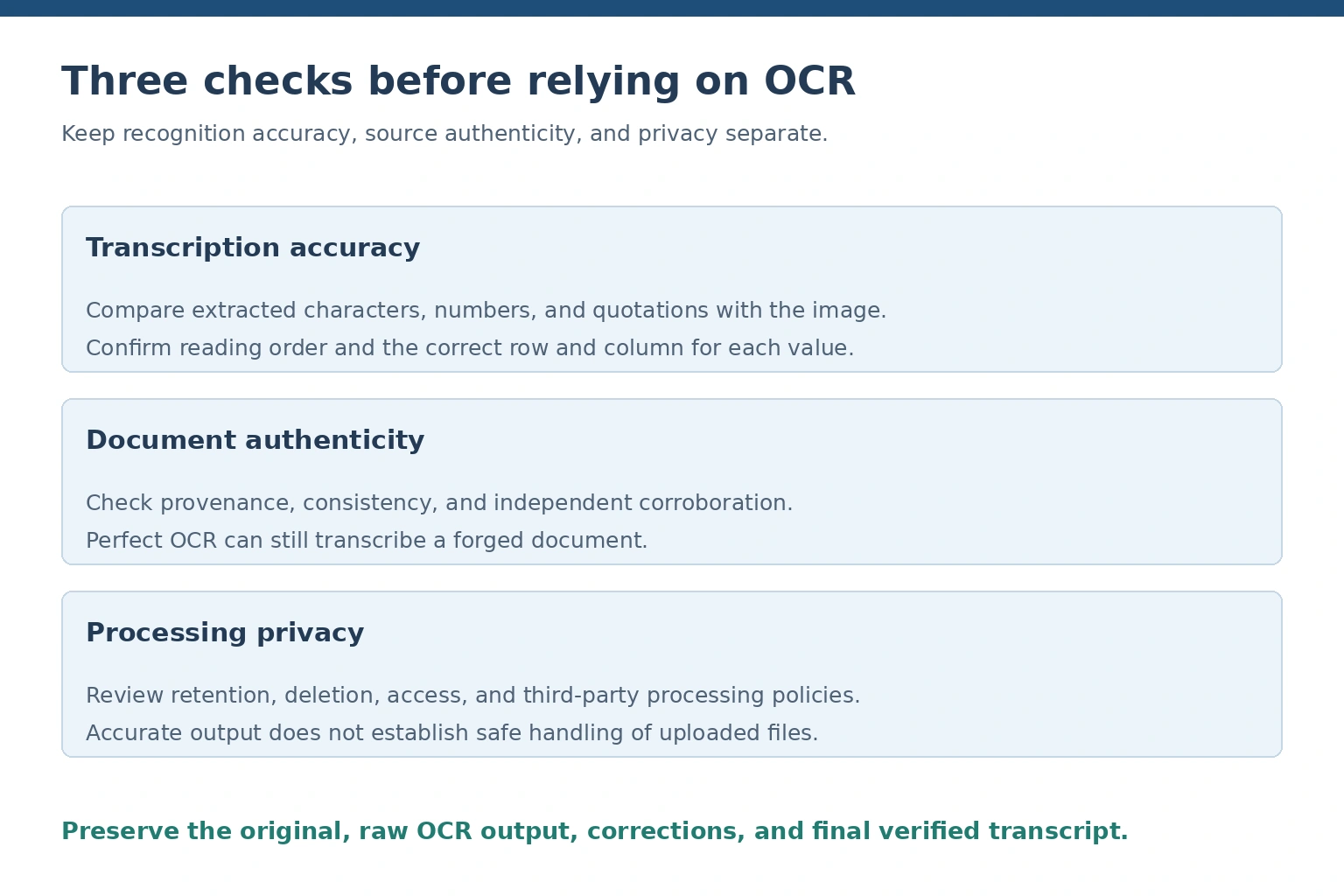
Correct recognition does not establish document authenticity or secure file handling.
OCR output should be treated as a transcription requiring validation, especially when it contributes to research findings.
A document can be transcribed accurately while containing false information. Conversely, an authentic document can be transcribed incorrectly.
These are separate problems requiring different checks.
Preserve the original document
Keep the source image or scanned file alongside the extracted text.
Record relevant information such as the source URL, document title, retrieval date, and page number when available.
This allows another researcher to compare the transcription with the original.
Check document authenticity separately
Correct text recognition does not prove that the underlying document is genuine.
A manipulated financial statement can still produce accurate OCR output. A forged letter can contain perfectly readable text.
AOFIRS’ practical framework for verifying suspicious digital documents describes a layered approach involving provenance, technical structure, internal consistency and independent confirmation. These checks complement OCR verification by helping researchers assess the trustworthiness of the source, not merely the accuracy of its transcription.
Compare extracted information with the source
Pay particular attention to dates, addresses, figures, bibliographic information, and quoted passages.
For tables, verify that each value remains associated with the correct row and column.
Where a document contains marginal notes or handwritten amendments, check that the OCR process has not omitted them.
Maintain a clear audit trail
Researchers should document any corrections made after extraction.
A corrected transcript should not silently replace the original output when the distinction could affect evidence review.
For substantial projects, maintain separate copies of the original image, initial OCR result, and verified transcription.
This approach improves reproducibility and allows reviewers to understand how the final text was produced.
OCR and AI-Assisted Research in 2026
OCR increasingly forms part of wider document-processing workflows that incorporate machine learning, multimodal AI and automated analysis.
Traditional OCR focuses on identifying text. More advanced document understanding systems may attempt to identify entities, interpret tables, classify records or extract relationships between fields.
These capabilities can improve efficiency, but they also introduce additional verification challenges.
For example, recognizing an invoice amount is different from determining whether it represents a subtotal, tax amount, or final balance.
An AI system may also infer missing information or generate a plausible interpretation of unclear text. Such an interpretation must not be presented as a literal transcription unless the source supports it.
Researchers should therefore separate three stages:
- Extraction: What characters or text were recognized from the image?
- Interpretation: What does the extracted material appear to mean?
- Verification: Does the original document and independent evidence support that interpretation?
The more stages a workflow automates, the more important it becomes to preserve source traceability.
Human review remains especially important when automated outputs influence legal, financial, medical, or investigative decisions.
Final Verdict: Should You Use JPGtoText.io in 2026?
JPGtoText.io cannot be given a definitive recommendation based on the evidence available for this review.
Its intended function is image-to-text conversion, but its actual recognition performance, supported features, and document-handling practices require independent confirmation.
No controlled benchmark was completed, and the service’s privacy and retention arrangements could not be verified.
For ordinary, non-sensitive material, users may consider conducting their own limited tests. Results should be checked against the original image before being reused.
For confidential or professionally significant documents, researchers should prefer tools whose capabilities and processing arrangements can be assessed and whose security controls satisfy their requirements.
Google Lens, Adobe Acrobat and Tesseract are useful alternatives for different OCR workflows, but each still requires evaluation against the specific task.
The central conclusion is that OCR convenience should never replace evidence-based evaluation. A reliable research workflow requires accurate transcription, preservation of the original source, transparent information handling and human verification.
Frequently Asked Questions
1. Is JPGtoText.io free to use?
Its current pricing structure and usage restrictions could not be independently confirmed. Users should check the official service for available free features, account requirements, and processing limits.
2. How accurate is JPGtoText.io?
No independent accuracy percentage was established. A reliable comparison would require controlled testing using verified transcripts and metrics such as character error rate and word error rate.
3. Can JPGtoText.io recognize handwritten text?
Handwriting recognition support was not verified. Users should test representative handwritten documents before relying on the service for this purpose.
4. Does JPGtoText.io support multiple languages?
Its supported languages and scripts could not be confirmed. Multilingual recognition should be verified using the particular languages required for the task.
5. Is JPGtoText.io safe for confidential documents?
There is insufficient verified information to determine whether it is appropriate for confidential files. Avoid uploading sensitive information until its security controls, processing arrangements, and retention practices have been evaluated.
6. Does JPGtoText.io store uploaded images?
Its file-storage and deletion practices could not be independently established. Users should not assume that files disappear immediately after conversion.
7. What are the alternatives to JPGtoText.io?
Google Lens supports convenient text extraction from images, Adobe Acrobat provides scanned-PDF OCR workflows, and Tesseract offers configurable open-source recognition that can run locally.
8. Can JPGtoText.io extract text from scanned documents?
The specific file formats and scanned-document capabilities of JPG to Text.io require verification. OCR technology can extract text from scans, but individual products differ in supported formats, recognition accuracy and layout preservation.