
Keyword research tools were built for search engine optimization, but the data inside them is useful well beyond marketing. Search demand shows what people want to know, which terms they use and how interest changes over time. For a market researcher it is a signal of attention around a product or problem; for an internet researcher it is a map of the vocabulary that sources use. The data has limits. Demand and competitor figures may be sampled, rounded, or modeled. Site-performance records measure a different thing, and reports can omit data. Tools and metric definitions differ. This guide explains what each type of tool measures, compares the main platforms on documented features and published pricing reviewed on November 15, 2026 where accessible, and gives you a protocol for evaluating coverage, consistency, and usefulness without treating incompatible metrics as ground truth.
Quick answer: which tool for which task?
Match the tool to the question rather than looking for a single winner. For search-volume estimates straight from a search engine, use Google Keyword Planner. For relative interest over time and by region, use Google Trends. For the queries that already bring people to a site you own, use Google Search Console. For competitor keywords and backlink-based difficulty, use a third-party database such as Semrush, Ahrefs, Moz or Ubersuggest. For drafting and checking content, and increasingly for tracking whether AI assistants mention a brand, use Surfer, Clearscope, MarketMuse or Frase. Most research tasks need one source of engine data and one third-party tool, checked against each other.
AI search experiences such as Google AI Overviews, ChatGPT Search, Perplexity, Gemini and Microsoft Copilot have changed what visibility means. Researchers now need to know which questions people ask, not only which keywords they type, and which sources AI systems draw on. Our conversational search guide explains this shift.
How we evaluated
This is a comparison of documented features, not a hands-on test. We did not create accounts or run queries in the paid tools, and we do not rate or rank them. Each tool was assessed on five criteria using its official documentation, pricing page or company announcement, reviewed where accessible on November 15, 2026:
- Data source. Does the data come from the search engine itself, from the user’s own site, or from a third-party model?
- Documented method. Does the vendor explain how volume, difficulty or other scores are calculated?
- Free access. What can a researcher do without paying?
- Entry price. The lowest published paid plan, with the billing period.
- Research fit. Whether the tool answers demand questions (how many, when, where) or content questions (what to write).
Semrush’s pricing page was accessible during this review. Moz’s pricing and Ubersuggest’s pricing could not be retrieved, so their current amounts are not asserted. MarketMuse’s former pricing URL redirects to Siteimprove’s product information. Failed retrieval does not prove a service is unavailable to normal visitors. Published features are vendor descriptions, not independently measured performance. Confirm taxes, billing commitments, quotas, and add-ons before buying.
The tools at a glance
| Tool | What its data represents | Access and published pricing |
|---|---|---|
| Google Keyword Planner | Ads search-demand estimates and campaign forecasts | No separate tool fee; Google Ads setup required |
| Google Trends | Sampled, normalized relative interest | Free |
| Google Search Console | Your authorized property’s search performance | Free; privacy and reporting limits |
| Semrush | Keyword, competitor, and visibility models | Limited free access; SEO $139/month or $117.33/month billed annually |
| Ahrefs | Keyword, link, and traffic estimates | Ahrefs Free for your site; Starter $29/month; Lite $129/month |
| Moz Keyword Explorer | Third-party keyword database | Current pricing not verified |
| Ubersuggest | Keyword and competitor estimates | Current pricing and trial terms not verified |
| Surfer | Draft guidance and plan-dependent AI tracking | Discovery $49/month billed yearly; tracking limits vary |
| Clearscope | Editorial coverage and visibility tracking | 14-day trial; Essentials $129/month |
| MarketMuse / Siteimprove | Topic research and content strategy | Former pricing page redirects; contact provider |
| Frase | Briefs, optimization, and AI visibility | 7-day trial; Starter $39/month, $468 billed yearly; monthly option advertised at $49 |
These are published U.S.-dollar examples where shown, reviewed November 15, 2026; they are not equal-feature comparisons. Verify checkout terms and whether a quoted price is billed monthly or paid up front annually.
What keyword research measures
Keyword research identifies the words, phrases, questions and topics people use when they search. Traditional work focused on search volume, keyword difficulty, competition, cost per click and ranking opportunities. Those metrics still matter, but their definitions differ, and none alone establishes what a searcher wants. Keyword Planner competition concerns advertisers; it is not an organic ranking-difficulty score.
| Narrow planning habit | More useful planning approach |
|---|---|
| Target individual keywords | Cover a topic and its related questions |
| Focus on exact-match phrases | Understand concepts and entities |
| Optimize for rankings | Optimize for visibility in results and AI answers |
| Create pages around keywords | Organize content around topics |
| Measure only rankings | Measure rankings, mentions and AI visibility |
| Use volume as the main signal | Combine intent, relevance, authority and coverage |
The comparison above describes planning choices, not a claim that all practitioners followed one historical method.
Know what each number is. Google defines Keyword Planner’s average monthly searches as the average number of searches for a keyword and its close variants, averaged over 12 months by default, and says the statistics are rounded (Keyword Planner metrics). Google Trends does not report volume at all: it samples searches, divides each data point by total searches for that place and time, and scales the result from 0 to 100; it also adds noise for privacy, so low-volume terms can show as zero (Google Trends data). Third-party tools model volume from their own data sources, which is why two tools rarely agree.
The Shift From Keywords to Search Intent
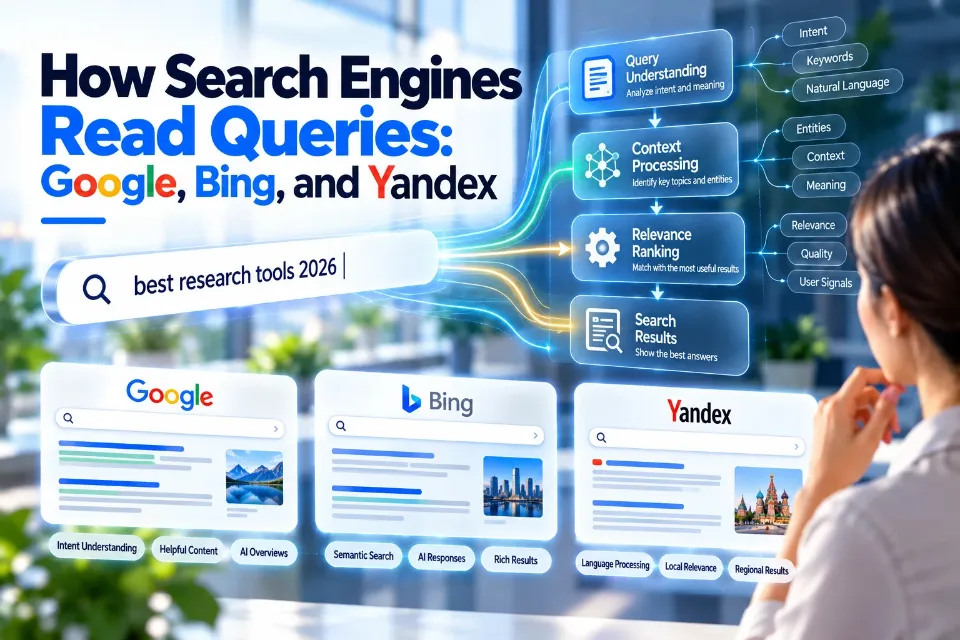
A keyword alone does not explain what a user wants. Take the query “keyword research tools”. A searcher might be a beginner or a professional, might want free tools or enterprise platforms, and might be comparing software before buying. Search engines increasingly interpret these layers, so useful content answers the information need behind the query, not just the phrase.
Semantic Search, Entities, and Topical Authority
Search engines connect related concepts. A page about keyword research tools would naturally cover search intent, clustering, results-page analysis, competitor research, content optimization and topic modeling. Covering related entities helps both readers and search systems understand the subject.
Google says its automated ranking systems are designed to prioritize “helpful, reliable information that’s created to benefit people”, and that it has no preferred word count (People-first content guidance). Complete, accurate coverage of a subject serves readers better than repetition of a phrase.
How Keyword Research Has Changed
1. AI Search Has Changed User Behavior
People increasingly search in full questions. Instead of “keyword research tools”, a user might ask “which keyword research tool suits a small agency producing content at scale?” or “what tools help track visibility in Google AI Overviews?”. Research now involves analyzing questions, comparisons and decision patterns rather than isolated phrases.
2. Visibility Is No Longer Limited to Blue Links
Organizations now consider visibility across Google results, AI Overviews, ChatGPT Search, Perplexity, Gemini and Copilot. Several content tools have added AI-visibility tracking for this reason (see the tool entries below). AOFIRS’s Google and AI search techniques guide covers how retrieval works across these surfaces.
3. AI-Assisted Discovery Is Now Common
Many practitioners combine traditional tools with AI assistants: AI to suggest audience questions, keyword tools to check demand, and competitor analysis to find gaps. AI speeds up discovery but does not supply demand data.
4. Keyword Clusters Matter More Than Single Keywords
A single article targeting one keyword often leaves related questions unanswered. A pillar topic such as “keyword research tools” can support a cluster covering free tools, beginner guides, competitor analysis, intent and clustering software. Clusters build coverage rather than isolated rankings.
The Tools Compared
The tools fall into three groups. Use source-appropriate first-party data when available, then document definitions and limitations. A provider’s own data is not automatically a complete measure of the entire market.
Search-engine and first-party data
1. Google Keyword Planner
Keyword Planner sits inside Google Ads. It suggests keywords and gives average monthly searches, competition and bid ranges, and campaign forecasts that are refreshed daily and based on the last 7 to 10 days, adjusted for seasonality (Keyword Planner guide). It is designed for advertising, so volumes are grouped with close variants and rounded. Available detail can vary by account. Record any range or rounding as displayed rather than converting it into an invented precise count.
Use it when you need a search-engine baseline for volume and seasonality and can work with rounded or ranged figures.
2. Google Trends
Google Trends shows relative interest in a search term or topic by time and place, scaled from 0 to 100. Google says Trends “merely reflects the search interest in particular topics”, is not a poll, and is “not a perfect mirror of search activity”; it recommends comparing a term with common reference terms and treating Trends as one data point among others (Google Trends data).
Use it when the question is “is interest rising, falling or seasonal, and where?” rather than “how many searches?”.
3. Google Search Console
Search Console’s Performance report shows the queries that brought your site into Google results, with clicks, impressions, click-through rate and average position; the default view covers the past three months (Search Console report). Access requires permission to the relevant property. These are site-specific performance observations, not total market search volume. Query tables omit some data for privacy and other reporting reasons, as Google explains in its reporting limits discussion. Use it to evaluate your known queries and site outcomes, not to declare a third-party volume estimate accurate.
Use it when you have authorized property access and want to understand reported site visibility and clicks.
Third-party keyword databases
4. Semrush
Semrush is an all-in-one search marketing suite covering keyword research, competitor analysis, site audits and content tools. Adobe completed its acquisition of Semrush on 28 April 2026 and describes it as “an Adobe company” (Adobe acquisition announcement). Its current Semrush pricing lists an SEO plan at $139 per month, or $117.33 per month billed annually, alongside a limited free tier and broader packages. AI tracking, seats, and historical data vary by plan.
Use it when you need keyword, competitor and audit data in one workspace and can justify a suite rather than a single tool.
5. Ahrefs
Ahrefs’ Keywords Explorer gives keyword suggestions, volume estimates, results-page overviews and two documented metrics. Keyword Difficulty is based on the number of unique websites linking to the top 10 ranking pages; Traffic Potential estimates the search traffic the top-ranking page gets from all the queries it ranks for, not just the one you entered (Ahrefs keyword methods). A keyword with modest volume can therefore sit on a topic with larger total traffic. On November 15, 2026 plans started at $29 a month (Starter), with Lite at $129 and Standard at $249; a free plan covers data on your own site (Ahrefs pricing).
Use it when competitor pages and link-based difficulty drive your decisions.
6. Moz Keyword Explorer
Moz Keyword Explorer, part of Moz Pro, provides keyword suggestions, difficulty and related-topic data. Moz’s documentation and pricing could not be opened during this review, so this entry does not describe its scores; check Moz’s help center for how its metrics are calculated before you rely on them.
Consider it when its keyword features fit your work, after confirming access, metric definitions, and current plans. Interface preference has not been tested here.
7. Ubersuggest
Ubersuggest offers keyword ideas, difficulty scores, traffic estimates and competitor views in a simple interface. Its Ubersuggest pricing could not be retrieved during this review. Check current monthly or lifetime terms, query quotas, cancellation conditions, and refunds directly; earlier quoted prices and trial terms are not carried forward as verified.
Consider it if its current cost and query allowance fit your work; compare definitions and coverage before relying on estimates. This review did not establish that its data is less complete than another vendor’s.
Content optimization and AI-visibility tools
8. Surfer
Surfer, now at surfer.ai, analyzes ranking pages to guide how a draft is written and scores it in a content editor. Its Surfer pricing lists Discovery at $49 per month billed yearly. AI-visibility tracking and prompt-refresh frequency depend on the plan; the entry content plan does not include tracked AI prompts in the displayed comparison. Check the selected tier rather than assuming every package contains the same monitoring. Scores can flatten writing if followed mechanically.
Use it when a publishing team needs consistent on-page guidance and wants to monitor AI mentions in the same tool.
9. Clearscope
Clearscope grades drafts for topic coverage and helps standardize editorial work across many writers. Every plan now includes query tracking, brand-visibility tracking and “query fan-out awareness”. On November 15, 2026 Essentials cost $129 a month and Business $399 a month, with a 14-day free trial and no minimum contract on monthly plans (Clearscope pricing).
Use it when editorial consistency across a large team is the problem to solve.
10. MarketMuse
MarketMuse models topic coverage and content gaps at the level of a whole site rather than a single page. Its former pricing URL now redirects to the MarketMuse product update, which places its topic research, briefs, and optimization capabilities within Siteimprove. A current standalone free-plan allowance or price was not established; contact the provider rather than relying on an older 10-query offer.
Use it when the unit of strategy is a content library, not an article.
11. Frase
Frase combines results-page research, content briefs, AI writing assistance and optimization, and offers plan-dependent AI-visibility monitoring. The current Frase pricing shows a seven-day trial without a credit card. Starter is displayed at $39 per month with $468 billed yearly, compared with an advertised $49 monthly option. Monitored AI platforms, seats, sites, and production quotas vary by tier.
Use it when individual writers or small teams work from brief to draft and want visibility tracking included.
How to test a keyword tool yourself
Define the decision you need to make, then compare like metrics under documented conditions. This is a suggested protocol, not a test performed for this article:
- Build a seed set. Choose 20 to 30 queries from your subject area: some broad, some long-tail, including known site queries and relevant queries outside your current ranking footprint. Separate branded from nonbranded terms.
- Fix the conditions. Record the date, country, language and device settings, and use the same ones in every tool.
- Compare compatible demand metrics. Record each tool’s volume beside Keyword Planner’s estimate or range using matching dates, location, network, and close-variant assumptions. Agreement shows consistency, not proof of accuracy. Keep Search Console impressions in a separate site-performance column.
- Check coverage. Count how many of your known Search Console queries the tool returns among its suggestions for your main seed terms.
- Check difficulty against reality. For five queries, open the live results page and note who ranks. Record referring-domain profiles, intent, content quality, and results features. A visual inspection cannot validate a numerical difficulty model; subsequent site outcomes are also affected by many other factors.
- Repeat after a month. Re-run the same queries to see whether figures are stable or shift sharply after data updates.
Keep a simple log:
| Query | Date and settings | Tool volume | Keyword Planner | Search Console impressions | Notes |
|---|---|---|---|---|---|
| example: heat pump grants | Illustrative month, UK, English; device/network recorded | [value] | [range] | [value or n/a] | [difference, suggestion coverage] |
Assess missing terms, grouping differences, directional consistency, update lag, export limits, and usefulness for your decision. A small convenience sample cannot establish universal accuracy. Investigate disagreement before excluding a tool or presenting one model as the truth.
A Seven-Step Keyword Research Workflow
Step 1: Identify Audience Problems and Search Needs
Before opening any tool, list the audience’s questions, problems, buying concerns and frequently asked questions. Starting from the problem rather than a seed keyword usually gives a broader set of opportunities.
Step 2: Use AI Tools for Topic Discovery
AI assistants can suggest related questions, subtopics, concerns and terminology. A prompt such as “create a topical map for keyword research tools covering beginners, professionals, agencies and enterprise users” produces a starting structure quickly. Treat AI output as a discovery aid, not a demand signal, and check it against real search data.
Step 3: Validate Keywords Using SEO Platforms
Check demand (is anyone searching, is it growing, is it seasonal?), difficulty (who ranks, how strong their pages and links are) and intent: informational, comparison, commercial investigation or transactional. Matching the content format to intent matters more than matching the phrase.
Step 4: Analyze SERP Competition
Keyword tools give estimates; the results page shows what currently ranks. Examine the ranking pages, their structure, results-page features, featured snippets and AI Overviews, then ask what is missing and whether you can add original research.
Step 5: Build Topic Clusters
Connect a pillar page to supporting articles that each handle one facet in depth, and link between them so readers and search engines can follow the relationship.
Step 6: Optimize Content for AI Citations
Make information clear and verifiable with direct answers early, tables, lists, definitions and step-by-step frameworks, with transparent methods and real examples.
Direct answer example. Question: “Which keyword research tool should I use?” Answer: “It depends on the question. Use a search engine’s own data for volume and seasonality, a third-party database for competitor keywords, and a content tool for drafting; check estimates against each other.” A concise answer helps readers locate the recommendation. It does not guarantee indexing, an AI citation, or favorable placement.
Appearing in AI answers is a visibility goal, not a verification standard. Our AI citation verification guide shows why citation-enabled output still needs source-level review.
Step 7: Monitor Visibility and Update Regularly
Monitor ranking changes, new competitors, shifts in intent, AI visibility, traffic quality and conversions. Update content when search behavior or the facts change, and do not change dates merely to simulate freshness.
How Professionals Use Keyword Research Tools
| User type | Typical tools | Reason |
|---|---|---|
| Researcher or analyst | Google Trends, Keyword Planner, one third-party database | Demand evidence with a documented baseline |
| Beginner or blogger | Keyword Planner, Ubersuggest | Low cost and simple interface |
| SEO professional | Semrush, Ahrefs, Moz, Search Console | Competitor and link analysis |
| Content team | Surfer, Clearscope, MarketMuse, Frase | Drafting guidance and AI-visibility tracking |
| Enterprise | Semrush, Ahrefs, MarketMuse | Large-scale research and reporting |
Internet Researchers and Analysts
Keyword tools help researchers understand public interest, spot emerging topics and find the terms people actually use. Combine them with search operators and source verification, as set out in our advanced search guide and Search Query Matrix.
Journalists and Investigative Researchers
Keyword tools show public concerns, emerging stories and information gaps. Popularity does not indicate factual importance: search volume measures attention, not truth, and claims found this way still need verification through reliable sources, as described in our source verification guide.
Businesses and E-commerce Brands
Businesses use keyword research to understand customer needs, market demand and competitor positioning. For an online store, specific queries such as “human hair extensions for thin hair” or “tape-in extensions maintenance guide” signal more specific intent than “hair extensions”. Whether they convert better is a hypothesis to test in your own analytics, not a rule.
Worked example: measuring interest in a topic
Suppose a market analyst needs to know whether UK consumer interest in heat pumps is rising. A defensible approach uses three layers. First, Google Trends compares “heat pump” with a stable reference term over five years for the UK, showing direction and seasonality as relative interest, not volume. Second, Keyword Planner gives rounded monthly averages for the main terms and their close variants, which help estimate search demand under stated settings. Third, the analyst checks the trend against an official statistic, such as government installation figures, before writing that interest is rising. The keyword data shows attention; the official data measures a different behavior, such as installations; the report should say which is which, give the date and settings of each query, and note that Trends is sampled and scaled.
Common Keyword Research Mistakes
- Focusing only on search volume. High-volume keywords are not automatically valuable. Evaluate intent, competition, business value and audience relevance together.
- Ignoring search intent. A well-optimized page still fails if it does not match what users want. Ask what problem the search is trying to solve.
- Optimizing only for blue links. Visibility now includes AI Overviews, ChatGPT Search, Perplexity, Gemini and Copilot. Content should be understandable to systems as well as readers.
- A separate page per keyword. Thin pages built around keyword variants rarely serve readers. Cover the topic and its related questions instead.
- Treating estimates as measurements. Volumes from third-party tools are modeled and Trends is relative. State the source, date and settings of every figure.
- Publishing without updating. Refresh data, improve explanations and monitor competitors on a schedule.
Frequently Asked Questions
Which keyword research tool should I use?
It depends on the task. Use Google Keyword Planner or Trends for search-engine data, Search Console for your own site, a third-party database such as Semrush, Ahrefs, Moz or Ubersuggest for competitor research, and a content tool such as Surfer, Clearscope, MarketMuse or Frase for drafting and AI-visibility tracking.
Are AI keyword research tools better than traditional SEO tools?
They do different jobs. AI tools help with discovery, planning and analysis; keyword platforms supply volume estimates, difficulty scores and competitor data. Most workflows use both.
Can ChatGPT replace keyword research tools?
No. An AI assistant can generate ideas, group topics, and suggest questions. An unaided generated answer is not demand evidence. A configured connection may retrieve tool data, but you must verify its source, dates, settings, and permissions.
What keyword tools do SEO professionals use?
Many teams combine Search Console and Keyword Planner with a third-party suite such as Semrush, Ahrefs or Moz, and a content tool such as Surfer, Clearscope or MarketMuse, depending on whether the task is research, competitive analysis or content optimization.
How do you optimize content for AI search?
Answer questions directly, structure information in tables and lists, cover related entities, show original analysis and state your methods, so that AI systems and readers can extract and check your content.
Conclusion
No single keyword tool answers every research question. Keyword Planner, Trends, and Search Console provide useful but different engine and property signals; third-party databases add competitor and difficulty data; content tools help with drafting and, increasingly, with tracking AI visibility. For researchers, the method matters more than the brand: state where each figure comes from, test a tool against data you trust before relying on it, and verify what search data suggests against independent sources.
References and Official Resources
- Adobe. (2026, April 28). Adobe completes Semrush acquisition [Press release]. Adobe acquisition announcement.
- Ahrefs. Pricing. Ahrefs pricing.
- Clearscope. Pricing. Clearscope pricing.
- Frase. Pricing. Frase pricing.
- Google Ads Help. Use Keyword Planner. Keyword Planner guide.
- Google Ads Help. About Keyword Planner forecasts. Keyword Planner metrics.
- Google Search Central. (2026, October 5). Creating helpful, reliable, people-first content. Google for Developers. People-first content guidance.
- Google Search Console Help. Performance report (Search results). Search Console report.
- Google Trends Help. FAQ about Google Trends data. Google Trends data.
- Siteimprove. MarketMuse product information. MarketMuse product update.
- Soulo, T. (2020, November 25; updated 2026, March 24). How to do keyword research for SEO (start to finish). Ahrefs Blog. Ahrefs keyword methods.
- Surfer. Pricing. Surfer pricing.
- Ubersuggest. Pricing. Ubersuggest pricing.
- Semrush. SEO and AI pricing.
- Ahrefs. Keyword Difficulty definition.
- Ahrefs. Traffic Potential definition.
- Google Search Central. Search Console reporting limits.