Most people search Google the way they would ask a friend: a few loose words and a hope that the right page turns up. That works for a restaurant address. It fails when you need a specific report, a named source, or evidence you can defend. Professional researchers treat a search box as a command line. They know how Google reads a webpage, they decide what kind of result they need before typing, and they use operators to tell the engine exactly where to look.
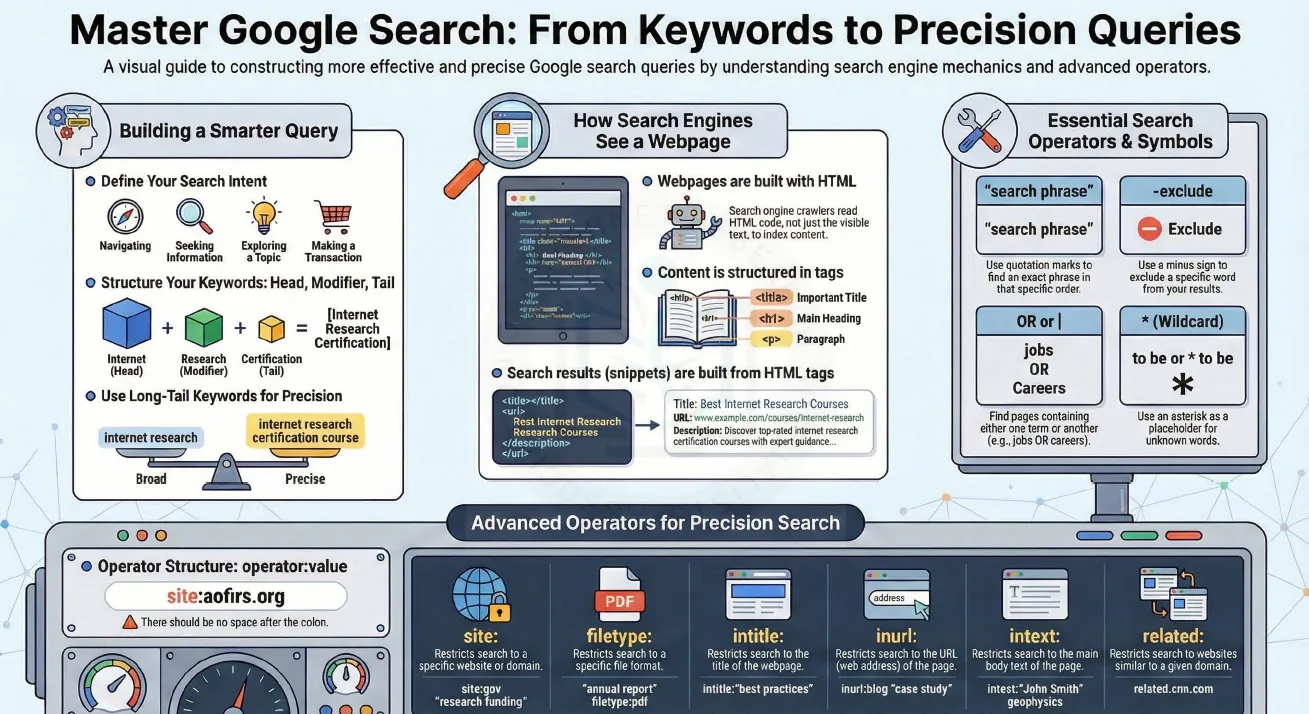
This guide follows the AOFIRS infographic Master Google Search: From Keywords to Precision Queries. It explains how crawlers read HTML, how to frame search intent, how to structure keywords, and how to combine core and advanced operators into precise, repeatable queries.
Learn more in the slides on The Art and Science of Precision Research and the research report Comprehensive Guide on Structured Query Building, Keywords and Advanced Google Search Operators.
Interactive presentation
How search engines see a webpage
Google’s crawlers do not look at a page the way you do. They read the underlying HTML code and index the text inside its tags. Some tags carry more weight than others because they describe what the page is about:
<title>– the page title, usually shown as the blue headline in results.<h1>– the main heading on the page.<p>– body paragraphs, where most of the detail lives.- The URL – the web address, which often contains descriptive words.
- The meta description – a short summary that Google may use beneath the headline.
Search result snippets are built from these elements. A result reading Best Internet Research Courses with the address example.com/courses/internet-research and a line about certification courses was assembled from the title tag, the URL and the description. Once you know this, operators such as intitle:, inurl: and intext: make sense: each one targets a specific part of the page’s code.
Building a smarter query
1. Define your search intent
Before typing, decide what kind of result you want. The infographic groups intent into four types: navigating to a known site, seeking information on a question, exploring a topic broadly, and making a transaction such as buying or registering. A query for a course’s official page is written differently from a query exploring what courses exist.
2. Structure keywords: head, modifier, tail
Strong queries have layers. The head is the core subject, the modifier narrows it, and the tail pins down the exact need. In internet research certification, “internet” is the head, “research” the modifier and “certification” the tail.
3. Use long-tail keywords for precision
Short queries are broad; long queries are precise. The progression internet research → internet research courses → internet research certification course moves from thousands of loosely related pages to a small set that match what you actually want.
Essential search operators and symbols
| Symbol | What it does | Example |
|---|---|---|
" " Quotation marks |
Finds an exact phrase in that specific order. | "internet research specialist" |
- Minus sign |
Excludes a specific word from results. | jaguar -car |
OR (or |) |
Finds pages containing either one term or another. Type OR in capitals. | jobs OR careers |
* Wildcard |
Acts as a placeholder for unknown words. | "to be or * to be" |
Advanced operators for precision search
Advanced operators follow one structure: operator:value. There must be no space after the colon. site:gov works; site: gov is treated as ordinary words.
| Operator | Restricts search to | Example |
|---|---|---|
site: |
A specific website or domain | site:gov "annual report" |
filetype: |
A specific file format | "research funding" filetype:pdf geophysics |
intitle: |
The title of the webpage | intitle:"best practices" |
inurl: |
The page’s web address | inurl:blog "case study" |
intext: |
The main body text of the page | intext:"John Smith" |
related: |
Websites similar to a given domain | related:cnn.com |
Note that Google has reduced support for related: in recent years, so treat it as an occasional aid rather than a dependable filter.
From vague to precise: a four-step protocol
| Step | Action | Query |
|---|---|---|
| 1. Start broad | State the subject. | internet research courses |
| 2. Lock the phrase | Quote the core concept. | "internet research" certification course |
| 3. Filter the source | Limit to a trusted domain or format. | "internet research" certification site:org filetype:pdf |
| 4. Remove noise | Exclude unwanted results and target the title. | intitle:certification "internet research" site:org -free |
Change one element at a time and compare results. That way you learn which filter actually improved the set, and you can document your search for others to repeat.
Watch: Google search tips and Boolean operators
Turn search skills into a credential
The Certified Internet Research Specialist (CIRS™) program teaches query building, research methods, source evaluation, AI-assisted research and verification as one structured workflow. Five online module exams lead to the AOFIRS CIRS certification.
Free resources
- The Search Query Matrix: Mastering Cross-Engine Syntax
- Engineering the Query: Advanced Information Retrieval
- From Chaos to Clarity: Mastering Google with Boolean Search
- Advanced Google Search Techniques course
Frequently asked questions
Why does my operator not work?
The most common cause is a space after the colon. Write site:gov, not site: gov. Also type OR in capital letters.
Can I combine several operators in one query?
Yes. For example, site:org filetype:pdf intitle:"annual report" combines domain, format and title filters. Add filters one at a time to see which helps.
What is the difference between intitle: and intext:?
intitle: searches only the page title tag; intext: searches the body text. Title matches are usually more relevant because the title describes the whole page.
Why are long-tail keywords more precise?
Each extra word narrows the meaning. A three- or four-word phrase describes a specific need, so fewer irrelevant pages match.
Do these techniques still matter with AI search?
Yes. AI summaries draw on indexed pages, and operators let you check the original sources yourself and find documents that AI answers may skip.
Published by the Association of Internet Research Specialists (AOFIRS).