Academic research fails quietly. A scholar who types a plain question into a search box gets the same algorithmic noise as everyone else: SEO-optimized summaries, content farms and AI-generated filler ranking above the primary sources that actually matter. The difference between a literature review built on evidence and one built on noise is rarely effort — it is technique. Knowing how search engines crawl, index and rank pages, and how to speak to them in their own query language, is what separates a professional search from a lucky one.
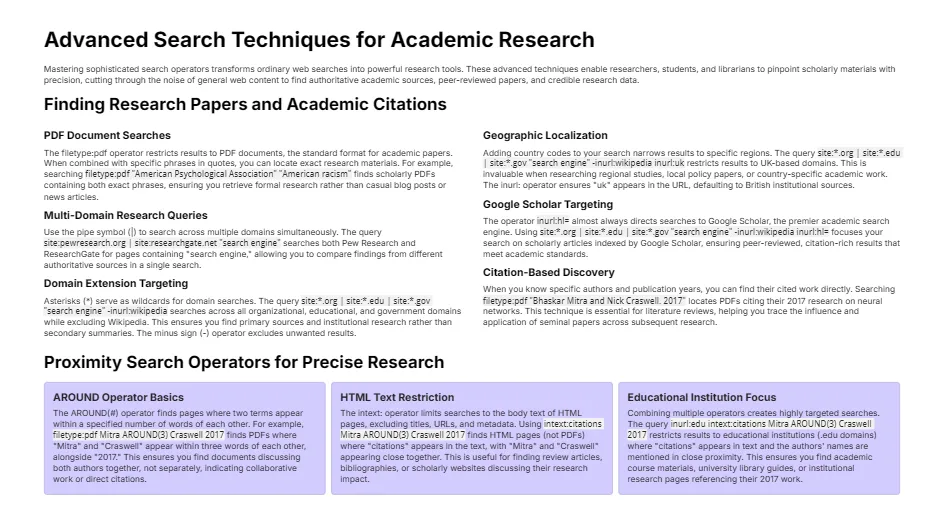
The Companion Guide
Read the full guide below, or download it to keep.
How Search Engines Actually Read a Page
Every academic search strategy rests on one fact: a search engine does not read pages the way you do. It crawls the raw HTML, extracts the text, titles, headings and metadata, and stores them in an index — a massive structured database. When you search, you are not searching the web; you are searching that index.
This has two practical consequences for researchers. First, if a document’s key terms never appear in its indexed text — buried in images, locked behind logins, or rendered only by scripts — a search engine cannot find them. Second, the elements that are indexed most reliably (titles, headings, URLs, anchor text) are exactly the elements advanced operators let you target directly.
The Operators That Matter Most for Academic Work
| Operator | What it does | Academic example |
|---|---|---|
site: |
Restricts results to one domain | site:who.int antimicrobial resistance |
filetype: |
Finds documents of one type | filetype:pdf systematic review meta-analysis |
intitle: / allintitle: |
Requires words in the page title | allintitle: cohort study vitamin D |
inurl: |
Requires words in the address | inurl:thesis machine learning |
intext: |
Requires words in the body text | intext:"sample size" randomized trial |
" " |
Exact phrase match | "randomized controlled trial" "intention to treat" |
- |
Excludes a term | mercury poisoning -planet -freddie |
OR |
Either of two terms | "climate change" OR "global warming" policy |
One rule trips up even experienced users: never put a space after the colon. site: who.int searches for the word “site”; site:who.int searches the World Health Organization’s website.
A Four-Step Protocol for High-Precision Evidence
- Define the evidence, not the topic. Before searching, decide what an acceptable answer looks like: a peer-reviewed study, a government dataset, a court filing. This determines your operators.
- Build the query in layers. Start with the exact phrase that would appear in an ideal source, then add one operator at a time — a domain restriction, a file type, a title requirement — until noise disappears.
- Search the specialized indexes. Google Scholar, PubMed, JSTOR, SSRN and government databases index material the general web does not. Run the same question through both general and specialist engines.
- Trace citations both ways. From one good paper, follow its references backward and its citations forward. One verified source is a map to twenty more.
Bypassing Algorithmic Noise
Ranking algorithms optimize for popularity and engagement, not accuracy. Researchers bypass them by making popularity irrelevant: exact phrases force literal matching, site: restrictions limit results to institutions with editorial standards, and filetype:pdf surfaces documents written for readers rather than clicks. The goal is not more results — it is fewer, better ones.
Watch: Google Advanced Search — intitle and allintitle
Become a Certified Internet Research Specialist
The CIRS program teaches the full operator language, academic database strategies and verification methods used by professional researchers.
Related Publications
Frequently Asked Questions
Why do advanced operators matter for academic research?
General searches rank pages by popularity, which buries primary sources under SEO content. Operators let you target titles, domains, file types and exact phrases — the elements where scholarly evidence actually lives.
What is the most useful operator for finding research papers?
Combining filetype:pdf with an exact phrase and a site: restriction to a university or government domain reliably surfaces working papers, theses and official reports.
Should I use Google or Google Scholar?
Both. Scholar indexes peer-reviewed literature; regular Google finds government reports, datasets, preprints and grey literature that Scholar misses. Professional researchers run the same question through both.
Why does a space after the colon break an operator?
Operators only work attached to their term. site:who.int restricts the domain; site: who.int is read as the ordinary word “site” followed by a separate search term.
How do I know if a source I found is trustworthy?
Trace it to its origin: who published it, whether it is the primary source or a summary, and whether independent sources corroborate it. Our guide to trust in online research covers the full verification protocol.