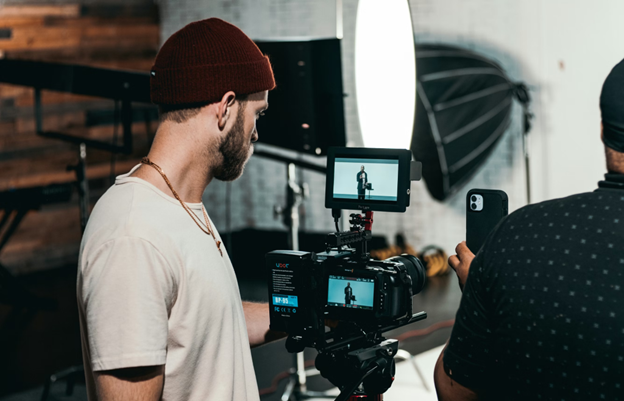
Creating professional video used to mean a lot of time. You needed a script, a camera, decent lighting, editing software, voiceover talent, and usually a few rounds of revisions that took longer than expected. For brands, creators, and small teams, that process often made video feel expensive, slow, and hard to scale.
But that is changing fast. Today, AI tools are making it easier to produce polished video content in a fraction of the time. Whether you are building marketing assets, social media clips, product explainers, or branded promos, you can now create videos from text with far less manual work than before.
How to Make Professional Videos Faster with AI Tools
Why Traditional Video Production Feels So Slow
Before we talk about AI, it helps to understand why video production becomes a bottleneck in the first place.
A typical workflow often includes:
- brainstorming and scripting
- filming or collecting footage
- recording voiceovers
- editing scenes
- adding subtitles, music, and effects
- exporting multiple versions for different platforms
Even simple projects can take days. More polished videos can take weeks. And if you need to publish regularly, test different messages, or create content for multiple channels, the process becomes overwhelming.
What AI Video Tools Actually Do
AI video tools are designed to automate parts of the video creation process that used to require manual effort. They can help you:
- generate videos from written scripts
- turn blog posts into video content
- create voiceovers automatically
- add subtitles and captions
- generate visuals or scenes
- create avatar-led videos
In other words, instead of building every frame by hand, you can use AI to handle the repetitive parts and focus more on the message itself.
This is why so many people now search for ways to make video from text. You start with words, and the tool helps turn them into a video that looks polished and ready to share.
The Fastest Way to Make Video From Text
If your goal is speed, text-based video creation is one of the smartest workflows available. Here is how it usually works.
Step 1: Start With a Clear Script
Everything begins with the script. The good news is that you do not need to write like a screenwriter. You just need a clear message.
A strong script usually includes:
- a hook in the first few seconds
- a clear problem or topic
- a simple explanation or solution
- a call to action
If you already have a blog post, product description, or ad copy, you can often repurpose that content and use it to make a video from text instead of starting from zero.
Step 2: Use AI to Generate the Visual Structure
Once your text is ready, AI tools can break it into scenes, match visuals to the script, and create a basic storyboard automatically.
This saves a huge amount of time. Instead of deciding manually what every sentence should look like on screen, the platform gives you a strong starting point that you can refine.
For marketers and content teams, this is where the workflow starts feeling dramatically faster.
Step 3: Add Voice, Captions, and Style
Most AI video platforms also let you choose voiceovers, subtitle styles, transitions, background music, and visual themes.
This is important because speed alone is not enough. A video still needs to feel polished.
The right AI tool helps you move quickly while keeping the final output professional enough for brand use, client work, or public-facing content.
Step 4: Export for Different Platforms
A professional video today usually needs more than one format. You may need a horizontal version for YouTube, a vertical version for Reels or TikTok, and a shorter cut for ads.
AI tools can simplify this process by resizing or adapting the content without forcing you to rebuild everything manually.
That is a major time-saver.
Why AI Helps You Create Professional Videos Faster
There is a reason this workflow is catching on so quickly. It solves several real problems at once.
It Reduces Manual Editing
Editing is where a lot of time disappears. AI can handle repetitive tasks like captioning, timing, transitions, scene suggestions, and voice syncing, which means less tedious work for you.
It Makes Content Repurposing Easy
One of the biggest advantages of AI is that it helps you get more value from content you already have.
For example, you can turn:
- a blog post into a short explainer
- product copy into a promo video
- a script into a social media clip
- an article into a voice-led presentation
That means you can make video from text you already wrote, instead of constantly creating new material from scratch.
It Helps Small Teams Move Like Bigger Teams
Not every business has a full production department. AI gives smaller teams a way to create polished videos without needing specialists for every step.
That is especially useful for startups, ecommerce brands, agencies, coaches, educators, and solo creators who need speed and consistency.
It Improves Testing and Output Volume
When video becomes faster to produce, you can test more ideas. You can try different hooks, different calls to action, different lengths, and different formats. That leads to better performance because you are no longer relying on one expensive creative asset to do all the work.
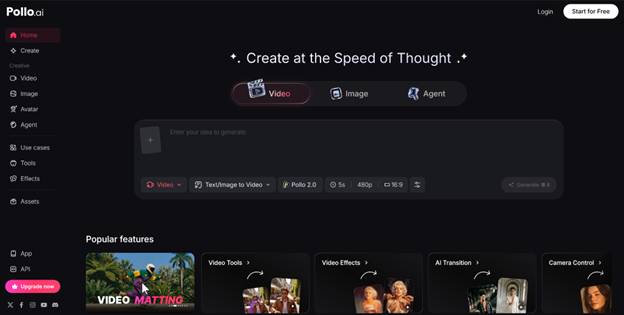
If you are looking for a practical tool to speed up video creation, Pollo AI is definitely worth checking out.
One reason it stands out is flexibility. It has a wide range of features, so whether you want to create a professional movie teaser or a fun birthday video, you can generate it with just one click. That makes it useful not only for marketers and businesses, but also for creators and everyday users who want fast, polished results without a complicated process.
AI Helps You Create Professional Videos Faster
Best Use Cases for AI Video Tools
AI video creation is especially effective in these scenarios:
Marketing Videos
Brands can produce promos, ads, launch videos, and product explainers much faster than with traditional production.
Social Media Content
Short-form content needs speed and volume. AI helps creators keep up without burning out.
Educational Videos
Coaches, course creators, and educators can turn scripts or lessons into video-based content quickly.
Internal Business Content
Teams can create training videos, onboarding materials, or presentations without a full production workflow.
Personal Video Projects
AI is not just for business. It can also be used for invitations, greetings, slideshows, and fun video gifts.
Tips to Make AI Videos Look More Professional
AI can save time, but quality still depends on how you use it.
Here are a few simple ways to get better results:
- keep your script concise and conversational
- use a strong opening line
- choose visuals that match the tone of the message
- avoid overloading the video with too much text
- add captions for accessibility and retention
- review the pacing before publishing
- customize enough so the final result does not feel generic
The best AI videos do not feel automated. They feel clear, intentional, and easy to watch.
Final Thoughts
If you want to create professional content without getting stuck in a slow production cycle, AI video tools are becoming hard to ignore.
They help you move faster, simplify editing, repurpose content, and scale your output without sacrificing quality. Most importantly, they make video creation more accessible to people who do not have a studio, a full team, or endless time.
That is why more businesses and creators are learning how to make video from text as part of their content workflow.
It is not just a shortcut. It is a smarter way to produce.
And if you want an option with plenty of creative flexibility, Pollo AI is a solid place to start—especially if you want everything from business-ready promos to fun personal videos generated quickly and easily.
In a world where video matters more every day, faster creation is no longer just helpful.
It is a serious advantage.