

Tor Browser is the best general-purpose choice for legitimate .onion research in 2026 because it combines Tor routing with browser-level anti-fingerprinting and session protections. On iPhone, Onion Browser is the practical Tor-oriented option, although Apple’s WebKit restrictions create additional limitations. Tails, Whonix, Qubes OS, I2P, Orbot and Mullvad Browser are useful, but they are not equivalent dark-web browsers.
Privacy tools change quickly. Browser releases, security fixes, network protocols and supported platforms should be confirmed against official project documentation before sensitive research begins. The release information below was checked on the official project pages on 9 November 2026.
Key Takeaways
- Tor Browser remains the recommended default for most legitimate .onion browsing.
- A privacy browser is not automatically an anonymity browser.
- Tails, Whonix and Qubes OS are not browsers. They are operating environments that can run Tor Browser.
- I2P is an anonymity network, not a browser, and .i2p services are different from Tor .onion services.
- Orbot is a routing application, not a web browser.
- Mullvad Browser provides strong anti-fingerprinting protections but does not use Tor by default.
- Brave’s Tor Window provides Tor connectivity, but Brave itself does not treat it as equivalent to Tor Browser.
- No browser can guarantee complete anonymity. Software, identity handling, downloads, device security and user behaviour all matter.
Best Tools at a Glance
| Tool | Correct classification | Direct .onion access | Best for |
|---|---|---|---|
| Tor Browser | Dedicated anonymity browser | Yes | Most Tor and onion research |
| Onion Browser | Tor-oriented iOS browser | Yes | iPhone/iPad access |
| Brave Tor Window | Tor-enabled browser mode | Yes | Occasional lower-risk Tor access |
| I2P + browser profile | Anonymity network + configured browser | No, uses .i2p | I2P research |
| Tails + Tor Browser | Portable live OS | Yes, through Tor Browser | Temporary research sessions |
| Whonix + Tor Browser | VM-based security environment | Yes | Network isolation |
| Qubes-Whonix | Compartmentalised operating environment | Yes | High-separation workflows |
| Mullvad Browser | Privacy browser | No by default | Anti-fingerprinting on the regular web |
| LibreWolf | Privacy-hardened Firefox fork | No by default | Everyday privacy |
| Orbot | Tor routing/proxy application | Not by itself | Routing supported mobile apps through Tor |
The comparison uses documented features and limitations. Which tool suits a task depends on the risks to the researcher, device, and data.
How We Evaluated These Tools
We evaluated the options using documented, observable criteria rather than hands-on benchmarks, which we did not run.
The review considered:
- correct technology classification,
- active maintenance,
- official release information and update practices,
- direct .onion or .i2p support,
- routing architecture,
- browser fingerprint protections,
- supported platforms,
- environment isolation,
- update practices,
- complexity,
- mobile availability,
- intended threat model,
- limitations disclosed by the developers.
What Is a Dark Web Browser?
A dark web browser is best understood as a browser that can correctly access services on an anonymity network while providing privacy protections appropriate to that network. For Tor, the principal example is Tor Browser. AOFIRS also explains mainstream web browsers and their features.
The phrase is often used too broadly. Five different technologies are regularly mixed together:
Browser
A browser renders web content. Example: Tor Browser.
Anonymity or Overlay Network
A network provides routing and addressing infrastructure. Examples: Tor and I2P. Tor is therefore not the same thing as Tor Browser.
Routing or Proxy Application
A routing application sends supported application traffic through a network. Example: Orbot.
Operating System or Security Environment
An operating environment can isolate applications, control networking or reduce traces left on a computer. Examples: Tails, Whonix and Qubes OS.
Privacy Browser
A privacy browser may block trackers, reduce telemetry and resist fingerprinting without changing the user’s network route through Tor. Examples: Mullvad Browser and LibreWolf.
This distinction matters because privacy, anonymity, security and operational security are related but separate goals.
Deep Web vs. Dark Web: What Is the Difference?


The deep web is not the dark web.
| Area | Meaning | Special network required? | Examples |
|---|---|---|---|
| Surface web | Publicly accessible content that conventional search engines can normally crawl | No | Public websites, news pages |
| Deep web | Content that is not publicly indexed or requires authentication | Usually no | Email, academic databases, corporate systems, subscriptions |
| Dark web | Services intentionally reachable through privacy-preserving overlay networks | Usually yes | Tor .onion and I2P .i2p services |
A private university database or email inbox is part of the deep web, but it does not require Tor. This is why the phrase “dark web browser” is often misleading: a normal browser already accesses enormous amounts of deep-web content after authentication. For a step-by-step approach to safe access, see AOFIRS’s How to Access the Deep Web Safely. For background, see deep web research tools.
Best Dark Web Browsers and Privacy Tools in 2026

1. Tor Browser — Best Overall for Accessing Onion Services
Classification: Dedicated anonymity browser · Network access: Tor and .onion services · Platforms: Windows, macOS, Linux, Android
Best for: Most legitimate .onion browsing, privacy-conscious investigation and Tor-based internet research.
The Tor Project maintains Tor Browser, which is based on Mozilla Firefox ESR and includes extensive modifications for Tor routing, privacy and fingerprint resistance.
The Tor Project published Tor Browser 16.0 on October 29, 2026, based on Firefox ESR 153. Check its release page for newer security updates.
Tor Browser routes browser traffic through the Tor network so a destination website normally sees the Tor connection rather than the user’s ordinary public IP address. It also modifies browser behaviour to make Tor Browser users more difficult to distinguish from one another.
Important Privacy Features
- Tor routing
- Native .onion access
- Session-oriented browsing
- Fingerprinting resistance
- Letterboxing
- User-agent normalisation
- First-party isolation
- NoScript integration
- HTTPS-Only support
- Standard, Safer and Safest security levels.
A useful correction concerns browser-window resizing. Older advice often tells users never to maximise Tor Browser. Modern Tor Browser includes letterboxing, which groups window dimensions into standardised buckets and is designed to reduce fingerprinting even when users resize or maximise the window. In Tor Browser 16.0 the letterboxing setting moved to the Appearance pane (Tor Project, 2026a).
Tor also advises against installing additional browser extensions because they can bypass Tor or weaken privacy (Tor Project).
Limitations
Tor cannot stop someone from identifying themselves voluntarily.
Logging into a personally identifiable account, entering a real name or email address, opening downloaded files while online, or otherwise mixing identities can defeat the intended anonymity. The Tor Project states that perfect anonymity is generally impossible, even with Tor (Tor Project).
2. Onion Browser — Best Tor-Oriented Browser for iPhone and iPad
Classification: Tor-oriented iOS browser · Network access: Tor and .onion services · Platforms: iPhone and iPad
Best for: iOS and iPadOS users who require legitimate .onion access.
The Tor Project does not offer its Tor Browser for iOS. Onion Browser uses WebKit and has a different set of browser-level protections.
Onion Browser is an open-source Tor-oriented browser for Apple’s mobile platforms. Its FAQ explains that WebKit offers fewer ways to control proxying and tracking than the Firefox engine used by Tor Browser, that the built-in Tor mode can leak a real IP address through WebRTC, and that audio and video streams cannot be tunnelled through Tor (Onion Browser).
Onion Browser’s release notes describe privacy fixes in the 3.4 series. Check those notes and the project FAQ for current limitations and updates.
The FAQ also describes Orbot as the safer routing option and the built-in Tor as the more stable one (Onion Browser).
Best Use Case
Use Onion Browser when legitimate Tor access must happen on an iPhone or iPad and moving the task to a supported desktop or Android Tor Browser environment is impractical.
Limitation
For high-risk investigations, do not assume an iPhone provides the same threat model as Tor Browser running in a purpose-built desktop or Android environment.
3. Brave Private Window with Tor — Best for Convenient, Lower-Risk Tor Access
Classification: Tor-enabled browser mode · Network access: Tor, through a private window that uses Tor as a proxy · Platforms: Desktop
Best for: Occasional Tor access when convenience matters more than achieving the Tor Browser anonymity profile.
Brave includes a Private Window with Tor Connectivity on desktop.
This feature is often called a “Tor browser”, but Brave’s documentation makes a crucial distinction: these are regular private windows that use Tor as a proxy, and they do not include most of the privacy protections found in Tor Browser. Brave highly recommends Tor Browser when a person’s safety depends on anonymity (Brave).
Check Brave’s release notes and help center for current availability and platform support.
Choose Brave Tor Window When
- the task is lower risk,
- you want occasional access without installing another browser,
- you understand that Tor routing and Tor Browser-style anonymity are not the same thing.
Do Not Treat It as a Full Replacement When
- protecting a source,
- conducting high-risk investigative work,
- operating under targeted surveillance,
- anonymity failures could create personal or professional harm.
4. I2P + Dedicated Browser Profile — Best for Researching the I2P Network
Classification: Anonymity network + browser profile · Network access: I2P services · Platforms: Windows, macOS, Linux
Best for: Research involving .i2p services rather than Tor .onion services.
I2P, the Invisible Internet Project, is an anonymity network. It is not a browser.
I2P supports its own services and addresses. Consult the official project documentation for supported platforms and how its tools are maintained.
I2P’s project blog lists router updates and security fixes. Use the release notes to confirm which version is supported.
Important Difference From Tor
Tor and I2P are separate networks.
- Tor onion services use .onion.
- I2P services commonly use .i2p.
- A Tor Browser session does not automatically make .i2p services available.
- I2P does not become a Tor browser simply because a browser is used as its interface.
5. Tails + Tor Browser — Best Portable Research Environment
Classification: Portable live operating system · Network access: .onion via Tor Browser · Platforms: Bootable x86-64 computers
Best for: Temporary research sessions where reducing local persistence is part of the threat model.
Tails is not a browser.
Tails is a portable operating system designed around privacy and censorship resistance. It can be started from removable media and includes Tor Browser as its primary web-browsing environment.
Tails 7.16 included Tor Browser 16.0. Check the Tails project’s release notes for subsequent security updates.
Why Researchers Use It
A normal browser leaves information inside the host operating system: browser profiles, caches, logs, thumbnails, temporary files and other artefacts.
Tails addresses a broader problem by creating a temporary operating environment intended to reduce local persistence when used properly.
Important Limitation
A portable operating system cannot make compromised hardware trustworthy.
Tails is therefore appropriate when its properties match the research threat model, not because it is automatically “safer” than every other approach.
6. Whonix + Tor Browser — Best for Network Isolation
Classification: VM-based security environment · Network access: .onion via Tor Browser · Platforms: VirtualBox and KVM hosts, and Qubes
Best for: Researchers who need stronger separation between the Tor networking layer and the workspace where applications run.
Whonix is not a browser. Its architecture commonly uses:
- Whonix-Gateway, which handles Tor networking; and
- Whonix-Workstation, where applications such as Tor Browser operate.
The Workstation is separated from ordinary direct networking so applications do not simply choose a direct internet path.
The Whonix project lists VirtualBox, KVM, and Qubes among its supported environments. Its release announcements document maintenance updates for Whonix 18.
Why It Matters
Tor Browser protects the browsing application. Whonix extends the defensive architecture to the networking environment surrounding the browser.
Limitation
Whonix introduces virtualisation, system administration and operational complexity. More complexity does not automatically mean more security if users cannot maintain the environment correctly.
7. Qubes-Whonix — Best for Compartmentalised Research
Classification: Compartmentalised environment · Network access: .onion via Tor Browser · Platforms: Compatible x86-64 computers
Best for: Advanced investigative workflows in which identities, documents, communications and browsing activities should be separated into different compartments.
Qubes OS is a security-focused operating system built around isolated compartments known as qubes.
When combined with Whonix, researchers can run Tor-based activities in isolated Whonix qubes while keeping ordinary work in separate compartments. Qubes documentation illustrates research and journalism scenarios using Whonix and disposable environments.
Qubes OS 4.3.2 was announced on October 2, 2026. Check the project’s current release and support notices before setting up a research environment.
Principal Advantage
Compartmentalisation assumes that failures can happen. Instead of relying entirely on one browser or application never being compromised, the design attempts to contain the effect of a compromise within a limited environment.
Limitation
Qubes-Whonix has a substantial learning curve and hardware requirements. It is unnecessary for most users who simply need legitimate Tor browsing.
8. Mullvad Browser — Best Anti-Fingerprinting Browser for the Regular Web
Classification: Anti-fingerprinting privacy browser · Network access: Regular web; no Tor by default · Platforms: Windows, macOS, Linux
Best for: Researchers who need strong browser-fingerprinting resistance without routing their browsing through Tor.
Mullvad Browser was built by the Tor Project at Mullvad’s request. The Tor Project describes the relationship as a narrowly scoped technical collaboration to develop the browser; Mullvad is also a funder of the Tor Project through its membership programme (Tor Project).
The critical distinction is simple: Mullvad Browser incorporates Tor Browser-style fingerprinting defences but does not use the Tor network. Mullvad describes it as “a Tor Browser without the Tor Network”. It works with or without a VPN, has no telemetry, uses private mode by default and includes uBlock Origin (Mullvad).
Check the project’s release page for the current stable version and applicable security updates.
Choose It When
- researching on the normal web,
- reducing fingerprinting is important,
- you want standardised browser characteristics,
- Tor latency or Tor exit addresses are unsuitable for the task.
Do Not Choose It Because
You expect it to automatically conceal your public IP address through Tor.
9. LibreWolf — Best Hardened Firefox Alternative
Classification: Privacy-hardened Firefox fork · Network access: Regular web; no Tor by default · Platforms: Windows, macOS, Linux, OpenBSD
Best for: Everyday research where users want stronger privacy defaults than standard Firefox but do not require Tor routing.
LibreWolf is an independent, customised build of Firefox that emphasises privacy, security and user freedom. The project aims to resist tracking and fingerprinting, removes telemetry and data collection, and includes uBlock Origin (LibreWolf).
Why It Belongs in This Guide
People frequently search for “Tor Browser alternatives” when their actual goal is ordinary-web privacy, not .onion access. LibreWolf can be useful in that context. See the AOFIRS guide to private search engines.
Why It Is Not a Dark-Web Browser
LibreWolf does not route ordinary browsing through Tor by default and therefore does not provide Tor’s network-level anonymity.
Manually turning an ordinary Firefox-derived browser into a Tor Browser substitute is not recommended. The Tor Project warns that non-Tor browsers may expose identifying information through DNS, WebRTC, fonts, plugins, cookies, cache and other browser characteristics.
10. Orbot — Best Tor Routing Companion for Mobile Applications
Classification: Tor routing/proxy application · Network access: Routes supported apps, including to onion services · Platforms: Android and iOS
Best for: Routing supported mobile applications through Tor when browser-only Tor access is not enough.
The Guardian Project maintains Orbot, a free and open-source app that routes traffic from other apps through the Tor network; on Android, users can choose which apps use it (Guardian Project). It is not a browser.
On Android, users who only need web browsing should generally start with the official Tor Browser for Android rather than assembling a custom browser-plus-proxy configuration. Orbot becomes more relevant when other supported applications need to route their connections through Tor. On iOS, Onion Browser’s documentation also discusses Orbot as part of its Tor-routing options.
Limitation
Routing an application through Tor does not automatically give that application Tor Browser’s fingerprinting and application-level privacy defences.
This is a recurring principle: network routing and browser anonymity protections are separate layers.
Which Option Should Researchers Choose?
| Research scenario | Recommended starting point | Why |
|---|---|---|
| Beginner visiting legitimate onion services | Tor Browser | Official, maintained and purpose-built |
| OSINT researcher | Tor Browser in a dedicated research workflow | Strong balance of usability and isolation |
| Investigative journalist | Tor Browser; Tails or Whonix when the threat model warrants it | Allows escalation beyond browser-only protection |
| Cybersecurity analyst | Organisationally approved isolated environment | Research evidence and unknown content may require containment |
| Research on approved shared hardware | Follow the organisation’s device policy | A portable OS cannot establish hardware trust |
| User requiring strong compartmentalisation | Qubes-Whonix | Separates identities and workflows |
| iPhone/iPad user | Onion Browser, understanding WebKit limits | Practical iOS Tor-oriented option |
| Android user | Official Tor Browser for Android | Maintained by the Tor Project |
| User facing Tor censorship | Tor Browser with official bridge/circumvention options | Bridges are purpose-built for blocked networks |
| Regular-web anti-fingerprinting | Mullvad Browser | Strong fingerprinting defences without Tor routing |
Choose the tool based on what the research needs to protect. For complementary discovery tools, see the AOFIRS guide to cybersecurity and OSINT search.
Tor Browser vs. a Privacy Browser
A privacy browser and an anonymity browser solve different problems.
| Privacy layer | What it addresses | Example |
|---|---|---|
| Tracker blocking | Advertising and cross-site tracking | Brave, Firefox, LibreWolf |
| Fingerprint resistance | Browser/device identification | Mullvad Browser, Tor Browser |
| Local session privacy | History and cookies on the device | Private browsing modes |
| IP/network anonymity | Hiding the direct network path from the destination | Tor Browser |
| System isolation | Containing applications and research identities | Whonix, Qubes |
| Reduced local persistence | Reducing traces on the host system | Tails |
Using incognito mode, blocking advertisements or disabling telemetry does not automatically hide the public IP address. Mozilla states that a Firefox private window does not make a user anonymous online, that activity may still be visible to sites, internet providers or an employer, and that it does not hide the IP address or location (Mozilla).

Are Tails, Whonix and Qubes OS Dark Web Browsers?
No. They can all support Tor-based browsing, but each operates at a different layer:
- Tails is a portable live operating system.
- Whonix is a virtualised anonymity/security environment.
- Qubes OS is a compartmentalised operating system.
- Tor Browser is the browser.
Calling all four “dark web browsers” hides the most important difference: Tor Browser protects the browser workflow; the operating environments try to protect or isolate a larger part of the computer system.
What Is the Difference Between Tor and I2P?
Tor and I2P are separate anonymity networks. Tor is widely used both for anonymous access to the public web and for .onion services. I2P is designed around its own internal network and .i2p destinations, and its documentation shows users how to configure a browser to use its proxy (I2P). Neither should be treated as a simple interchangeable “browser alternative.”
Do You Need a VPN With Tor?
Tor Browser can operate without a VPN. The Tor Project advises that adding a VPN can change the trust assumptions of the connection and requires careful evaluation.
For users dealing with blocked Tor connections or censorship, Tor bridges and pluggable transports are purpose-built options. Current Tor circumvention technologies include obfs4, Snowflake and WebTunnel.
A VPN changes which intermediary sees the user’s initial network connection. It does not automatically make Tor “twice as anonymous.”
Incognito Mode vs. Anonymous Browsing
Incognito or private browsing primarily affects what is stored locally and how session information is handled. It does not inherently hide:
- the user’s public IP address,
- activity from an ISP,
- activity from an employer or network administrator,
- information voluntarily submitted to a website,
- every browser fingerprinting signal.
Tor Browser addresses a different layer by routing traffic through Tor and adding fingerprinting defences.
AI-Assisted Dark-Web Research in 2026
AI search and research systems can help researchers with:
- document summarisation,
- translation,
- entity extraction,
- terminology expansion,
- research-question generation,
- classification,
- link-analysis preparation,
- comparison of public security advisories,
- triage of legally acquired research material.
They should not be treated as trust authorities for onion addresses, software versions or security claims. AI answers and their citations can be incomplete, out of date or wrong, so check every important point against the underlying source. An AI model can also produce a syntactically plausible but invalid or malicious .onion address.
A responsible workflow is:
AI-assisted discovery → authoritative documentation → independent verification → research conclusion
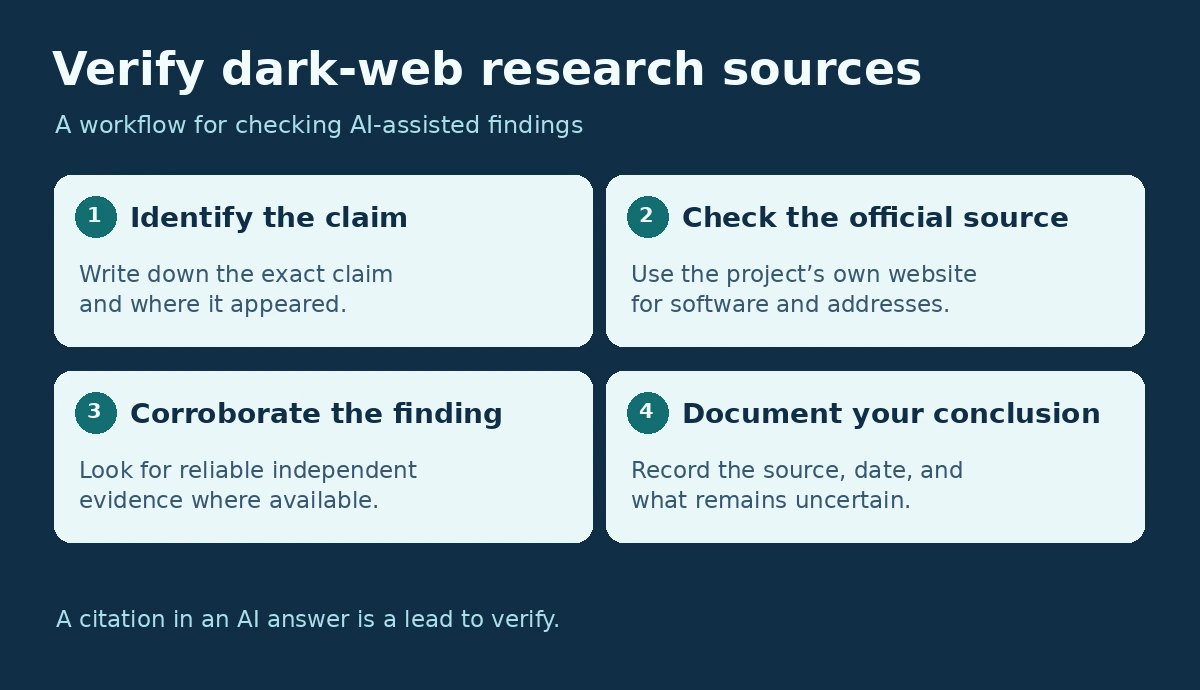
For professional work, require source verification before using an AI-assisted claim in a report or forwarding a sensitive address.
Ethical Research and Safety Checklist

For legitimate professional or academic research:
- Download software only from official project sources.
- Follow official package or signature-verification guidance where appropriate.
- Keep browsers, operating systems and network software updated.
- Separate professional research identities from personal accounts.
- Avoid unnecessary browser extensions.
- Treat unknown links, files, forms and scripts as untrusted.
- Avoid downloading unknown files unless an approved research workflow specifically requires it, and do not open downloaded documents while online.
- Do not assume a search result or AI-generated address is legitimate.
- Use an organisationally approved research environment for professional investigations.
- Use Tor security levels according to the threat model rather than applying extreme settings without understanding the usability trade-off.
- Use bridges when censorship or Tor blocking is the actual problem.
- Follow applicable law, organisational policy and research ethics.
- Do not access, download, retain or redistribute illegal material.
- Never assume Tor provides perfect anonymity.
Document approval and handling requirements before collecting sensitive research material.
Tools That Should Not Be Treated as Full Tor Browser Replacements
Chrome, Edge and Safari
These are conventional browsers. Private modes do not turn them into Tor Browser.
Firefox
Firefox provides valuable privacy controls and is the technical foundation for Tor Browser, but ordinary Firefox is not Tor Browser. The Tor Project discourages manually routing conventional browsers through Tor as a replacement.
Mullvad Browser
A strong anti-fingerprinting browser, but it does not route through Tor.
LibreWolf
A privacy-oriented Firefox derivative, but with no built-in network anonymity.
Brave Tor Window
A useful Tor routing feature, but Brave acknowledges that it lacks most Tor Browser privacy protections.
VPN
A VPN changes network routing and trust relationships. It does not itself provide native .onion access or Tor Browser’s fingerprinting protections.
Orbot
A Tor routing application, not a browser.
Tails, Whonix and Qubes
Security or privacy environments that can run Tor Browser, not independent browsers.
Frequently Asked Questions
What is a dark-web browser?
A dark-web browser is software configured to access services on a privacy-preserving network such as Tor. Tor Browser is the principal example for .onion services because it combines Tor routing with browser-level privacy and fingerprinting protections.
Which dark-web browser is safest?
For most legitimate users, Tor Browser is the strongest general-purpose starting point because the Tor Project builds and maintains it. “Safest” still depends on the threat model. Higher-risk researchers may need system-level isolation through tools such as Tails or Whonix.
Is Tor Browser legal to use?
Rules vary by jurisdiction and by activity. Check applicable laws and organisational policies before beginning a project.
Is the dark web the same as the deep web?
No. The deep web includes ordinary content that is not publicly indexed, such as email, databases and private portals. The dark web consists of intentionally hidden services accessed through specialised anonymity networks such as Tor or I2P.
Can Chrome, Firefox or Safari open onion sites?
They do not natively provide Tor Browser’s .onion access and anonymity protections. Although some browsers can technically be routed through Tor, the Tor Project recommends Tor Browser because ordinary browsers can expose identifying information.
Can a VPN access the dark web?
A normal VPN does not by itself provide native .onion access. Tor Browser supplies the required Tor routing and onion-service support. A VPN is also not required for Tor Browser.
Does incognito mode make browsing anonymous?
No. Incognito or private browsing mainly limits local history and session persistence. It does not conceal the user’s IP address from websites or make activity invisible to an ISP, workplace or network administrator.
Is Brave’s Tor Window equivalent to Tor Browser?
No. Brave routes its special private window through Tor, but Brave says it does not include most Tor Browser privacy protections and recommends Tor Browser when personal safety depends on anonymity.
Are Tails and Whonix browsers?
No. Tails is a portable live operating system. Whonix is a virtualised security and anonymity environment. Both can use Tor Browser, but neither is a conventional web browser.
What is the best onion browser for iPhone?
Onion Browser is a practical, open-source, Tor-oriented option for iOS and iPadOS. Apple’s WebKit restrictions mean it cannot reproduce all Tor Browser protections, so higher-risk users should read its current limitations before relying on it.
What is the best Tor option for Android?
The official Tor Browser for Android is the recommended starting point for web browsing. Orbot is useful when other supported Android applications need their traffic routed through Tor.
Can dark-web activity ever be completely anonymous?
No. The Tor Project states that perfect anonymity is generally impossible, even with Tor. Browser vulnerabilities, personal-account use, behavioural mistakes, downloaded files, endpoint compromise and advanced traffic analysis can all affect a user’s threat model.
Final Recommendation
For most legitimate dark-web research in 2026, Tor Browser is the correct starting point because it combines Tor routing, native onion-service support and browser protections designed specifically for anonymity. Onion Browser fills the iOS gap with important WebKit limitations, while Brave’s Tor Window offers convenient but weaker Tor integration. I2P belongs to a separate anonymity ecosystem. Tails, Whonix and Qubes-Whonix become relevant when the research threat model extends beyond the browser into persistence, network isolation or compartmentalisation. Mullvad Browser and LibreWolf are useful privacy browsers for the regular web, not substitutes for Tor Browser. The most important principle is not to search for the product that claims the “highest anonymity”, but to select the correct technology layer for the research task, keep it updated, and combine it with disciplined source verification and operational security.
References
- Brave. What is a Private Window with Tor Connectivity? Brave Help Center. Brave Tor Window guide
- Brave. (2026). Release notes: Desktop v1.99.55 (5 November 2026). Brave release notes
- Guardian Project. Orbot: Tor VPN for smartphones. Orbot project
- I2P. Web browser configuration. I2P documentation. I2P browser documentation
- I2P. (2026). I2P blog [I2P 2.14.1 release, 4 November 2026; 2.14.0, 20 October 2026]. I2P release news
- LibreWolf. LibreWolf. LibreWolf project
- Mozilla. How Private Windows protect you. Firefox Help. Firefox private browsing
- Mullvad. Mullvad Browser. Mullvad Browser project
- Mullvad. (2026). mullvad-browser releases [15.0.24, 30 September 2026]. GitHub. Mullvad Browser releases
- Onion Browser. FAQs. Onion Browser FAQ
- Onion Browser. (2026). OnionBrowser releases [v3.4.1, 11 August 2026; v3.4.4, 19 October 2026]. GitHub. Onion Browser releases
- Pichai, S. (2026, May 19). I/O 2026: Welcome to the agentic Gemini era. Google, The Keyword. Google I/O keynote
- Qubes OS Project. (2026). News [Qubes OS 4.3.2 released, 2 October 2026; Qubes OS 4.2 end of life, 21 June 2026]. Qubes OS news
- Tails. (2026). News [Tails 7.16; Tails 7.15.1]. Tails release news
- Tor Project. (2026a, October 29). New release: Tor Browser 16.0. Tor Blog. Tor Browser 16 release
- Tor Project. (2026b). Tor Blog [New release: Tor Browser 15.0.26, 21 October 2026; New release: Tails 7.16, 30 October 2026]. Tor Project news
- Tor Project. Am I totally anonymous if I use Tor Browser? Tor Support. Tor anonymity guidance
- Tor Project. What is the relationship between Mullvad VPN and the Tor Project? Tor Support. Tor Mullvad collaboration
- Tor Project. Using Tor Browser with a VPN. Tor Support. Tor VPN guidance
- Whonix. (2026a, July 17). Whonix 18.2.1.9 point release. Whonix Forum. Whonix point release
- Whonix. (2026b). Whonix announcements channel [Whonix 17 end of security support and deprecation notice]. Telegram. Whonix announcements
- Whonix. Download. Whonix Wiki. Whonix platform documentation