What Is Boolean Search?
Boolean search is a structured search method that uses operators such as AND, OR, and NOT to control and refine search results. It allows researchers, analysts, and investigators to retrieve highly relevant information while eliminating noise and irrelevant data.
This technique is widely used in:
- Online research and digital intelligence
- OSINT investigations
- Academic databases
- Legal and journalistic research
- Recruitment and professional profiling
Why Boolean Search Matters in Modern Research
In an environment driven by AI, big data, and information overload, simple keyword searches are no longer enough.
Boolean logic helps you:
- Find precise and relevant sources faster
- Reduce time spent filtering irrelevant results
- Discover hidden relationships between topics
- Build repeatable and defensible research methodologies
For intelligence professionals and certified researchers, Boolean search is not just a skill—it is a core analytical capability.
Ever feel like you’re shouting into the void of a search engine? You type in a few keywords, hit Enter, and get hit with a tidal wave of millions of results—most of which are completely useless. If you’re tired of wading through irrelevant information, whether for a school paper, a work project, or just to find a specific fact, there’s a better way. Standard searching forces you to rely on an algorithm’s guess about what you want. It’s time to stop guessing and start commanding.
To get past these limits, you need to learn how to speak the language of search engines and databases. This isn’t a language of vague questions, but one of precise, logical commands. This is the power of Boolean search. It’s a system that lets you connect your keywords with simple operators to broaden, narrow, and fine-tune your queries with incredible control. Learning this skill will fundamentally change how you find information online. You’ll go from being a passive searcher to an active commander of your results.
The Unlikely Genius: George Boole and the Algebra of Thought
You might be surprised to learn that the secret to better searching in the 21st century comes from a 19th-century, self-taught English mathematician named George Boole. Born to a shoemaker in 1815, Boole was a prodigy who, despite lacking a formal university education for much of his early life, became a major figure in mathematics. To support his family, he opened his own school at just 19 years old, all while teaching himself advanced math and publishing in top journals.
Boole’s game-changing idea was to argue that logic, which had always been part of philosophy, should really be a branch of mathematics. In his groundbreaking books, The Mathematical Analysis of Logic (1847) and An Investigation of the Laws of Thought (1854), he laid out a system to do just that. He created a new type of algebra—now called Boolean algebra—that used symbols to formalize logical reasoning. His dream was to create a “calculus of deductive reasoning” that could analyze logical statements with mathematical precision.
For nearly 100 years, Boole’s work was seen as a brilliant but purely theoretical exercise. That all changed in 1937, thanks to a young MIT student named Claude Shannon. Shannon, who had studied both engineering and philosophy, had a flash of insight. He realized that Boole’s binary logic (where things are either true or false, 1 or 0) was the perfect way to describe the electrical switches in telephone circuits, which were either on or off.
Shannon proved that you could arrange these switches according to Boolean algebra to build circuits that could solve incredibly complex logical problems. This single idea became the foundation for the digital logic circuits inside every computer, smartphone, and server today. So, when you use Boolean operators like AND, OR, and NOT, you’re not just using a “search hack”—you’re speaking the fundamental language of the digital world itself.
The Core Boolean Operators

Beyond Keywords: Mastering the logic of Boolean Search
AND → Narrows Your Search
Returns results that include all specified terms.
Example:
digital intelligence AND OSINT
Use this when you need highly focused results.
OR → Expands Your Search
Returns results that include any of the specified terms.
Example:
OSINT OR "open source intelligence"
Ideal for synonyms, variations, and multi-terminology fields.
NOT → Excludes Unwanted Results
Removes specific terms from your search.
Example:
jaguar NOT car
This is essential for eliminating irrelevant meanings.
Advanced Boolean Techniques
Use Quotation Marks for Exact Matches
Example:
"online research methodology"
This ensures the words appear together in the exact order.
Group Terms with Parentheses
This creates structured and logical search queries.
Example:
("digital intelligence" OR OSINT) AND training
Combine Operators for High-Precision Queries
Example:
("online research" OR OSINT) AND (certification OR training) NOT free
This type of structured string is used in professional-level investigations.
Boolean Search for Different Platforms
Use for:
- Advanced web research
- File discovery
- Academic content
Example:
"Boolean search" filetype:pdf
Academic Databases
Perfect for:
- Peer-reviewed literature
- Structured research frameworks
Example:
("information retrieval" AND methodology)
Social Media & OSINT Investigations
Used to:
- Identify digital footprints
- Track narratives
- Map networks
The Pillars of Boolean Logic: The Three Core Operators
At the heart of Boolean search are three simple words that act as powerful commands: AND, OR, and NOT. These operators give you direct control over the relationship between your keywords, allowing you to master the art of precision searching.
AND: The Power of Intersection (Narrowing Your Search)
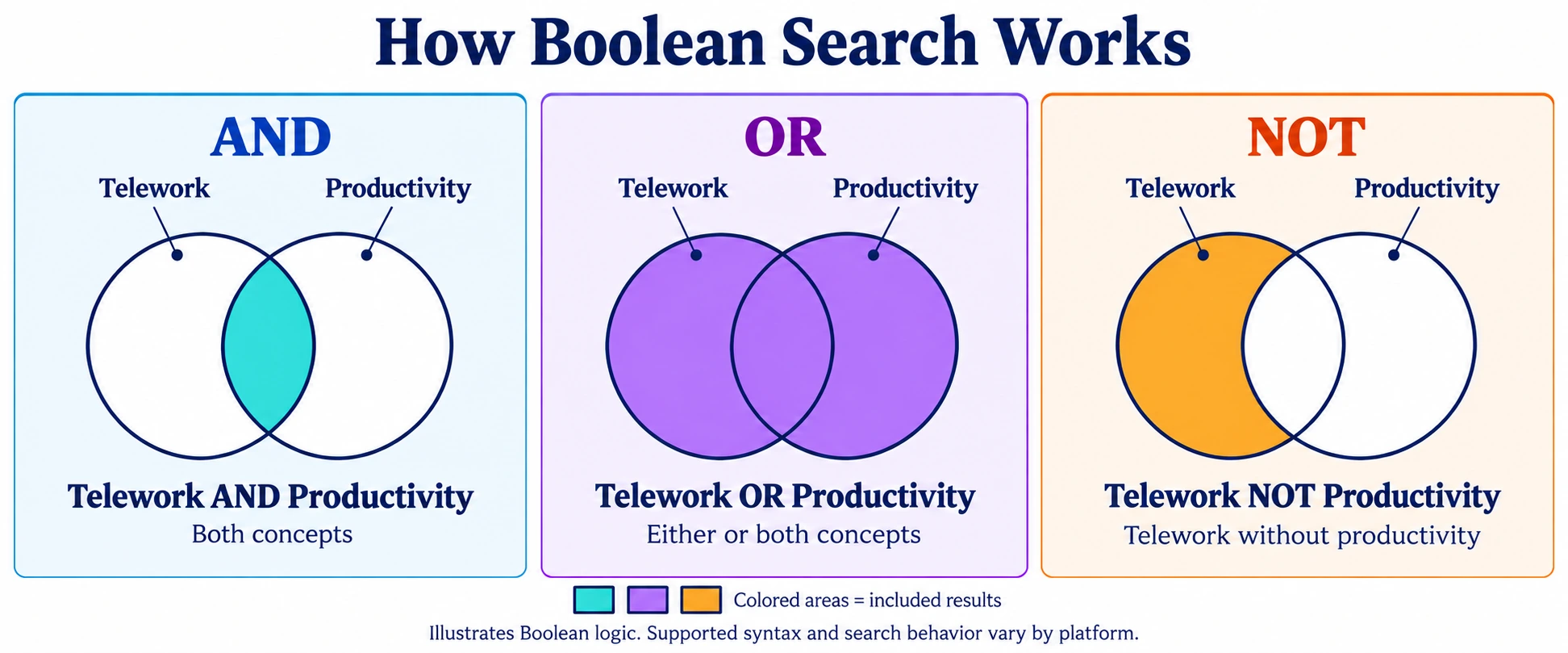
AND is your tool for precision. Use it to narrow your search by telling the database to only show you results that contain all of your keywords. When you link different concepts with AND, you’re looking for the sweet spot where they overlap.
Think of it like ordering Neapolitan ice cream. If you ask for Strawberry AND Chocolate, you’ll only be happy with a scoop that has both flavors. A scoop with just strawberry or just chocolate won’t cut it. In a Venn diagram, this is the overlapping area between two circles—the shared space where both concepts exist.
- Example: A search for cats AND dogs will only give you documents that mention both animals. Anything that only talks about cats or only talks about dogs will be excluded.
- How to use it: This is perfect for combining different topics to find specific information, like “climate change” AND policy or marketing AND Salesforce.
OR: The Power of Union (Broadening Your Search)
The OR operator does the exact opposite of AND. It broadens your search by finding results that contain at least one of your keywords. This is your go-to tool for linking synonyms, different spellings, or related ideas to make sure you don’t miss anything important just because of different wording.
Back to the ice cream shop: a search for Strawberry OR Chocolate OR Vanilla is for someone who would be happy with any of those flavors. The search is inclusive, grabbing everything that mentions at least one of your terms. In a Venn diagram, this is the total area of all the circles combined.
- Example: A search for college OR university will pull up documents that contain “college,” documents that contain “university,” and documents that contain both.
- How to use it: Use this to capture all the different ways to say the same thing, like teenagers OR adolescents or “death penalty” OR “capital punishment”.
NOT: The Power of Exclusion (Refining Your Search)
The NOT operator (which you might also see as AND NOT or a minus sign) refines your search by kicking out any documents that contain a specific word you don’t want. It’s a powerful way to filter out noise, especially when your keywords have multiple meanings.
If you love ice cream but are allergic to chocolate, you might search for (Strawberry OR Vanilla) NOT Chocolate. This ensures you get the flavors you want while completely removing the one you don’t.
- Example: A search for cats, NOT dogs, will find documents about cats but will throw out any result that also happens to mention dogs.
- How to use it: This is excellent for clarifying ambiguous terms, like “Apple” NOT “fruit” (to find the tech company), or for focusing on one aspect of a topic, like “sex education” NOT “abstinence-only.”
One of the trickiest things for beginners is that these operators often mean the opposite of what they do in everyday conversation. In normal speech, “and” adds things and makes a list bigger (“I’ll have a coffee and a bagel”). In Boolean search, AND adds requirements, which makes your results pool smaller. Likewise, “or” in conversation usually means choosing one thing, which reduces your options (“We can go to the park or the museum”). In Boolean logic, OR adds possibilities, which makes your results pool bigger. To search like a pro, you have to switch your brain from its natural language mode to this more structured, logical way of thinking.
A quick word of warning about NOT: use it carefully. Because it’s an absolute filter, you might accidentally remove a perfect result that just happens to mention your excluded word. For instance, an article comparing university and high school students would be kicked out of a search for (university students) NOT (high school), even though it’s highly relevant.
Core Operator Quick Reference
| Operator | Function | Impact on Results | Practical Example |
| AND | Combines different concepts | Narrows (Fewer results) | “climate change” AND policy |
| OR | Combines similar concepts | Broadens (More results) | teenager OR adolescent |
| NOT | Excludes a concept | Narrows (Fewer results) | Apple NOT fruit |
Mastering the Syntax: Essential Modifiers for Precision Control
Once you’ve got the hang of AND, OR, and NOT, it’s time to level up with a few special symbols. These modifiers give you even more control, letting you search for exact phrases, group your ideas, and catch all sorts of word variations. Think of them as the secret weapons of a Boolean master.
“Exact Phrases”: Using Quotation Marks to Eliminate Ambiguity
When your search term is made up of more than one word—like a name, a title, or a specific phrase—you need to wrap it in quotation marks (“”). This tells the search engine to treat those words as a single, unbreakable unit. It will only find results where the words appear in that exact order, with nothing in between.
This is a huge deal. Without quotes, a search for project management is often treated as project AND management. You might get an article about a “management project,” which has nothing to do with the professional field of “project management.” Quotation marks get rid of that confusion.
- Example: To find information on a specific geological period, you have to search for “Holocene epoch”. Otherwise, you’ll get results that just happen to mention “Holocene” and “epoch” somewhere on the same page.
- How to use it: This is essential for job titles (“director of talent”), famous quotes, scientific names, or any multi-word phrase with a specific meaning.
(Nesting): Using Parentheses to Dictate the Order of Operations
Parentheses () are arguably the most powerful—and most commonly misused—tool in your Boolean toolkit. Their job is to group keywords and operators together, telling the search engine what to process first. This is called “nesting,” and it works just like the order of operations in a math problem.
Many search engines have a default order, often processing AND before OR. If you don’t use parentheses to manage this, your results can be a disaster. Imagine you want to find information on training for either dogs or cats. A common mistake is to search for dogs OR cats AND training. Because AND is processed first, the search engine sees this as dogs OR (cats AND training). It finds the few documents about “cat training” and then adds the entire universe of documents that mention “dogs.” You end up with a mountain of irrelevant results.
The correct way is (dogs OR cats) AND training. The parentheses force the engine to first find all documents that mention either “dogs” or “cats.” Then, it applies the AND training filter to that large group, giving you a precise and relevant list. Forgetting to use parentheses correctly is one of the biggest mistakes you can make in Boolean searching.
- Simple Nesting Example: (id OR ego) AND developmental first finds documents with “id” or “ego,” then filters that group to find the ones that also mention “developmental.”
- Multi-Level Nesting Example: ((id OR ego) AND Lacan) AND developmental shows how you can nest parentheses inside each other. The search engine starts with the innermost group (id OR ego) and works its way out.
Wildcards and Truncation (*, ?): Capturing All Variations
Wildcards, or truncation symbols, are special characters that stand in for one or more letters in a word. This lets you capture tons of variations—like plurals, different verb tenses, or alternate spellings—with a single term.
- Multi-Character Wildcard (*): The asterisk is the most common wildcard and usually stands for zero or more characters. It’s great for finding all forms of a root word. For example, develop* will find “develop,” “developer,” “developing,” and “development.”
- Single-Character Wildcard (?): The question mark is often used to replace just one character. This is perfect for catching common spelling differences. For example, wom?n will find both woman and women, while organi? ation will find both the American (organization) and British (organisation) spellings.
Be aware that the symbols for wildcards can change depending on the database or search engine. It’s always a beneficial idea to check the “Help” or “Advanced Search” page to see what symbols to use. Also, be careful not to truncate a word too early. A search for gen* might be meant to find genetics, but it will also give you a flood of results for “general,” “generate,” and “gender.”
Advanced Techniques for Granular Searching
Feeling confident? Let’s dive into some pro-level techniques. These operators let you get incredibly specific, searching for words that are near each other or targeting specific parts of a webpage, like the title or URL.
Proximity Operators (NEAR, WITHIN, AROUND): Finding Keywords in Context
The AND operator is great, but it only guarantees that your keywords are somewhere in the same document—they could be pages apart. Proximity operators fix this by letting you specify that your keywords must appear close to each other. This gives you more context than AND but more flexibility than an exact phrase search.
- NEAR (or Nx): This operator requires your terms to be within a certain number of words (x) of each other, in any order. For example, solar N5 energy would find “solar energy” and “energy generated by solar panels,” as long as the two keywords are within five words of each other.
- WITHIN (or wx): This works like NEAR, but it’s order-dependent. It requires the terms to appear within ‘x’ words of each other in the exact order you typed them. So, solar W5 energy would find “solar panels generate energy” but not “energy generated by solar panels.”
- AROUND (X): This is a proximity operator used by some search engines, like Google. It works like NEAR, finding terms within a set number of words of each other. For example, sustainability AROUND (3) reporting would find documents where these two terms are mentioned close together.
Field-Specific Searching: Targeting Your Query
One of the most powerful ways to get hyper-specific results is with field searching. Most structured documents, from academic articles to websites, are broken into different sections or “fields” (like title, author, URL, etc.). Field searching lets you tell the engine to only look for your keyword in a specific section, which drastically cuts down on irrelevant results.
- title: or intitle: This limits your search to only the title of the document. A search for intitle:”systems thinking” is much more likely to be relevant than a general search, because if it’s in the title, it’s probably the main topic.
- author: This searches for works by a specific author. It’s a lifesaver for academic research. For example: author:”George Boole”.
- inurl: This looks for your keyword inside the web address (URL). This is a clever trick for finding certain types of content. For instance, recruiters often use inurl:resume AND “data scientist” to find resumes online.
- site: This restricts your search to a single website or domain. It’s perfect for finding information on a site you trust. For example, “climate change” site:nasa.gov will only search for that phrase on NASA’s website.
Precision Modifiers & Advanced Operators
| Technique | Common Syntax | Function | Example |
| Exact Phrase | “” | Forces exact word order and eliminates ambiguity. | “machine learning” |
| Nesting | () | Controls the order of operations in complex queries. | (cat OR dog) AND food |
| Multi-Character Wildcard | * | Finds multiple variations and endings of a word stem. | behav* (finds behavior, behavioral, etc.) |
| Single-Character Wildcard | ? | Replaces a single character to find spelling variations. | organi?ation (finds organization/organisation) |
| Proximity (Order Independent) | NEAR/N | Finds terms within X words of each other, in any order. | tax N5 reform |
| Proximity (Order Dependent) | WITHIN/W | Finds terms within X words of each other, in specified order. | privacy W3 policy |
| Site Search | site: | Restricts search to a specific website or domain. | site:gov “public health” |
| Title Search | title:/intitle: | Restricts search to the title of a document or page. | intitle:report |
Boolean in the Wild: Platform-Specific Strategies
Here’s a crucial tip: Boolean search isn’t a one-size-fits-all language. How you write a search for a university library database is different from how you’d do it on Google or LinkedIn. To become a true search ninja, you need to know how to adapt your strategy for each platform.
This is because different platforms are built for different people. Academic sites are all about precision and control for researchers. Google, on the other hand, is built for the general public, so it prioritizes simplicity and uses its own powerful algorithms to guess what you mean. This has created a split between the “professional” search world that uses formal, explicit commands and the “consumer” search world that favors simple, algorithm-driven searches.
1. The Academic Arena: Library Catalogs & Research Databases (PubMed, JSTOR)
In academic research, Boolean isn’t just a tool—it’s a required skill. For projects like systematic reviews, the ability to build a precise, comprehensive, and repeatable search query is absolutely essential.
Key Techniques:
- Standard Syntax: These platforms stick to the classic rules. Operators (AND, OR, NOT) must be in all caps, and parentheses are fully supported for building complex, nested searches.
- Controlled Vocabulary: This is a game-changer. Major databases like PubMed use a standardized list of terms (called Medical Subject Headings, or MeSH) to index every article. Searching with these official terms alongside your own keywords ensures you find everything on a topic, no matter what words the authors used. A good search strategy always combines both.
- Example Academic Search: A researcher looking for studies on heart attacks and exercise wouldn’t just search heart attack AND exercise. A much stronger search in PubMed would be: (“myocardial infarction” OR “heart attack” [tiab]) AND (“exercise” OR “physical activity” [tiab]). This combines official MeSH terms with keyword searches in the title and abstract ([tiab]) for much better results2
2. The World Wide Web: Taming Google Search
Searching on Google requires a different mindset. While it’s built on Boolean logic, the syntax you use has been simplified to work with its powerful ranking algorithms. Using strict academic syntax on Google will often fail or give you weird results.
Key Syntax Translations:
- AND: A space acts as an implicit AND. Searching for Amazon rainforest is the same as Amazon AND rainforest.
- OR: The OR operator must be capitalized. You can also use the pipe symbol (|). So, how to draw OR paint is the same as how to draw | paint.
- NOT: This is replaced by the minus sign (-). You have to put it right before the word you want to exclude, with no space in between. For example: dogs -corgi.
- Other Modifiers: Quotation marks (“”) for exact phrases and the asterisk (*) for wildcards work mostly as you’d expect.
The Parentheses Problem: This is Google’s biggest limitation for advanced searchers. While Google recognizes simple parentheses, its support for complex, nested queries is unreliable. As confirmed by Google’s own experts, a search like (marketing AND B2B) OR (sales AND enterprise) probably won’t work the way you want it to. The system tends to ignore the nested logic. For these kinds of complex searches, you may have to run them as separate queries and combine the results yourself.
3. The Professional Network: Boolean for LinkedIn
For recruiters, salespeople, and anyone networking professionally, LinkedIn search is a goldmine, and Boolean logic is the key to unlocking it. It lets you sift through millions of profiles to find people with the exact skills, titles, and experience you need.
Key Techniques:
- Standard Operators: LinkedIn uses the standard, capitalized operators: AND, OR, and NOT. It also fully supports parentheses for nesting and quotation marks for exact phrases.
- Field-Specific Application: You’ll apply these operators within specific search fields like Title, Company, School, and a general Keywords field. The fields available depend on your subscription level (Basic, Sales Navigator, etc.).
- Example Recruiting String: A recruiter looking for a senior marketing leader in tech, but wanting to exclude junior candidates, could use this string in the Title field: (VP OR “Vice President” OR Director OR Head) AND (Marketing OR Communications OR “MarCom”) NOT (Assistant OR Coordinator OR Specialist). This query expertly combines OR for different titles, AND to connect concepts, and NOT to filter out unwanted roles.
Platform Syntax Translation Guide
| Desired Action | Academic/Library Database Syntax | Google Search Syntax | LinkedIn Syntax |
| Require all terms | AND | [space] | AND |
| Require any term | OR | OR or | |
| Exclude a term | NOT | – | NOT |
| Search exact phrase | “” | “” | “” |
| Group concepts | () | () (Limited reliability for complex nesting) | () |
| Find word variations | * or ? (varies) | * | Not officially supported |
The Professional Boolean String Formula
Use this repeatable structure to build high-precision search queries:
Step 1: Identify your core concepts
Step 2: List synonyms for each concept
Step 3: Combine synonyms with OR
Step 4: Connect concept groups with AND
Step 5: Remove noise with NOT
Template:
(main concept OR alternative term) AND (second concept) NOT (irrelevant term)
This framework is used in professional online research, intelligence analysis, and structured academic discovery.
Develop Structured Search as a Professional Skill
In fact, Boolean logic is not just a search technique. It is a core professional skill for modern researchers, analysts, and digital intelligence professionals.
Through the CIRS – Certified Internet Research Specialist—pathway, you learn how to:
- Design defensible search strategies
- Work across academic, web, and deep web environments
- Apply AI-augmented research workflows
- Produce high-precision, repeatable results
Structured search is a foundational capability in the modern research ecosystem.
Building Your Search Strategy: A Step-by-Step Framework
Knowing the operators is one thing, but using them effectively requires a strategy. A successful search query is like a well-planned recipe: it starts with a clear goal and is built with a logical, step-by-step process. This approach turns searching from a random guessing game into a deliberate act of discovery.
Step 1: Deconstruct Your Research Question into Core Concepts
Before you type anything, stop and think. What is the absolute core of what you’re looking for? Break your main question down into its essential building blocks. A good rule of thumb is to identify two to four main concepts.
- Example: Your research question is, “How does the use of social media impact the mental health of teenagers?” Your three core concepts are:
- Social Media
- Mental Health
- Teenagers
Step 2: Brainstorm Keywords & Synonyms for Each Concept
Now, for each of your core concepts, make a list of all the different ways someone might talk about it. Think of keywords, synonyms, alternate spellings, and related jargon. This is a crucial step because no two people use the exact same language. This ensures you don’t miss great results just because they used a different word.
- Concept 1 (Social Media): “social media”, Facebook, Instagram, TikTok, Twitter
- Concept 2 (Mental Health): “mental health”, anxiety, depression, wellbeing, psychological
- Concept 3 (Teenagers): teenagers, adolescents, youth, “high school students”
Step 3: Construct Your Boolean String with Proper Nesting
It’s time to assemble your keywords into a single, powerful search string. The formula is simple:
- Combine all the synonyms for a single concept using OR.
- Put that OR group inside parentheses ().
- Link your different parenthetical concept groups together using AND.
This structure tells the search engine to find documents that contain at least one term from each of your core concept groups.
- Building the String:
- Concept 1 Group: (“social media” OR Facebook OR Instagram OR TikTok)
- Concept 2 Group: (“mental health” OR anxiety OR depression OR wellbeing)
- Concept 3 Group: (teenagers OR adolescents OR youth)
- Final Combined String: (“social media” OR Facebook OR Instagram OR TikTok) AND (“mental health” OR anxiety OR depression OR wellbeing) AND (teenagers OR adolescents OR youth)
This final string is a precise command: “Find me documents that mention at least one of the social media terms, and at least one of the mental health terms, and at least one of the population terms.”
Step 4: Execute, Evaluate, and Iterate
Searching is a cycle, not a single event. Run your first search and look at the results. Are they on target?
- Too many irrelevant results? You need to narrow your search. Try adding another concept with AND (e.g., AND “school performance”) or use NOT to get rid of a recurring irrelevant topic (e.g., NOT “parental controls”).
- Not enough results, or missing key articles? You need to broaden your search. Go back to your synonym lists from Step 2. Are there other words people might use? Add them to the right OR group and try again.
By building and refining your search this way, you’re no longer guessing. You’re strategically guiding the search engine to the exact information you need.
Common Pitfalls and Troubleshooting
Even with a great strategy, sometimes your search just doesn’t work. Don’t worry—it happens to everyone. Usually, the problem is one of a few common mistakes. Here’s a quick troubleshooting guide to help you diagnose and fix your query.
Logical Errors: The AND/OR Mix-up
This is the #1 mistake beginners make, usually because Boolean logic feels backward compared to everyday language.
- Mistake: Using AND to connect synonyms (e.g., teenagers AND adolescents). This tells the search engine to find only documents that contain both words, which will give you almost no results.
- Fix: Always use OR to connect similar words inside a concept group: (teenagers OR adolescents).
- Mistake: Using OR to connect different concepts (e.g., social media OR mental health). This finds all documents about social media plus all documents about mental health, creating a giant, unfocused mess.
- Fix: Always use AND to connect your different concept groups: (“social media”) AND (“mental health”).
Syntax Errors: The Perils of a Missing Parenthesis or Typo
These are like typos or grammar mistakes that confuse the search engine and break your query.
- Mistake: Forgetting to capitalize operators. If you type social media and mental health, most professional databases will just search for the word “and” instead of using it as a command.
- Fix: Always capitalize your operators: AND, OR, NOT.
- Mistake: Unmatched parentheses or quotes. Forgetting a closing ) or ” is easy to do and will kill your entire search.
- Fix: Proofread your query carefully. Make sure every opening symbol has a matching closing symbol.
- Mistake: Extra spaces. Some systems are picky, especially with Google’s – operator. A search for dogs – corgi (with a space) might not work right, but dogs -corgi will.
- Fix: Be precise with your spacing, especially around symbols.
Strategic Errors: Flawed Foundations
Sometimes your query is technically perfect but still gives you bad results. This usually means the strategy behind it was flawed.
- Mistake: Starting with a vague idea of what you want. A fuzzy research question will always lead to a fuzzy and unhelpful search.
- Fix: Always start with the framework in the previous section. Break your question down into core concepts before you start searching.
- Mistake: Forgetting synonyms. This is the biggest reason for missing good results. If you only search for “elderly,” you’ll miss every article that used the words “seniors,” “aged,” or “older adults.”
- Fix: Spend real time on Step 2 of the framework. Brainstorm a rich list of alternative terms for each of your concepts.
- Mistake: Using NOT too aggressively. As we discussed, NOT is a powerful but blunt tool. It can easily throw out great articles that happen to mention your excluded word, even in a relevant context.
- Fix: Use NOT sparingly. It’s best used as a clean-up tool after you’ve run a search and see a consistent, irrelevant theme you want to remove (like filtering out “book reviews”).
The Lifelong Value of Digital Literacy
If you’ve made it this far, congratulations! You’ve moved beyond the limits of the simple search box and learned the fundamentals of a skill that will serve you for life. To have a grip, learn more about the basics of Boolean Search. The journey starts with understanding the three pillars—AND, OR, and NOT—and then mastering modifiers like quotation marks, parentheses, and wildcards to gain total control.
By adopting a strategic, step-by-step approach, you can stop being frustrated by irrelevant results and start finding exactly what you need, when you need it.
In a world overflowing with information, knowing how to formulate a precise, logical query is more than just a neat trick for researchers. It’s a fundamental component of digital literacy. It’s the skill that separates passive information consumers from active, empowered navigators. It’s your new search superpower.
Real-World Applications
Boolean search is used by:
- Intelligence and OSINT analysts
- Investigative journalists
- Legal researchers
- Academic scholars
- Certified online research specialists
It transforms searching from a basic activity into a defensible analytical process.
Boolean Search – Frequently Asked Questions
What is a Boolean search used for?
It is used to retrieve precise and relevant information in search engines, academic databases, OSINT investigations, recruitment platforms, and digital research workflows.
Is Boolean search still relevant with AI search tools?
Yes. Boolean logic improves query precision and helps both humans and AI systems retrieve structured, high-quality information.
What is the difference between AND and OR in Boolean search?
AND narrows results by requiring all terms to appear. OR broadens results by allowing any of the terms to appear.
Why is Boolean search important for online research professionals?
It enables repeatable, defensible, and high-precision search strategies — a core requirement in intelligence, academia, and investigative research.
Final Thoughts
Boolean search is not just a technical skill — it is the foundation of modern, high-precision research.
For professionals working in intelligence, analysis, academia, and digital investigations, mastering Boolean logic means gaining control over information, reducing research time, and producing reliable, defensible results.


Online Research Training Manual 6.0: AI-Driven Methods for Modern Researchers