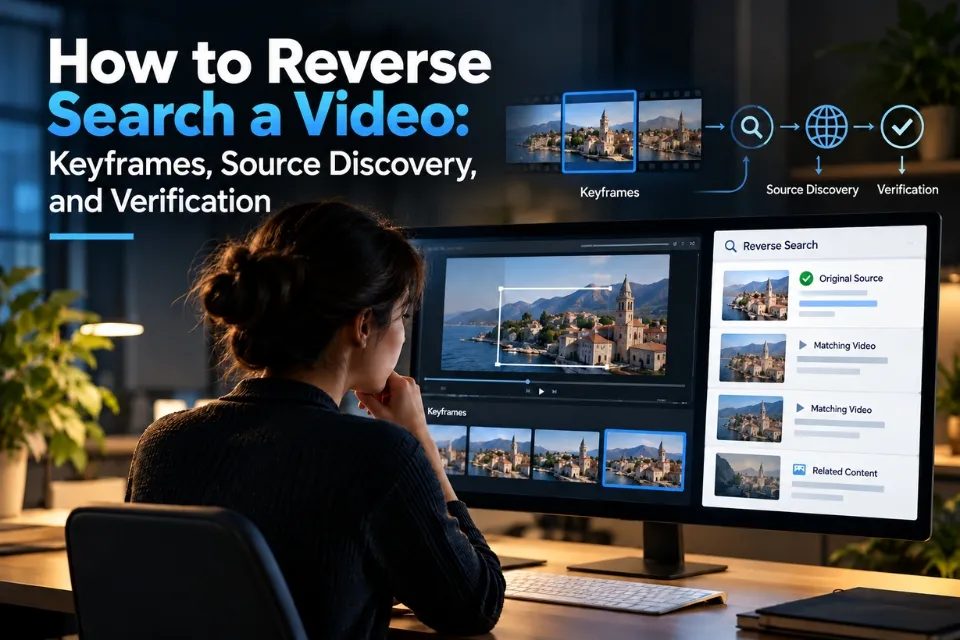
Reverse video search helps researchers find earlier appearances of footage, identify possible original sources, and check whether a video has been shared with misleading information. The most practical method is to extract distinctive frames from a video, search those images using visual search engines, and compare the results with independent evidence.
Unlike a conventional text search, reverse video searching begins with visual material. A researcher may have only a short clip from TikTok, Facebook, YouTube, Instagram, or a messaging app, with no reliable information about who filmed it or where it originated.
The process can reveal earlier uploads, longer versions, related news reports, and clues about the recording’s location or date. However, it has an important limitation: a visual match is not proof of original ownership, authenticity, or filming location.
This guide explains how to reverse search a video using keyframes, Google Lens, Bing Visual Search, and specialist verification tools. It also examines real investigations and shows how to move from finding a match to reaching an evidence-based conclusion.
Quick Answer
Capture several distinctive frames, search them with Google Lens and another visual search engine, then compare earlier uploads, source details, dates, and landmarks. A visual match is a lead, not proof of origin or authenticity.
What Is Reverse Video Search?
Reverse video search is a method of finding information about a video by searching with visual material taken from the footage rather than relying only on words.
In practice, researchers usually select screenshots or representative frames and submit them to an image search engine. The search engine compares those images with material it has indexed and returns potentially related pages or images.
The results may help identify:
- Earlier appearances of the same footage.
- Longer or higher-quality copies of a video.
- Websites and social media accounts that published it.
- Locations, objects, or events visible in the recording.
- Possible original publishers or creators.
- Evidence that a video has been reused with a false description.
Reverse search and video verification are related, but they are not identical.
Reverse search is primarily a discovery method. Verification involves evaluating the evidence found through that search and determining which claims it actually supports.
For example, finding the same clip in a news report published five years earlier can demonstrate that the footage is not new. It does not necessarily establish who operated the camera or whether every detail in the older report is accurate.
How Does Reverse Video Search Work?
Most accessible reverse video search workflows rely on still images extracted from footage. These images act as visual search queries.
Preserve the source video and its surrounding claim, then extract representative stills. Visual search engines compare those stills with indexed images and pages. Compare promising matches, then independently verify the source, date, location, and context before drawing a conclusion.
Understanding Keyframes
A video consists of a sequence of images displayed rapidly to create movement. For investigation purposes, researchers select frames that contain details likely to distinguish one video from another.
Technically, a keyframe in video compression is an independently encoded frame used for decoding. In verification tools, the term is also commonly used for representative still images selected from a clip.
These are not necessarily the same thing. A manually captured screenshot may be just as useful for reverse searching as an automatically extracted representative frame.
A good search frame might show a recognizable building, street sign, vehicle, uniform, logo, or unusual combination of objects. A frame containing only a blue sky or a person’s blurred movement is less likely to produce a useful match.
Researchers should search several frames because different parts of the same video can produce different results. AFP’s documented verification workflow demonstrates why this matters: some frames generated little useful information, while another led to a relevant article and an earlier video publication.
How to Reverse Search a Video: Step-by-Step
The following workflow can be completed with a desktop browser, although the basic screenshot method also works on smartphones.
Step 1: Preserve the Video and Its Original Context
Before searching, record where the video was found. AOFIRS’s Forensic Investigator’s Playbook for online video and digital evidence provides a complementary framework for preserving material and recording its investigative history.
Save the original URL, account name, visible caption, publication date, and any claims made about the footage. If appropriate and permitted, preserve a copy of the video or capture screenshots of its surrounding post.
This information matters because videos frequently lose context when downloaded and reposted. A clip might retain its visual content while losing its caption, location, description, or attribution.
Avoid editing the original file. Work with a separate copy when extracting frames or examining footage.
Step 2: Extract Several Distinctive Frames
Play the video and pause at moments containing identifiable details.
For a short video, choose approximately three to six useful frames. A longer recording may require more, particularly when it contains several different scenes.
On Windows, use Snipping Tool or Windows + Shift + S to capture a selected area. On macOS, use Shift + Command + 4. Smartphone users can capture frames with their device’s screenshot function.
When selecting frames, look for details such as shop signs, road markings, recognizable structures, distinctive clothing, or text shown on screen.
Example of useful visual evidence
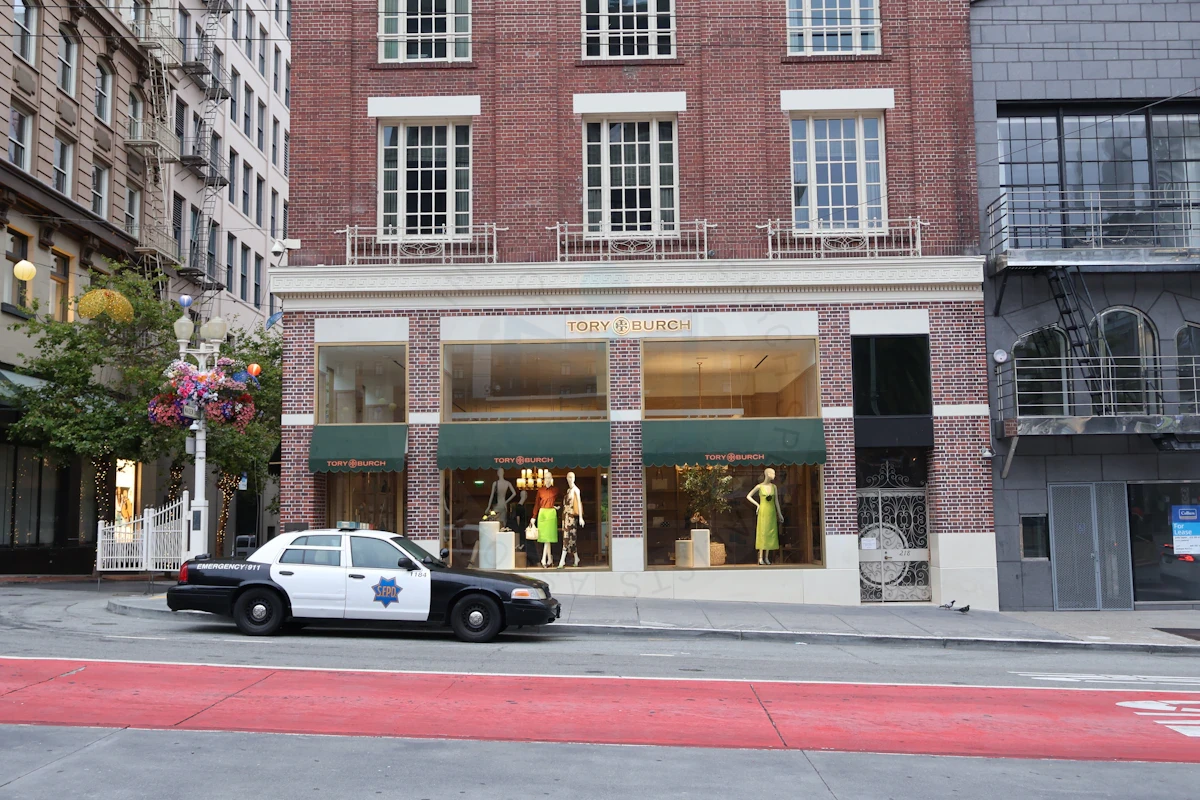
Illustrative photograph, not a frame from a verified investigation. Photo by Prakhar Singh on Unsplash.
Wide frames reveal the setting, road layout, and surrounding buildings.
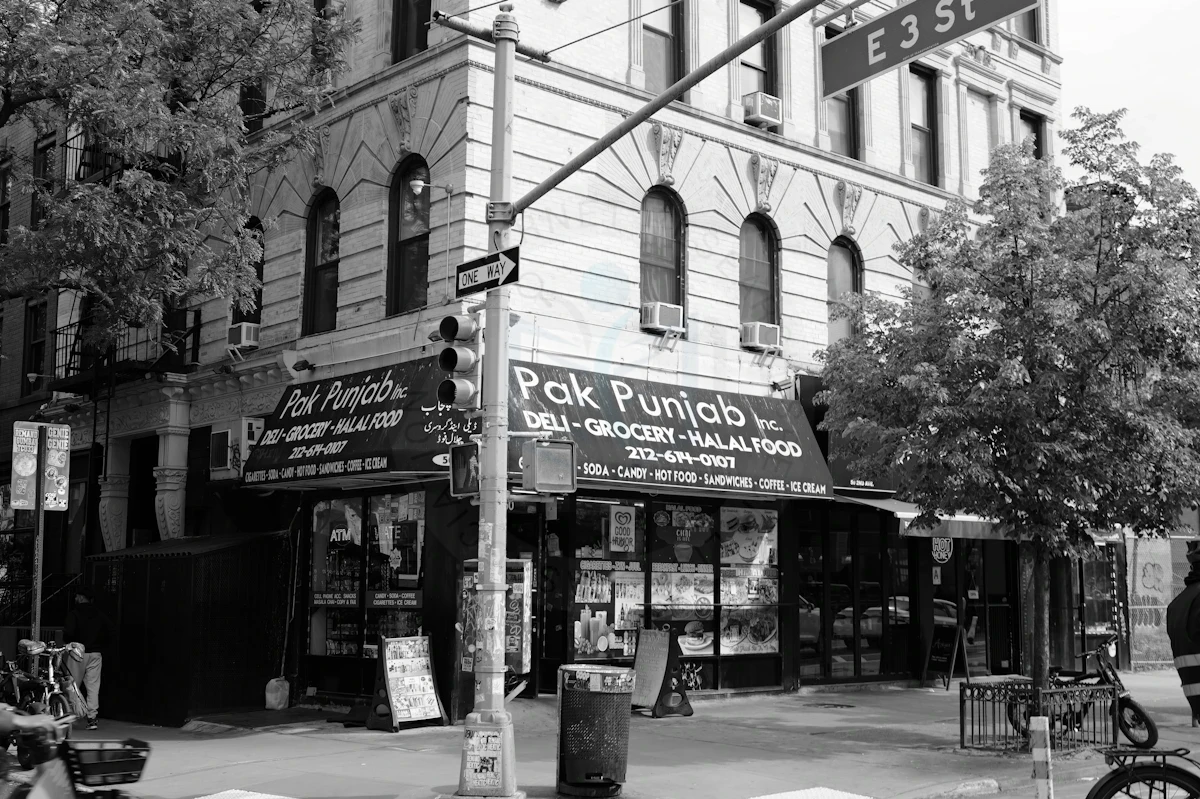
Illustrative photograph, not a frame from a verified investigation. Photo by Sal Media on Unsplash.
Closer frames can help identify distinctive text and landmarks.
Illustrative photographs, not frames from a verified investigation.
Do not automatically crop out all surrounding details. Sometimes the background contains the strongest evidence.
Step 3: Search the Frames Using Google Lens
Google Lens allows users to search the web using an image. According to Google’s image search guidance, results can include similar images and websites containing the same or related visual material.
To investigate a video frame:
- Open Google or Google Images.
- Select the image search option.
- Upload one of the screenshots.
- Examine visually matching images and linked pages.
- Open promising results and inspect their dates, captions, and source information.
- Repeat the search with different frames.
A useful result might show the same street scene in an older news article. Another result could identify a landmark without containing the original video.
Both are valuable leads, but they support different conclusions.
Google Lens should not be described as a universal tool that accepts any video and identifies its original recording. Its standard workflow is image-based.
Step 4: Search Additional Visual Search Engines
If Google returns no useful match, search the same frame elsewhere.
Bing Visual Search provides image-based searches that may return pages containing a matching image, related pictures, or information about objects in the scene. Microsoft’s official documentation describes options for uploading an image or searching with an image URL.
Other options include TinEye and Yandex Images.
Using several engines increases the number of sources examined, although it does not guarantee that the original footage will be found.
Step 5: Compare Matching Results
A match should be investigated rather than immediately accepted.
Open the matching page and compare the footage with the video being examined. Check whether the scene, people, objects, and sequence of events are genuinely the same.
Look for earlier publication dates, longer versions, different captions, and additional context.
Ask whether the page is presenting original reporting or simply repeating material published elsewhere.
Step 6: Verify the Evidence
Once promising matches have been found, investigate the source, date, location, and authenticity separately.
Compare the findings with independent reporting, original publisher statements, identifiable landmarks, and other available records.
A sound conclusion should distinguish what has been established from what remains uncertain.
For example, finding an identical clip in a 2019 article may disprove a claim that the footage was first recorded in 2026. It may still leave the original photographer unidentified.
Best Tools for Reverse Video Search in 2026
No single tool reliably finds every copy or the true origin of every online video. Each tool searches a different collection of indexed material or performs a different investigative function.
| Tool | Main purpose | Best use | Important limitation |
|---|---|---|---|
| Google Lens | Visual image search | Finding matching scenes and objects | A match does not prove video origin |
| Bing Visual Search | Image-based discovery | Searching frames across web pages | Coverage depends on indexing |
| TinEye | Image matching | Finding indexed copies of frames | First-found date is not capture date |
| Yandex Images | Alternative visual search | Additional matching images | Availability and coverage vary |
| InVID-WeVerify | Keyframe extraction and verification | Investigating social media videos | Supported links and features vary |
| FFmpeg | Local video processing | Extracting frames from saved footage | Requires technical familiarity |
For beginners, Google Lens and Bing Visual Search are useful starting points. Researchers examining numerous videos may benefit from InVID-WeVerify and locally extracted frames.
Using InVID-WeVerify for Video Investigation
The InVID-WeVerify verification plugin provides tools designed to support investigations into online video and images. Its documented capabilities include video fragmentation, representative frame extraction, reverse image searches, and metadata inspection.
A typical workflow is:
- Install the verification extension from a trusted source.
- Open its keyframe extraction feature.
- Submit a supported public video URL or local file.
- Review the representative frames produced.
- Select frames containing useful visual clues.
- Perform reverse image searches on those frames.
- Compare results and record the relevant evidence.
Some online videos cannot be processed because of privacy settings, platform restrictions, unavailable links, or compatibility issues. When this happens, manually capturing frames from footage you can lawfully access is a practical alternative.
The plugin does not independently prove whether a video is authentic. It helps researchers collect leads that must be evaluated.
Using TinEye to Find Earlier Image Appearances
TinEye is useful when an investigator wants to identify webpages where matching still images have been indexed.
A researcher can upload a frame, review matching results, and examine the dates associated with those matches.
However, TinEye makes an important distinction in its official explanation of first-found dates: the date indicates when TinEye’s crawler first encountered an image, not when the image was originally created or published.
A frame indexed in 2020 could have been recorded in 2015. An image discovered yesterday could also have circulated privately for years.
Use first-found dates to establish a minimum documented history, not unquestionable proof of origin.
Real Examples of Reverse Video Search and Verification
The following examples come from documented investigations by established verification organizations. They demonstrate how different types of evidence can expose misleading video claims.
Example 1: A Viral Aldi Shopping Video Misrepresented During COVID-19
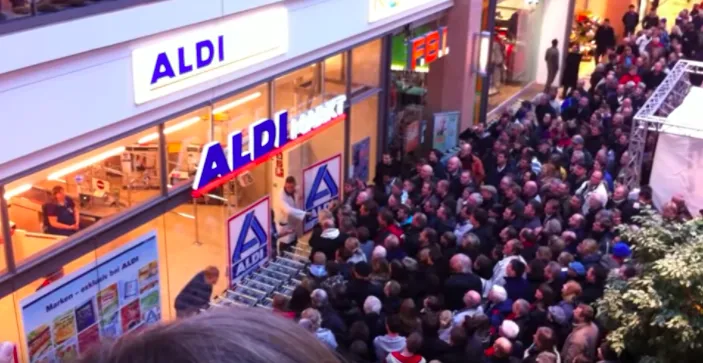
The circulating Aldi video examined in Bellingcat’s documented investigation. The investigation traced it to footage predating the pandemic. Screenshot credit: Bellingcat.
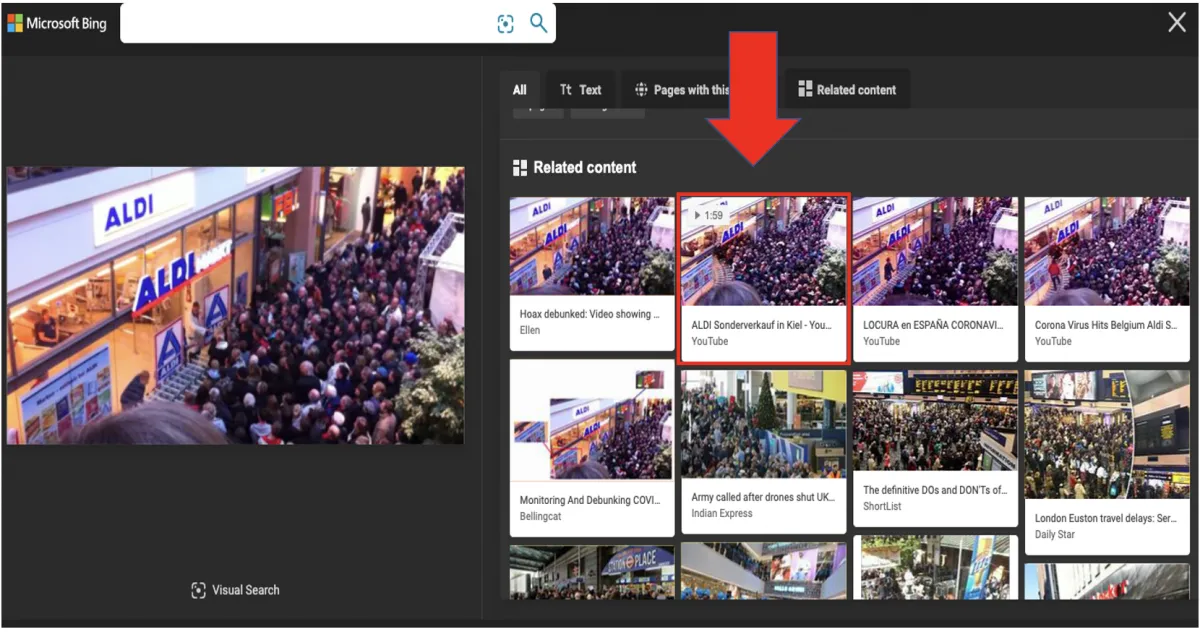
Historical Bing results reproduced in Bellingcat’s documented investigation show how a video frame led to earlier copies. Search interfaces and results can change. Screenshot credit: Bellingcat.
During the early COVID-19 pandemic, a video circulated on TikTok claiming to show people panic-buying outside an Aldi supermarket in Haarlem, the Netherlands.
Investigators at Bellingcat examined whether the footage supported that claim.
How the investigation worked
A frame was captured from the circulating video and submitted to Bing’s visual search.
The search led to a video titled ALDI Sonderverkauf in Kiel, referring to an Aldi special sale in Kiel, Germany. The corresponding YouTube upload dated from 2011, years before the pandemic.
Investigators also examined a visible F.B.I sign associated with a German hairdressing chain. That detail provided an additional location clue.
What the evidence established
The video’s earlier appearance in 2011 contradicted the claim that it documented pandemic-related panic buying. The location evidence also conflicted with the alleged Dutch setting.
The lesson is that a successful reverse search may reveal an older upload, but researchers should still corroborate its location and context.
The complete investigation is described in Bellingcat’s guide to social media verification.
Example 2: Finding the Context of a Nigerian Cyclist’s Video

Frame from AJ+’s November 21, 2016 video, the earlier publication identified in AFP’s keyframe-search tutorial. Frame credit: AJ+.
In a documented example, AFP investigated a video showing a man cycling through traffic while balancing a football on his head.
The initial video file did not provide enough information to establish the person’s identity or explain the activity.
How the investigation worked
AFP processed the recording using InVID-WeVerify and generated representative frames.
Some frames returned unhelpful results. Another led to an English-language football article containing a video published by AJ+.
That report provided more context about the cyclist and the sporting challenge.
The rider was identified as Harrison Chinedu, a Nigerian amateur footballer who attempted to cycle approximately 104 kilometers while balancing a football on his head.
The related AJ+ publication dated from November 21, 2016.
What the evidence established
Keyframe searches helped identify the subject, connect the footage to earlier reporting, and recover context missing from the unidentified clip.
The process did not, by itself, establish who operated the camera or owned the original recording.
AFP documents the example in How to find the source of a video.
Example 3: A Shipping Container Video Falsely Linked to the Ever Given
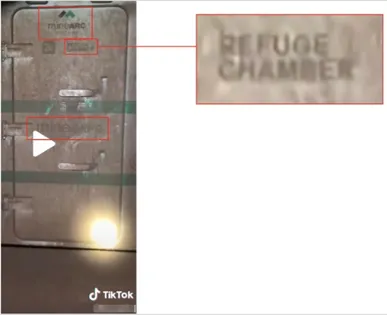
Visible markings helped identify a mining refuge chamber in Bellingcat’s documented investigation, contradicting the claim linking the footage to the Ever Given. Screenshot credit: Bellingcat.
In March 2021, the container ship Ever Given blocked the Suez Canal. During the incident, a video circulated with claims suggesting that a container shown in the recording was associated with child trafficking aboard the ship.
Bellingcat investigated the footage by examining its visible details and tracing the account associated with the video.
How the investigation worked
The video contained a TikTok username, which offered a starting point for locating the associated profile.
Investigators found that the account regularly published content involving mining equipment.
They also noticed the words MineARC, mineSAFE, and refuge chamber on the equipment visible in the footage.
Searches for those terms led to information about mining refuge chambers, which provide emergency shelter for workers underground.
Comparing the visible equipment with manufacturer information showed that the object was consistent with a mining safety chamber.
What the evidence established
The investigation found no evidence connecting the recording to child trafficking or to the Ever Given. The footage instead showed equipment associated with the mining industry.
This example illustrates why reverse video investigation should extend beyond visual matching. Sometimes the most useful evidence is a product label, username, or piece of text visible within a frame.
Source: Bellingcat’s investigation and verification methodology.
How to Find the Original Source of a Video
Locating an earlier copy is usually easier than proving who created the original recording.
A video may have passed through several accounts, websites, and messaging services before being discovered by a researcher.
To investigate the original source, distinguish four questions:
- Who published the copy being examined? The answer may be visible in the current post.
- Where is the earliest documented appearance? Search results, archives, and publication records may provide a lead.
- Who created the recording? Attribution may require creator statements, original files, or other supporting evidence.
- Where and when was it filmed? Publication information alone may not establish the recording’s location or date.
Trace the Publication History
Begin with the earliest credible result found through reverse searching. Examine the associated webpage, username, publication date, and any attribution.
Then search for the video title, creator name, distinctive captions, and visible text.
If a clip contains a watermark, locate the account associated with it. Compare that account’s publishing history with other known copies.
A watermark may provide useful attribution evidence, but it can also be added to a repost or manipulated.
Search engines can help identify earlier appearances, while archived pages may preserve material that has since changed or disappeared.
Look for the Full-Length Recording
Short social media clips may omit important events before or after the visible action.
If a 15-second video appears to show a confrontation, an uninterrupted recording could reveal what happened immediately beforehand.
Search for longer versions using distinctive dialogue, descriptions of the scene, event names, or related reporting.
Where a full recording is available, compare the short clip with the corresponding segment. Check whether it has been cropped, reordered, dubbed, or selectively edited.
Finding a longer version does not guarantee that it is unaltered. Its provenance must also be considered.
How to Reverse Search Videos on Social Media
Social media investigations combine image search, platform search, and source examination. For a claim-by-claim process that checks the account, content, location, and time separately, see AOFIRS’s social media content verification workflow.
YouTube
YouTube provides searchable titles, descriptions, channel names, and video content, but searching an arbitrary video through Google Lens requires first capturing a frame.
Extract a screenshot, search it with visual search engines, then use any discovered names or phrases to search YouTube directly.
Compare upload dates, channel histories, descriptions, and longer versions. Remember that an earlier YouTube upload might itself be a repost.
TikTok and Instagram Reels
Short-form videos often circulate with modified captions, music, cropping, or additional overlays.
Capture distinctive frames, then search any visible usernames, captions, hashtags, and locations.
For TikTok, look for traces of the posting account and possible earlier videos using the same imagery. On Instagram, examine public Reels, account history, and visible attribution.
Do not assume that an account displaying a watermark created the footage. When a watermark or handle provides a lead, use the methods in AOFIRS’s username investigation guide to examine public account connections, then corroborate the identity rather than assuming that matching handles establish ownership.
Facebook and X
Search public posts using distinctive keywords, event descriptions, visible usernames, and phrases from the video.
If a video appears in multiple posts, compare the accompanying claims and publication histories.
Search availability may be limited by privacy settings, deleted content, account restrictions, and platform indexing.
Reddit and Messaging Apps
Reddit discussions can provide contextual leads, including links to older publications or alternative explanations. Those comments must be verified independently.
Messaging-app videos may have lost most of their original publication context. In these cases, visual clues, recognizable audio, and image searches are especially important.
Do not upload private or sensitive recordings to third-party search services without considering privacy, consent, and applicable law.
Why Reverse Video Search Sometimes Fails
Reverse video search is useful, but its effectiveness depends on what is publicly available, what search engines have indexed, and how closely the searched frame resembles existing material.
A failed search is not evidence that footage is original, authentic, or AI-generated.
1. The Video Has Not Been Indexed
Search engines cannot reliably return footage that is unavailable to their crawlers. Private posts, restricted social media content, encrypted messages, and recently uploaded videos may be absent from results.
Even public videos may not have matching frames indexed as searchable images.
2. The Footage Has Been Modified
Videos can be cropped, mirrored, resized, color-adjusted, or overlaid with text. These changes may affect visual matching.
A video might also contain different camera angles or edits that make it difficult to match individual frames.
When direct searches fail, try another frame, search a distinctive object, or use visible text as a conventional keyword query.
3. The Frames Are Too Generic
A screenshot of an empty road, cloudy sky, or ordinary office may return many unrelated results.
Choose visually distinctive details instead of relying on arbitrary frames.
4. Search Results Have Incomplete Dates
Search engines may display crawl dates, page modification dates, or publication information that does not correspond to the video’s original recording.
TinEye’s first-found date, for example, identifies when its crawler found an image, not when that image was created.
5. Search Engines Return Similar but Unrelated Material
Computer vision can identify similar objects, backgrounds, and compositions without confirming that two images depict the same event.
A search for a crowded supermarket might retrieve hundreds of unrelated shopping scenes.
Researchers must visually compare the results and investigate their surrounding context.
How to Verify a Video’s Date, Location, and Authenticity
Reverse searching should be followed by a structured verification process that examines separate questions.
Verify the Recording Date
A video’s upload date establishes when a particular copy appeared on a platform. It does not necessarily establish when the underlying footage was recorded.
To investigate timing, compare earlier publications, visible weather conditions, event records, seasonal details, and contemporaneous reporting.
Where available, inspect file metadata. However, timestamps can reflect exporting, editing, or transferring a file rather than the original capture.
Verify the Filming Location
Look for identifiable landmarks, road signs, storefronts, architecture, street layouts, and geographic features.
Compare them with independent mapping imagery or other documented photographs.
A sign or recognizable building may establish a strong location lead, while a collection of consistent landmarks can support a more confident conclusion.
Verify the Video’s Context
A recording may be genuine while the accompanying explanation is false.
The Aldi investigation discussed earlier demonstrates this distinction. The footage was not necessarily fabricated, but the claim associating it with COVID-19 panic buying in the Netherlands contradicted the documented earlier appearance and location.
Researchers should check what happened before and after the recorded scene, who published the claim, and whether independent evidence supports it.
Assess the Strength of the Evidence
| Finding | What it supports | What it does not prove |
|---|---|---|
| Matching frame | Related visual material exists | Original creator |
| Earlier upload | Footage appeared by that date | Original filming date |
| Recognizable landmark | Possible location | Exact recording time |
| Original-looking video file | Potential technical evidence | Automatic authenticity |
| Creator attribution | Possible source identity | Ownership without corroboration |
| Verified content credentials | Certain signed provenance information | Truth of the depicted event |
A professional investigation should report the strongest supported conclusion without converting uncertainty into certainty. This separation of source history, technical signals, and contextual claims is developed further in AOFIRS’s guide to AI video verification and deepfake investigation.
Can Reverse Video Search Detect AI-Generated Videos?
Reverse video search can contribute to investigating synthetic or manipulated footage, but it is not a reliable standalone deepfake detector.
An AI-generated recording might have no earlier online appearance. A genuine video that has never been publicly indexed could produce the same result.
Likewise, a manipulated video may contain real footage that appears in older publications.
An investigator should distinguish three possibilities:
Authentic footage with misleading context: The video records a real event but is described inaccurately.
Manipulated footage: Existing material has been modified, combined, or edited in a way that changes its meaning.
Synthetic footage: Some or all of the visible content has been generated artificially.
Reverse searching is particularly useful for the first two categories because it may reveal source material or earlier versions.
Use AI Detection Tools Carefully
Automated detection tools may analyze visual irregularities, temporal consistency, or other characteristics of media. Their outputs should be treated as indicators rather than conclusive judgments.
Video compression, editing, lighting, and low-resolution footage can complicate interpretation.
A more reliable investigation combines source tracing, visual analysis, provenance information, and independent corroboration. AOFIRS’s research report on verifying authentic videos and investigating manipulated footage expands this process to metadata checks, frame searches, and documented evidence.
What About C2PA and Content Credentials?
The Coalition for Content Provenance and Authenticity (C2PA) develops technical specifications for recording verifiable information about digital content and its history.
Where Content Credentials are available, they may provide information about how a file was created or modified.
However, provenance records can be incomplete or lost during certain editing and sharing processes. The C2PA technical explanation explicitly distinguishes provenance information from proof that depicted content is factually true.
A video can have valid provenance information and still present a staged event or misleading narrative. Conversely, the absence of credentials does not prove that a recording is fake.
Advanced Keyframe Extraction With FFmpeg
For researchers processing longer videos, FFmpeg provides a method of extracting frames locally.
The following command extracts one image every five seconds from a video:
ffmpeg -i input.mp4 -vf "fps=1/5" frame_%04d.pngThis command creates sequential image files, which can be reviewed and searched individually.
For an individual screenshot at a particular time, such as 15 seconds into a recording, the following command can be used:
ffmpeg -ss 00:00:15 -i input.mp4 -frames:v 1 frame.pngThese commands extract still images rather than necessarily selecting the most visually informative frames. Researchers still need to inspect the output and choose useful images.
For longer investigations, keeping extracted images in a clearly labeled folder helps preserve the relationship between each frame and its source video.
A Practical Video Verification Checklist
- Preserve the original video URL and accompanying claim
- Capture several distinctive frames
- Search frames using at least two visual search engines
- Investigate earlier copies and longer versions
- Check visible text, usernames, logos, and landmarks
- Compare recording dates with publication dates
- Corroborate location and event context independently
- Record supporting evidence, limitations, and uncertainty
Frequently Asked Questions About Reverse Video Search
1. Can you reverse search an entire video?
Some specialist tools can process video files or supported URLs to extract representative frames. Most common visual search methods rely on searching individual frames rather than submitting an entire video for universal matching.
2. How do I reverse video search on Google?
Capture a distinctive frame from the video and upload the image to Google Lens. Examine the results for matching scenes, earlier appearances, and relevant source pages.
3. What is the best free reverse video search method?
A useful starting point is to capture screenshots and search them using Google Lens and Bing Visual Search. InVID-WeVerify can help extract frames and organize more detailed investigations.
4. Can I reverse search a TikTok video?
Yes, you can capture frames from a TikTok video and search them using visual search engines. You should also investigate watermarks, usernames, captions, and possible earlier uploads.
5. Can reverse video search find the original creator?
It may identify accounts or publications associated with earlier versions. Establishing the actual creator normally requires additional attribution evidence.
6. Can reverse video search detect deepfakes?
Reverse searching may identify real source material that has been manipulated or reused. It cannot independently determine whether an unfamiliar video is AI-generated.
7. Why do reverse video searches return no results?
The footage may not be indexed, or the selected frames may lack distinctive visual details. Cropping, overlays, access restrictions, and other modifications can also affect matches.
8. Does finding an older video prove the new upload is fake?
An earlier matching upload can disprove a claim that the footage was newly recorded after that earlier publication. It does not automatically mean the recording itself was fabricated or that every accompanying claim is false.
Conclusion
Reverse video search is an important technique for investigating online footage, discovering earlier appearances, and challenging misleading claims. By extracting informative keyframes, searching across multiple platforms, and examining the context of matching results, researchers can uncover evidence that ordinary keyword searches might miss.
The most reliable approach combines visual discovery with structured verification. A matching frame provides a starting point, not a final answer. Establishing the source, timing, location, and meaning of a video requires careful comparison, independent evidence, and a clear understanding of what each investigative method can and cannot prove.