Have you ever found yourself waiting for a download to finish or stuck in a meeting that could have been an email? We’ve all been there. Luckily, Google has a treasure trove of hidden games and Easter eggs nestled within its services. These games are perfect for killing time, giving your brain a quick, fun break, and, most importantly, they’re entirely free!
Some of these classic hidden games may have evolved since their original launch, but they remain as engaging and fun as ever. Here’s an updated guide to the 7 best secret Google games and how you can play them in 2026.
Games Hidden in Google Search
By simply typing a search query into Google, you can uncover these three hidden games. These games appear directly in your browser or through special playable pages, making them easy to access without downloads.
1. Atari Breakout – A Retro Arcade Classic
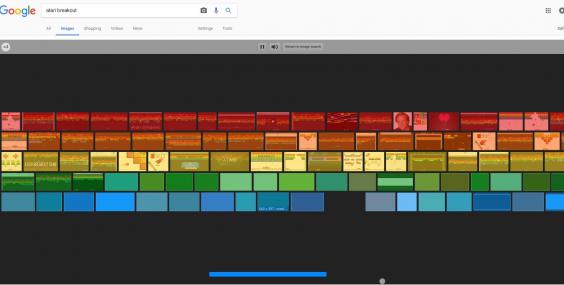
Atari Breakout is a throwback to the golden era of arcade gaming. The classic trick of searching for it in Google Images may no longer work, but the game is still available and provides a satisfying break for any retro game lover. The goal is simple: move your paddle and bounce the ball to smash through all the blocks on the screen. Can you clear the board and achieve a high score?
Find it here: Search for “Atari Breakout game” on Google or play via mirrored versions online.
🔗 Visit Game
2. Pac-Man – The Legendary Maze Game
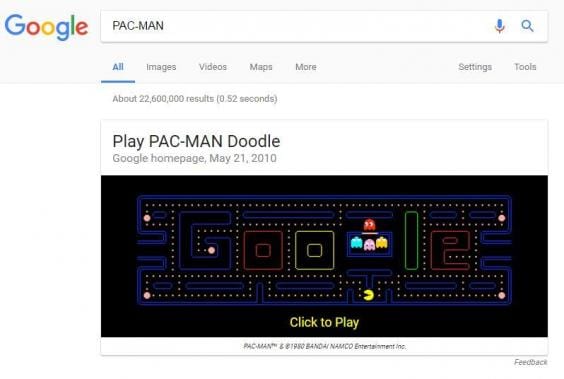
Who doesn’t love Pac-Man? In 2026, you can still enjoy the classic arcade game on Google, which originally celebrated Pac-Man’s 30th anniversary. Just search for “Pac-Man” and jump right into the game to navigate the maze, eat Pac-dots, and avoid Blinky, Pinky, Inky, and Clyde.
Find it here: Search “Pac-Man” on Google and click the playable game panel.
3. Zerg Rush – A Battle to Defend Your Search Results

Inspired by Starcraft’s Zerg, this fast-paced game lets you defend your Google search page from an onslaught of “o”s. They come to destroy your links, and your job is to eliminate them before they overwhelm your screen. The game is simple but surprisingly intense.
Find it here: Search Zeg Rush on Google and click the playable game panel.
🔗 Visit Game
Games Hidden on Android Devices
Google also includes hidden games within Chrome and Android devices. These games work offline or through system settings.
4. T-Rex Game (Chrome Dino Runner) – The Ultimate Offline Game

The T-Rex game is the ultimate offline savior when your internet connection goes down. When you see the “Unable to connect to the Internet” screen in Google Chrome, simply press the spacebar or tap the screen on mobile to start the game. The goal is to help the lonely T-Rex run, jump over cacti, and duck under pterodactyls.
Find it here: Disconnect your internet and open Chrome
🔗 Visit Game: Type chrome://dino into your address bar.
5. Android’s Easter Egg Game – Unlock a Hidden Android Game

Each new Android OS version hides a unique Easter egg game. While the classic “Flappy Droid” game has been replaced, the tradition continues.
Find it here: Go to Settings → About Phone → Tap Android Version repeatedly, then long-press to launch the hidden feature.
🔗 Visit Game: Navigate to the “About Phone” section in your Android device’s settings.
Games Hidden in Google Maps and Earth
Google Earth and Maps offer more immersive experiences, combining gaming with exploration.
6. Geo-Games on Google Earth – Geography Meets Fun

Google Earth’s “Voyager” section offers a variety of educational and fun games, such as identifying landmarks from satellite images, taking quizzes on animal sounds, and even playing “Where on Google Earth is Carmen Sandiego?” It’s a fun and educational way to explore the planet and expand your geographical knowledge.
Find it here: Open Google Earth, click the Voyager (ship wheel icon), and select “Games.”
7. Google Earth Flight Simulator – Take to the Skies

In Google Earth Pro (desktop version), you can access a built-in flight simulator. Fly a jet or a propeller plane and soar over any city, mountain range, or landmark in the world. It’s a peaceful and relaxing experience, offering stunning views from a new perspective.
Find it here: Download Google Earth Pro for desktop, then go to the “Tools” menu and select “Enter Flight Simulator.”
🔗 Visit Game
If you’re looking for unique, underground, or browser-based experiences beyond the mainstream, explore Secret Games On The Internet for more hidden gems and curiosities.
How Google Games Have Evolved with AI Integration in 2026
Google games have changed significantly in 2026. They no longer rely only on simple code-based mechanics. Instead, they now reflect broader changes in AI-powered search and interactive design. Google integrates machine learning and generative AI to improve how users engage with content. These improvements make games smarter, faster, and more personalized.
Key AI-driven changes include:
- Adaptive difficulty based on user behavior
- Personalized suggestions inside search results
- Visual recognition through tools like Google Lens
- Context-aware gameplay tied to user intent
This evolution shows how Google transforms search into an interactive experience rather than a static tool. For more on how AI affects digital interactions, check out AI and the New Rules of Influence.
Browser Compatibility and System Requirements for 2026
Modern Google games depend on updated browsers and web technologies. While most games run smoothly, using the right setup improves performance. You can play these games easily if your system meets the basic requirements.
Recommended browsers:
- Google Chrome (latest version)
- Microsoft Edge (Chromium-based)
- Mozilla Firefox (updated)
- Safari (latest iOS/macOS versions)
System requirements include:
- Enabled JavaScript
- Stable internet connection (except offline Dino game)
- Updated device OS (Android 10+, iOS 15+)
- Basic GPU/browser rendering support
Using outdated browsers may limit performance or disable certain features.
Mobile vs. Desktop: Platform-Specific Gaming Features
Google designs its hidden games differently for mobile and desktop users. Each platform offers a unique experience. On mobile devices, games feel quick and touch-friendly. On desktops, they provide more control and immersion.
Mobile features include:
- Tap and swipe controls
- Faster access through search apps
- Integration with voice and camera tools
- Optimized for short sessions
Desktop features include:
- Keyboard controls for precision
- Larger display for better visibility
- Access to advanced tools like a flight simulator
- Improved rendering and smoother gameplay
Google follows a mobile-first approach, but desktop still delivers a richer experience.
Safety & Accessibility: Ad-Free Play and Privacy Notes
One major advantage of Google hidden games is their safety. Unlike many free gaming websites, these games run inside Google’s secure ecosystem. They do not require downloads or risky permissions.
Safety benefits include:
- No malware or harmful files
- No hidden subscriptions
- No forced downloads
- Safe browsing within Google environment
Google also maintains strong privacy standards.
Privacy considerations:
- Minimal data collection
- No third-party trackers in most cases
- Activity used only to improve user experience
Accessibility also plays an important role in design.
Accessibility features include:
- Simple and intuitive controls
- Fast loading on low-end devices
- Clean interface with minimal distractions
- Compatibility with assistive tools
Adopting this mindset reflects the modern digital standard where user-centric design, ethical development, and platform transparency are non-negotiable. To safeguard your experience, it’s equally vital to stay aware of the dangers posed by Fake Games on iOS & Android.
Why Google Hidden Games Still Matter in 2026
Google hidden games are more than just entertainment. They represent how digital platforms evolve.
They combine multiple elements into one experience:
- Search functionality
- AI integration
- Interactive engagement
- Educational value
These games show how technology moves toward smarter and more engaging user experiences. To explore more secret games hidden across the internet, check out our list of secret games you’ve never heard of, and remember, always be mindful of the games you play.
Conclusion: Hassle-Free Gaming in One Click
Google’s commitment to innovation is clear in how these games have adapted to meet the needs of today’s digital audience. From educational opportunities in Geo-Games to immersive experiences in Google Earth’s Flight Simulator, there’s something for everyone. Whether you’re stuck in a meeting or simply bored, these hidden Google games offer the perfect escape. From classic arcade games like Pac-Man and Breakout to educational tools in Google Earth, these games make it easy to pass the time and have some fun. These games now seamlessly blend AI integration, personalized interactions, and adaptive gameplay, offering a richer and smarter experience than ever before.