
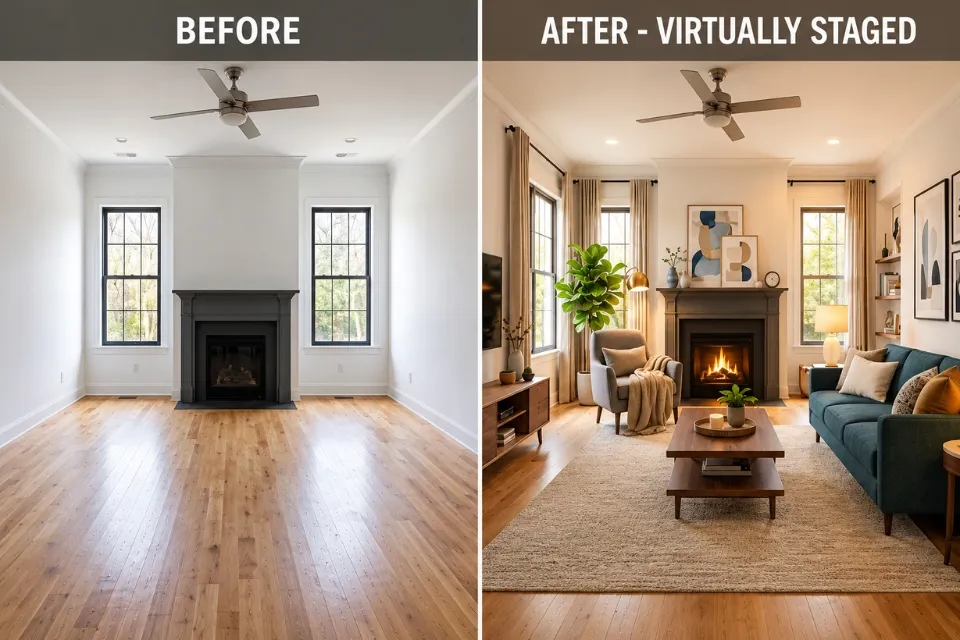
Anyone who has redecorated a room knows the moment. The sofa looked perfect in the product photo, then it arrived and swallowed half the living room. Or the paint chip that seemed warm and inviting turned out faintly gray once it covered four walls in afternoon light. Small misjudgments like these are how a weekend refresh turns into returns, repainting, and a budget that quietly doubles.
Most of these mistakes share a root cause: we commit before we have enough evidence. That makes it a research problem as much as a design problem. Professional online researchers face the same challenge every day. They start with a question, sort through sources that may or may not be reliable, and need a confident answer before anyone acts on it.
Virtual staging gives homeowners, renters, and property professionals a way to gather that evidence visually. Instead of relying only on imagination, you can use artificial intelligence to turn a photo of your room into a concept with different furniture, layouts, and decorative details. HomeDesignsAI makes this accessible to people without design training, whether they’re refreshing a bedroom, furnishing an empty apartment, or preparing a property for sale. This guide covers how the feature works and, just as importantly, how a researcher’s habits help the images you generate lead to better real-world decisions.
Virtually Stage a Room Free: How to Preview New Furniture and Decor Before Making Changes
The hardest part of interior design is knowing whether an idea will work in your space, not someone else’s. Inspiration photos point you in a direction, but they were shot in rooms with different proportions, ceiling heights, and light. They can’t tell you how a particular arrangement will look in your home.
Free virtual room staging closes part of that gap. Depending on the tool and its free usage limits, you can upload a room photo, choose a style, and generate a redesigned version of the space without spending anything on furniture or a designer’s time.
Picture a living room with a tired sofa, bare walls, and almost no decoration. You might first try a contemporary look: a neutral sofa, warm wood furniture, a couple of simple framed prints. Then you try something bolder, with a patterned rug, two accent chairs, and layered lamps. Seeing both versions side by side does something a mood board can’t. You quickly notice which elements you’re drawn to, and you spot the pieces that look great on their own but clash once they share a room.
Virtual staging is especially handy when you want to:
- Test furniture and decor combinations. See how sofas, tables, rugs, curtains, and accessories might work together before you start shopping.
- Explore different styles. Compare minimalist, Scandinavian, industrial, traditional, or contemporary interiors without moving a single chair.
- Plan an empty space. Visualize how an unfurnished apartment or spare bedroom could look once the essential furniture and finishing touches are in place.
Before relying on any “free” offer, do what a careful researcher would do and go to the primary source. That means the platform’s own pricing page and terms of service, not a third-party review written a year ago. Free tiers change often. Check how many generations you get, whether downloads are watermarked or reduced in resolution, and, if you plan to use the images commercially in a property listing, what the terms say about usage rights.
AI Image Room: Visualizing Interior Design Ideas With Realistic Room Images
Design decisions get easier when you can look at a concept instead of holding it in your head. An AI image room tool bridges that gap by producing a visual interpretation of your ideas, usually starting from a photo of the existing room.
That starting point matters because the same furniture or color scheme behaves differently in different rooms. A large sectional suits an open-plan living area but can make a narrow room feel cramped. Deep charcoal walls make a sunny bedroom feel cozy and a dim north-facing one feel like a cave.
With HomeDesignsAI, you can try several interior directions and use the results as references for a makeover. Test warm wood finishes, swap traditional decor for cleaner modern lines, or bring in brighter colors to give a room more energy.
Explore HomeDesignsAI’s virtual staging feature to see how the platform supports this kind of visual experimentation.
Your room photo is your source material, and the output can only be as good as the input. Shoot in natural daylight when you can, capture as much of the room as possible, and keep the camera level so walls and floor lines don’t distort. A clean, straight image gives the tool a far better starting point.
Your prompt works a lot like a search query. Online researchers learn early that vague queries return vague results, and the same holds here. “Beautiful living room” leaves the AI guessing. “Compact modern living room with light oak furniture, a deep green accent chair, and warm evening lighting” gives it specific terms to work with, and gives you a result you can actually evaluate.
Then treat what comes back as a claim to verify, not a fact. AI-generated images are interpretations, not architectural renderings. Computer vision researchers at the University of Illinois Urbana-Champaign showed this clearly in a paper presented at CVPR 2024 (Sarkar et al., “Shadows Don’t Lie and Lines Can’t Bend! Generative Models don’t know Projective Geometry…for now”). They found that images from current generators get perspective lines and shadows wrong so consistently that classifiers looking only at geometry could tell them apart from real photographs. In a staged room, that might show up as a window that has shifted, a rug that’s subtly the wrong shape for the floor, or a sofa whose proportions wouldn’t survive a tape measure. Use the image to judge the look, then measure your room before making practical decisions.
Room Generator AI: Exploring Different Layouts, Styles, and Decor Options
A room generator AI tool earns its keep when you have several ideas and can’t settle on one. Rather than spending an evening collecting inspiration screenshots, you generate a handful of concepts for your own room and compare them directly.
Take a small bedroom. You could try a pared-back minimalist layout, a soft natural palette with linen and rattan, or a moodier version with dark walls and contrasting textiles. Each serves the same purpose, a place to sleep, yet each feels completely different.
This is where a researcher’s discipline pays off. If you change the furniture, wall color, flooring, and lighting all at once, you can’t tell which change made the room better. It’s the same reason a sound experiment changes one variable at a time. Pick a direction, adjust one element per round, and compare.
A simple process keeps things organized:
- Start with the room’s purpose. Decide whether you want a calm bedroom, a practical home office, or a social living space. Purpose drives furniture choices and layout.
- Fix your style and palette first. Choose two or three main colors and a general direction before generating anything. Consistent starting points make comparisons meaningful.
- Keep a simple research log. Save each image with the prompt you used and a one-line note on what changed. It takes seconds, and it stops you from losing the version you liked best three rounds ago.
- Refine the strongest concept. Once one image stands out, adjust details such as lighting, finishes, or accents rather than starting over each time.
Keep in mind that a pleasing picture is not a working floor plan. A generated image might put a desk in front of a door or run a sofa straight across a walkway. Check circulation space, furniture dimensions, outlet positions, and storage needs before you apply anything.
AI Generated Interior Design Free: How to Experiment With Interior Makeovers
You don’t need a renovation budget to start exploring. AI generated interior design free tools let you test changes to a room’s appearance before deciding which improvements deserve real money.
That’s particularly useful for renters, first-time buyers, and anyone tired of a familiar room but unwilling to replace everything. Quite often a new palette, better lighting, and a few well-chosen accessories do more than a new sofa ever would.
Start by naming the problem. Is the room too dark? Missing a focal point? Full of furniture that doesn’t belong together? A clear problem statement gives your experiments a purpose, the same way a well-defined research question keeps an investigation from sprawling.
Next, explore changes that fit your budget: lighter curtains, a different rug, wall art, or a new arrangement of furniture you already own. For bigger investments such as kitchen cabinets or flooring, generate several options before requesting quotes, so you go into those conversations knowing what you want.
Then comes the real research task: turning an AI image into things you can actually buy. Generated furniture often doesn’t exist, and AI can happily combine materials that are hard to source. A few online research techniques make the jump easier:
- Search by image. Crop the piece you like and run it through a visual search tool such as Google Lens, Bing Visual Search, or TinEye to find real products with a similar shape and finish.
- Use search operators. Adding site: followed by a retailer’s domain, plus an exact phrase in quotation marks such as “oak sideboard” and the width you need, narrows results to one store and one size. It’s far faster than scrolling category pages.
- Go to the manufacturer’s specification sheet. Retail listings sometimes round or misstate dimensions. The spec sheet is the primary source, so check measurements, materials, and assembly requirements there.
- Read laterally on reviews. Rather than trusting the reviews on the product page, open new tabs and see what independent sources say about the brand. Stanford researchers Sam Wineburg and Sarah McGrew found that professional fact-checkers work this way, leaving a site quickly to check it against others, and they reached more accurate conclusions in less time than readers who stayed on the page (Teachers College Record, 2019).
Free tools also come with practical limits on image quality and edits. Save the results you like so you can compare them later or share them with family members or a contractor.
Virtual Staging for Property Listings: Research the Rules Before You Publish
For real estate professionals, staging is a marketing tool with evidence behind it. In the National Association of Realtors’ 2025 Profile of Home Staging, 83% of buyers’ agents said staging made it easier for buyers to visualize a property as their future home. Virtual staging brings some of that effect to vacant listings without the cost of renting and moving furniture.
It also carries disclosure obligations, and those are tightening. California’s AB 723 added Section 10140.8 to the state’s Business and Professions Code, effective January 1, 2026. It requires agents to label listing images that have been digitally altered in a way that materially changes how the property looks, and to give consumers access to the original, unaltered image. Virtual staging falls within that definition. Routine edits such as brightness, color correction, and cropping do not. Many MLS systems also set their own photo rules.
The research habit here is straightforward. Before publishing a staged image, check the current rules at the primary sources, meaning your state’s real estate regulator, your MLS, and your brokerage, rather than relying on a blog summary. Keep the original photo alongside every staged version so you can supply it on request. Requirements vary by location, and none of this is legal advice, so confirm the specifics for your market.
AI Tools for Interior Design: How HomeDesignsAI Makes Virtual Staging Easier
The main advantage of AI tools for interior design is access. You don’t need rendering software or design training to explore styles, and you can produce several concepts in the time it would take to sketch one by hand.
HomeDesignsAI brings that into a straightforward digital workflow. Homeowners can use it to plan a makeover, real estate professionals to prepare listing images, and designers to show a client an early concept before investing hours in detailed drawings.
It helps communication, too. If you’re working with an interior designer, one generated image of your own room says more about your taste than a folder of unrelated screenshots. It gives you both a shared reference point for colors, materials, and atmosphere.
To get the most from it, treat virtual staging as a series of small, documented decisions rather than a hunt for one perfect image. And keep its limits in view. No AI tool replaces a tape measure, professional judgment, or knowledge of building requirements. Before you buy or build, run through a short checklist:
- Measure first. Compare your room’s dimensions with those of every piece on your shortlist.
- Confirm the products exist. Use visual search and manufacturer specifications to match the AI’s ideas to real, available items.
- Re-read the terms. Check the platform’s current terms if the images will be used commercially.
- Disclose and keep originals. Label virtually staged listing photos and store the unaltered images.
Virtual staging makes interior design less intimidating because it lets you experiment before you commit. Pair HomeDesignsAI with a few habits borrowed from good online research (a clear question, specific queries, primary sources, and a willingness to verify), and a vague decorating idea becomes a plan you can trust for your home.
Recent Post
Nothing Found



