
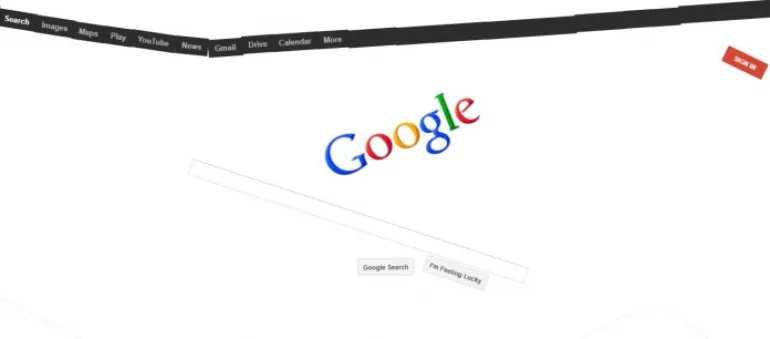
Almost everyone uses Google every day — whether for searching, studying, or exploring. It’s hard to imagine life without it. But if you’ve ever found the Google homepage a little too plain, you’ll be happy to know there’s a playful side to it too.
In 2025, Google Magic Tricks (also known as Google Easter Eggs) are still alive — fun, creative, and interactive ways to make your Google experience more entertaining. While Google is now powered by AI search (Gemini) and interactive experiences, these hidden features let you play, learn, and laugh with the world’s favorite search engine.
Here are the Top 6 Funny Google Tricks (2025 Edition) that you can still enjoy today. Whether you want to see Google float, fall, or spin — these tricks will brighten your browsing experience.
1. Google Gravity (Classic Falling Homepage Trick)
Google Gravity remains one of the most popular Google Magic tricks — letting you watch every element of the homepage fall apart like it’s obeying real-world physics.
How to Try Google Gravity in 2025:
- Visit: Google.com
- Type “Google Gravity” in the search bar.
- Click “I’m Feeling Lucky.”
- Watch as your Google homepage collapses, and move each element freely with your mouse.
2025 Update:
If the classic version doesn’t load, visit “Google Gravity – Mr. Doob” (a modern version hosted on mrdoob.com). It’s compatible with the latest Chrome and Edge browsers.
2. Google Anti Gravity (Floating Homepage Trick)
Imagine your Google homepage floating like it’s in space — that’s Google Anti Gravity. All the buttons and text boxes start drifting around as if gravity no longer exists.
How to Try Google Anti Gravity in 2025:
- Go to Google.com
- Type “Google Anti Gravity.”
- Click “I’m Feeling Lucky.”
- Watch as everything begins to float — move them around with your mouse!
Fun Tip:
If you’re using Google Gemini, try saying:
“Hey Google, activate Anti Gravity mode.”
It will show a fun animation before redirecting to the Easter egg version (on select devices).
3. Google Zero Gravity (The Upside-Down Google)
Google Zero Gravity is another hilarious trick where the entire homepage flips upside down — as though your screen is in a mirror world.
How to Try Google Zero Gravity in 2025:
- Visit Google.com
- Type “Google Zero Gravity.”
- Click “I’m Feeling Lucky.”
- You’ll see an inverted version of the homepage, and everything starts to drop just like in Google Gravity.
Pro Tip:
If you want the mirrored effect instantly, search “Google Mirror elgooG” — a project maintained by elgooG.fun, which hosts interactive Google Easter eggs preserved from earlier versions.
4. Google Underwater (Swim with the Google Logo)
Google Underwater makes your homepage float on water — complete with moving waves and bubbles. It’s an immersive visual experience you can interact with using your mouse.
How to Try Google Underwater in 2025:
- Go to Google.com
- Type “Google Underwater.”
- Click “I’m Feeling Lucky.”
- Watch Google’s logo, buttons, and links float underwater — move your mouse to make waves.
2025 Update:
This trick works best on desktop browsers. For mobile users, elgooG.fun/underwater has a responsive version that simulates water physics using modern WebGL.
5. Google Sphere (Spinning Homepage Trick)
If you want to make your homepage look like a rotating planet, try Google Sphere. Every element — from the logo to buttons — revolves around the center like a solar system.
How to Try Google Sphere in 2025:
- Visit Google.com
- Type “Google Sphere.”
- Click “I’m Feeling Lucky.”
- Move your mouse to make the elements spin around in a 3D sphere effect.
💡 New for 2025:
The Google Sphere 3D version has been rebuilt using JavaScript and WebGL, making it compatible with modern browsers. Try it at elgooG.fun/google-sphere for a smoother experience.
6. Google “Do a Barrel Roll” (The Spinning Search Trick)
One of the most iconic Google Easter eggs ever — “Do a Barrel Roll” — makes your entire browser window spin a full 360 degrees. It’s fast, surprising, and endlessly entertaining.
How to Try “Do a Barrel Roll” in 2025:
- Go to Google.com
- Type “do a barrel roll.”
- Press Enter (you don’t even need to click “I’m Feeling Lucky”).
- Watch as your screen flips and spins around in a smooth animation.
Pro Tip:
You can also type “do a barrel roll 20 times” or “do a barrel roll 100 times” to see extended spins. Google’s AI Gemini Assistant also triggers a voice-based animation if you say:
“Hey Google, do a barrel roll!”
Bonus: More Fun Google Tricks to Try in 2025
Here are a few more Easter eggs and AI interactions Google fans love this year:
- Ask Google “blink HTML” — and watch the words “blink” and “HTML” start flashing.
- Type “Askew” — and see your screen tilt slightly.
- Search “Pac-Man” — to play the original 1980s arcade game on Google.
- Search “Thanos Snap” — click the glove and watch your results vanish.
- Try “Google Space” — and make everything float around in zero gravity.
Why These Google Tricks Still Matter in 2025
These Easter eggs remind us that even in an era of AI-driven search, voice assistants, and smart interfaces, Google hasn’t lost its sense of fun and creativity. They show the lighter side of technology — blending coding, design, and imagination.
Whether you’re a student learning search skills, a developer exploring creative interfaces, or just someone who loves digital surprises — these tricks are a fun break from routine.
Conclusion
Google isn’t just about answers — it’s about experiences.
From falling homepages to spinning searches, Google’s Magic Tricks continue to entertain users across generations.
So next time you’re bored or curious, take a few minutes to try these Top 6 Google Tricks in 2025 — and bring back the magic to your daily searches!





