
Boolean searches allow you to show the relationships that exist between different concepts; you can state which ideas should be grouped together, include alternative terms, and exclude meanings that you do not want.
That doesn’t make a source reliable or ensure full coverage; instead, it provides you with a more thoughtful method of finding information and a search strategy which you can explain, evaluate, and improve.
What Is Boolean Search?
| Operator | Purpose | Illustrative example |
|---|---|---|
| AND | Require different concepts together | telework AND productivity |
| OR | Include alternatives | telework OR telecommuting |
| NOT | Exclude a concept where supported | telework NOT recruitment |
Understanding AND, OR, and NOT
AND Adds Requirements
telework AND productivity
OR Accounts for Different Wording
telework OR telecommuting OR "remote work"
It enables other descriptions of the way the arrangement works.
NOT Can Remove Useful Evidence
telework NOT pandemic
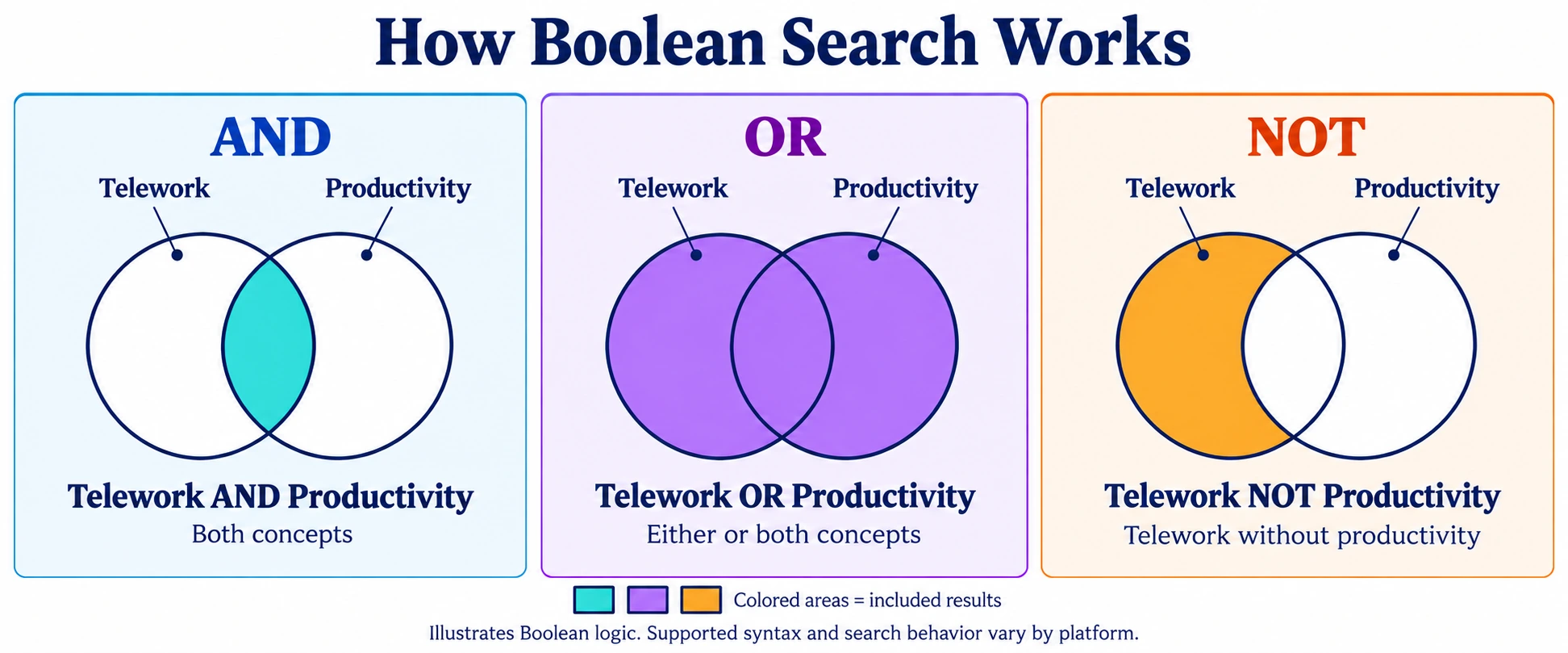
Caption: AND selects the overlap, OR selects either or both concepts, and NOT excludes the second concept. Supported syntax and search behavior vary by platform.
Grouping, Phrases, and Operator Order
On platforms supporting parentheses, group alternatives before connecting them to another concept:
(telework OR telecommuting) AND productivity
Quotation marks can help search for a particular phrase:
"remote work"
But precise wording can reduce coverage. Searching only that phrase may miss sources using “working remotely.”
Operator order also varies. Bing documents a precedence hierarchy, while PubMed processes Boolean combinations left to right unless parentheses establish groups. Explicit grouping helps make your intent clear. Bing search documentation, PubMed search documentation
Build a Search Around the Research Question
Consider:
What evidence explains how remote working arrangements affect productivity?
1. Separate the Concepts
Identify the working arrangement and the outcome. Do not turn every word in the question into a required search term.
2. Create a Term Map
| Concept | Candidate terms | Caution |
|---|---|---|
| Working arrangement | remote work, telework, telecommuting | Terminology may vary by period and discipline |
| Outcome | productivity, performance | Performance is broader than productivity |
| Population | employees, workers, staff | Making this mandatory may exclude relevant records |
3. Draft a Platform-Appropriate Query
For a database supporting the syntax:
(telework OR telecommuting OR "remote work") AND productivity
Keep the first version manageable.
4. Inspect the Sources
Review more than the result count. Read a sample of records and open useful sources.
Ask:
- Do these sources address the question?
- Which terms appear in relevant documents?
- Are expected sources missing?
- Is a restriction excluding useful material?
5. Refine One Element at a Time
Changing one condition makes it easier to understand its effect.
Record your decisions. A search strategy should explain how you reached the evidence, not simply preserve a complicated string.
Worked Example: Improving a Research Query
The following example illustrates query design on a database supporting AND, OR, and parentheses. It does not report observed search results.
Start with a Simple Query
"remote work" AND productivity
This connects the working arrangement with the outcome. However, it depends on sources using the phrase “remote work.”
Include Alternative Terminology
("remote work" OR telework OR telecommuting) AND productivity
The revised query includes alternative descriptions without requiring every expression to appear.
| Change | Reason | What to check |
|---|---|---|
| Add telework and telecommuting | Accommodates different terminology | Whether the terms fit the question |
| Connect alternatives with OR | Allows any of the descriptions | Whether broader coverage introduces irrelevant material |
| Group alternatives with parentheses | Keeps the concept together | Whether the platform supports this syntax |
| Keep productivity as a separate requirement | Maintains the outcome focus | Whether useful sources use different outcome terminology |
Review Before Broadening Further
You might consider adding performance:
("remote work" OR telework OR telecommuting) AND (productivity OR performance)
But performance is not the same as productivity. It may refer to quality, individual assessments, or organizational outcomes.
Add it only if your scope includes those meanings. More results are not automatically better results.
Document the Actual Test
When you run the query, record the platform, date, fields, filters, and what you observed.
Compare a manageable sample of sources from each version. Explain which relevant sources became easier to find and which irrelevant categories appeared. Do not infer improvement from result counts alone.
Adapt the Search to the Platform
Google Search
Use documented controls rather than assuming Google executes a database query literally.
Examples:
site:ilo.org "remote work"
"remote work" -jobs
"remote work" after:2025-01-01
Google documents phrase searching, site restrictions, exclusions, and date controls. Do not insert spaces after commands: use site:ilo.org, not site: ilo.org.
Check dates on the underlying documents rather than relying solely on search filtering. Google Search Help
Bing
Bing explicitly documents Boolean operators and grouping:
(telework OR telecommuting) AND productivity
Its documentation also states that it uses only the first ten terms to retrieve results. Avoid copying lengthy database strategies into Bing without simplifying them. Microsoft’s advanced search options
Academic Databases
Research databases may provide field searching, subject headings, proximity searches, and truncation.
These are not universal commands. Learn the database’s syntax before using them.
For example, PubMed supports title/abstract tags and lets you inspect Search Details to understand query translation. Restricting fields changes what the search can retrieve. PubMed Help
Recruitment and Monitoring Tools
Check the documentation for the exact product, subscription, and search field.
A platform’s keyword box may behave differently from its title filter. Operator limits and supported features may also differ.
Copyable Search Examples
These examples are starting points, not guarantees of relevant or trustworthy results.
| Platform | Query | Purpose and limitation |
|---|---|---|
site:ilo.org "remote work" |
Focuses discovery on one organization’s site; excludes material elsewhere | |
"remote work" -jobs |
Excludes jobs; may also exclude relevant sources mentioning employment | |
"remote work" after:2025-01-01 |
Applies a date restriction; verify dates in the documents | |
| Bing | (telework OR telecommuting) AND productivity |
Connects alternative terms with an outcome; inspect relevance |
| PubMed | (telework[tiab] OR telecommuting[tiab]) AND stress[tiab] |
Searches title/abstract fields for working arrangements and stress |
The PubMed example addresses stress rather than productivity. Changing the outcome changes the research scope—not merely the syntax.
Advanced Techniques: Use Them for a Reason
Field Searching
A title search can reduce incidental matches. But useful material may discuss your concept without naming it in the title.
Compare a field-restricted search with a broader version before relying on it.
Truncation and Wildcards
Some databases allow a symbol to retrieve word endings or spelling variations.
Check the supported symbol, minimum word length, and expansion limits. A short stem can capture many unrelated words.
Do not assume an asterisk works identically in web search and research databases.
Proximity Searching
Proximity searching looks for terms near each other rather than anywhere in a record.
It can help when the relationship between terms matters, but the commands and distance rules vary. Use documented database syntax—not a generic list of interchangeable NEAR, WITHIN, or AROUND commands.
Subject Headings
Controlled vocabulary can complement keywords in databases that support it.
Use both deliberately: keywords capture authors’ wording, while subject headings reflect the database’s indexing system. Neither guarantees complete coverage alone.
Balance Precision and Coverage
A focused search produces fewer irrelevant matches. A broad search may uncover relevant terminology and unexpected evidence.
The right balance depends on the task.
For a quick factual check, a narrow search may be sufficient. For a literature review, broader discovery and careful screening are often necessary.
One useful check is to identify a known relevant source. If your strategy misses it, investigate why. This is a diagnostic check—not proof that the search is comprehensive.
Use AI to Assist, Not Replace, Search Judgment
AI can help draft synonym lists or explain a query. Ask it to separate close synonyms from broader concepts and identify assumptions.
A useful prompt is:
Help develop a search strategy for this question: [question]. Separate the essential concepts, suggest terminology, and explain broader terms that could change the scope. Draft a query for [named platform]. Flag syntax that requires checking against official documentation.
Then review and run the query yourself.
Do not assume Boolean words in a conversational prompt become strict retrieval controls. Unless the tool documents that behavior, they may simply be interpreted as instructions.
A practical combined workflow is:
- Define the question and source requirements.
- Construct and run platform-specific searches.
- Select and read relevant sources.
- Use AI to organize or summarize selected material.
- Check important statements against the original evidence.
- Record unresolved uncertainty.
Summarization and verification are separate tasks.
Before and After: Fixing a Query
Suppose you are researching whether teleworking arrangements relate to productivity.
Before
telework AND telecommuting AND productivity
This requires both descriptions of the arrangement. A useful source using only one term could be excluded.
After
(telework OR telecommuting) AND productivity
This allows either description while retaining the productivity requirement.
The improvement is logical, not a claim about measured search performance. Whether it produces better evidence depends on the platform, collection, and sources retrieved.
Troubleshooting Your Search
| Problem | Possible explanation | Next step |
|---|---|---|
| Too few relevant matches | Excessive restrictions | Remove one condition and compare |
| Too many unrelated matches | Ambiguous or broad alternatives | Refine the term map |
| Missing expected material | Terminology or collection gaps | Search another source collection |
| Unexpected behavior | Unsupported syntax | Check platform documentation |
| Sources disagree | Different dates, definitions, or methods | Compare the evidence directly |
A technically valid query cannot compensate for a poorly defined question or inaccessible sources.
Keep a Research Trail
Record the platform, search date, exact query, filters, and reasons for changes.
For important sources, preserve identifiers and notes explaining their relevance. Record which claims were verified and which remain uncertain.
Documentation makes the process reviewable. It does not guarantee identical future results from a changing web index.
Research Log Template
Copy this template into a spreadsheet or research notebook. Use one entry for each meaningful search version.
| Field | What to record |
|---|---|
| Research question | The question the search should help answer |
| Platform or collection | Search engine, database, or tool used |
| Search date | When the query was run |
| Exact query | Copy the query without altering its syntax |
| Fields and filters | Date, language, document type, or field restrictions |
| Sources reviewed | Identifiers or URLs and brief relevance notes |
| Problems observed | Missing sources, ambiguous terms, or irrelevant categories |
| Query revision | What changed and why |
| Verification notes | Claims checked against underlying evidence |
| Remaining limitations | Coverage gaps and unresolved uncertainty |
Avoid storing unnecessary personal or sensitive information in the log.
Final Search-Quality Checklist
Before relying on your findings, ask:
- Question: Does the query reflect what I intended to investigate?
- Terminology: Have I considered relevant synonyms, abbreviations, and spelling variations?
- Syntax: Does the platform support the commands I used?
- Restrictions: Could phrases, exclusions, fields, or filters hide useful sources?
- Coverage: Should I search another collection, language, or source type?
- Evidence: Have I read the underlying documents rather than relying on snippets or AI summaries?
- Interpretation: Have I distinguished what the evidence supports from what remains uncertain?
- Documentation: Could another researcher understand my decisions?
A completed checklist does not prove that a search is exhaustive. It makes the process more transparent and its limitations easier to identify.
How Can CIRS Certification Improve Your Online Research Skills?
Learning Boolean operators is one part of becoming a capable researcher. The next step is knowing how to select sources, evaluate evidence, document decisions, and use AI responsibly.
AOFIRS’s Certified Internet Research Specialist (CIRS) program provides structured study in online search strategies, research methodologies, source evaluation, AI-assisted research, data analysis, and internet law and ethics.
Practical Example: From Search Query to Research Finding
Suppose you are investigating how remote working arrangements affect productivity. On a platform supporting this syntax, you might begin with:
("remote work" OR telework OR telecommuting) AND productivity
Building the query is only the discovery stage. A structured research approach then involves:
- Refining the search: Review terminology and adapt the query to each platform.
- Evaluating sources: Examine authorship, publication dates, methods, and supporting evidence.
- Comparing findings: Identify differences in populations, definitions, and study conditions.
- Using AI carefully: Check summaries against the original documents.
- Documenting conclusions: Record the search process, evidence, limitations, and unresolved questions.
This illustrative workflow connects Boolean searching with the broader competencies covered by CIRS. Certification does not replace ongoing practice or guarantee that every finding is accurate.
For further study, explore the AOFIRS Online Search and Research Book alongside the program’s current syllabus and learning materials.
Frequently Asked Questions
Is Boolean search still useful with AI?
Yes. It helps structure searches on systems that support it. AI can assist query development, but source evaluation remains necessary.
Does Boolean search find only reliable information?
No. Matching a query does not establish accuracy, authority, or authenticity.
Can I use the same query everywhere?
No. Adapt operators, grouping, fields, and filters to each platform.
Should every query include NOT?
No. Exclusions are optional and can hide relevant evidence.
What is the difference between Boolean search and advanced search?
Boolean search expresses logical relationships between terms. Advanced search may also include fields, dates, languages, document types, and other controls.
Conclusion
Mastering Boolean search means making thoughtful choices—not collecting the largest number of operators.
Define the question, choose meaningful alternatives, adapt the syntax, and learn from the results. Use AI where it helps, but keep discovery, interpretation, and verification distinct.
The goal is a search process that leads to useful evidence and makes its limitations visible.